December 12, 2019 NHTSA CAMPAIGN NUMBER: 19V886000
Rearview Image Can Remain on Radio Display
The lingering rearview image can distract the driver, increasing the risk of a crash.
NHTSA Campaign Number: 19V886
Manufacturer Chrysler (FCA US LLC)
Components EQUIPMENT, BACK OVER PREVENTION
Potential Number of Units Affected 20,441
Summary
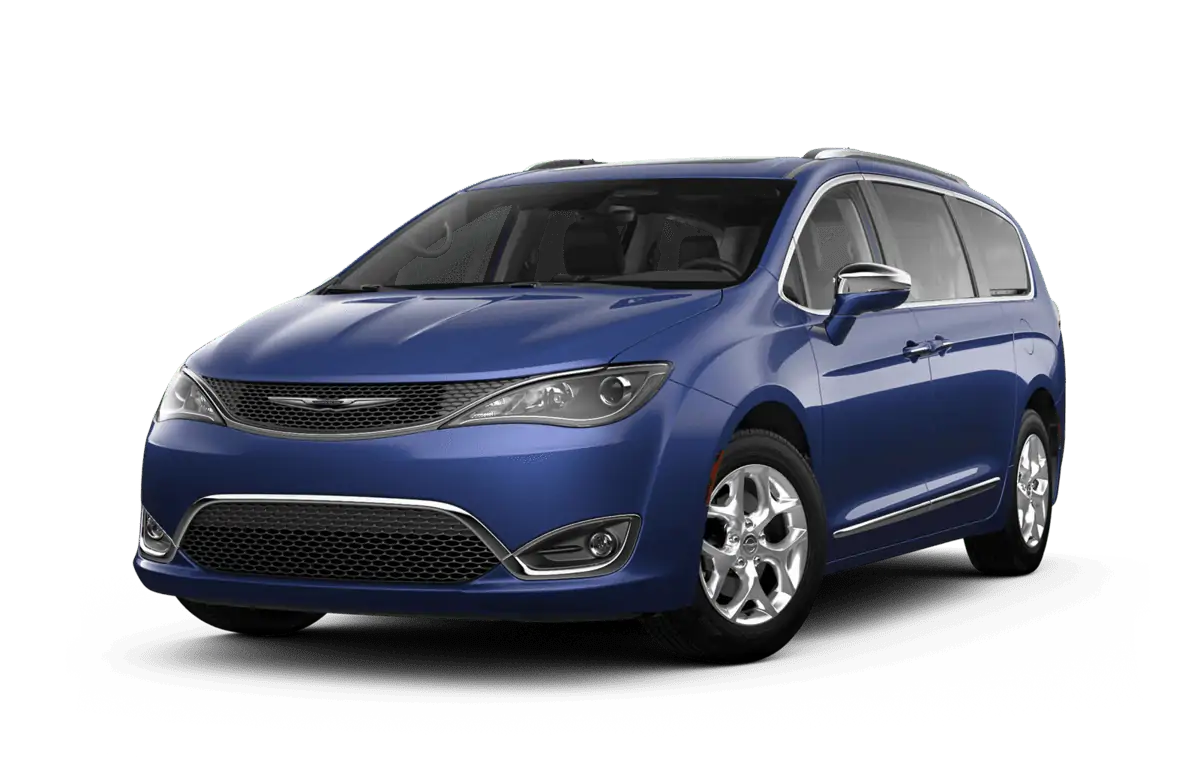
Chrysler (FCA US LLC) is recalling certain 2018-2019 Pacifica vehicles equipped with an 8.4 inch radio display, 360 degree surround view camera system, and seat back video screens. A software error can cause the rearview camera image to remain displayed on the radio after the vehicle has been shifted out of reverse. As such, these vehicles fail to comply with the requirements of Federal Motor Vehicle Safety Standard (FMVSS) number 111, “Rearview Mirrors.”
Remedy
Chrysler will notify owners, and dealers will update the radio software, free of charge. The recall began January 9, 2020. Owners may contact Chrysler customer service at 1-800-853-1403. Chrysler’s number for this recall is VE2.
Notes
Owners may also contact the National Highway Traffic Safety Administration Vehicle Safety Hotline at 1-888-327-4236 (TTY 1-800-424-9153), or go to www.safercar.gov.
Check if your Vehicle has a Recall
Revised February 2020
Dealer Service Instructions for:
Safety Recall VE2 / NHTSA 19V-886 Rear View Camera
NOTE: Revised Step 2 for easier access to dealer mode. Updated Note to clarify USB usage. Revised step 10 and Figure 4 to show new file structure based on updated software. Revised LOP numbers to reflect updated software.
Effective immediately all repairs on involved vehicles are to be performed according to this recall. Service Bulletin 08-116-19 is no longer applicable for vehicles involved in this recall. Those vehicles that have already had this repair performed, as determined by our warranty records, have been excluded from this recall.
Remedy Available
| 2018-2019 | (RU) | Chrysler Pacifica |
NOTE: This recall applies only to the above vehicles equipped with an Uconnect 4C Nav with 8.4” Display Radio (Sales Code UAV), 360 Surround View Camera System (Sales Code XAK) and Seatback Video Screens (Sales Code RHH).
NOTE: Some vehicles above may have been identified as not involved in this recall and therefore have been excluded from this recall.
IMPORTANT: Some of the involved vehicles may be in dealer new vehicle inventory. Federal law requires you to complete this recall service on these vehicles before retail delivery. Dealers should also consider this requirement to apply to used vehicle inventory and should perform this recall on vehicles in for service. Involved vehicles can be determined by using the VIP inquiry process.
Subject
The Rear View Camera image on about 20,400 of the above vehicles may linger until a drive cycle ends. If the rearview image is displayed after the backing event has ended, a driver may be distracted by the image which can cause a vehicle crash without prior warning.
The condition above fails to conform to the requirements of Federal Motor Vehicle Safety Standard (FMVSS) No. 111, “Rear Visibility”.
Repair
The radio software requires an update.
Alternate Transportation
Dealers should attempt to minimize customer inconvenience by placing the owner in a loaner vehicle if inspection determines that a radio software update is required and the vehicle must be held overnight.
Parts Information
No parts are required to perform this service procedure.
Special Tools
The following special tool is required to perform this repair:
| ➢ NPN | 16GB USB Flash Drive |
Service Procedure
- Open the hood. Install a battery charger and verify that the charging rate provides 13.0 to 13.5 volts. Do not allow the charger to time out during the radio update process. Set the battery charger timer (if so equipped) to continuous charge.
NOTE: Use an accurate stand-alone voltmeter. The battery charger volt meter may not be sufficiently accurate. If voltage reading is too high, apply an electrical load by activating the park or headlamps and/or HVAC blower motor to lower the voltage.
- Verify the radio software version. Radio must be in Dealer Mode to verify. To put the radio in Dealer Mode, follow these steps:
- Push and hold the Front Defrost, Driver Temperature Up and Temperature Down buttons simultaneously until the Dealer Mode screen appears (approximately seven seconds). Release buttons.
- Select System Information, then Radio Part Information. The software level will be listed next to Application Version (Figure 1).
- Is the radio software level (Application Version) at or higher than 28.4?
- If YES, the radio software is already up to date. Return the vehicle to the customer.
- If NO, proceed with the Repair Procedure.
- Has a 16GB USB flash drive been created? Ø If YES, proceed to Step 12.
- If NO, proceed to Step 5.
- Go to DealerCONNECT, Service, Uconnect Command Center, Uconnect, More Information, Dealer Software Downloads to download the files.
- If a security message appears “Do you want to view only the web page content that was delivered securely?” (Figure 2), press “No” to continue.
NOTE: If the software cannot be downloaded, make sure you have proper security access. If not, have the Service Manager or Shop Foreman download the software update.
- Use a blank USB flash drive with at least 16GB of space. Follow the on-screen instructions to download the software files.
- Download the software update file to your local PC’s desktop. Make sure to select the “MAC” radio button for all downloads, regardless of the computer being used (Figure 3).
- Be sure to download the file to your designated folder before extracting the zip file to the blank USB flash drive.
NOTE: A blank USB flash drive will be needed for each radio update version; additional updates cannot be on the same USB flash drive. Once created it is recommended to label the USB flash drive with the recall number and proper radio Sales Codes.
- Extract the compressed folder to the desktop. Open the folder and drag and drop the VP4R_Update files to the USB flash drive. The flash drive should look like (Figure 4).
- Once the file is extracted to the USB flash drive, it is recommended to label the USB flash drive with the recall number and proper radio Sales Codes.
- Start the vehicle and insert the correct USB flash drive with new software into the USB port.
CAUTION: Make sure no other device is plugged into any of the USB ports while performing this re-program. If other devices are connected to USB ports during reprogramming, it may cause failure of files to be loaded which may cause the radio to need replacement.
- If the screen in (Figure 5) is displayed, the USB flash drive was not set up correctly. Use a top name brand USB flash drive like Kingston and create a new flash drive and start the update again.
NOTE: This software will update the radio to version 28.4.
- If the radio software is up to date, the screen in Figure 6 will be displayed. Press “OK” and remove the USB flash drive (Figure 6).
NOTE: If the ignition is turned off before the two minute has expired, the software update will be canceled. The ignition does not have to be turned off to perform this updated (Figure 8).
- Once the system has verified there is an available update, press the “Update Now” button. Make sure the vehicle is in park. Do NOT turn off the ignition at this point (Figure 7).
- When the radio starts updating, this screen will be displayed (Figure 8).
- The radio will reboot and the update will begin. The update will take approximately 30 minutes, though the timer on the screen may display the incorrect time remaining.
NOTE: The completion indicator may not reach 100%, even though the software update has been completed. Once the software update has finished, the radio and display screen will turn off (Figure 9).
NOTE: Some display screens will not be displayed, if the ignition is turned off during the update.
- After the update has completed, the radio will shut down. With the USB flash drive still inserted in the USB port, turn the ignition back to the run position. If the radio has been updated correctly, the screen in Figure 10 will be displayed. Press “OK” and remove the USB flash drive (Figure 10).
- Remove the battery charger from the vehicle.
- Close the hood and return the vehicle to the customer.
NOTE: After performing the radio update, the radio display screen may have a ghost image that will not clear, even after turning off the ignition. This ghost image may appear on any radio screens selected. Do not replace the radio for this concern, turn the vehicle off and allow the radio and vehicle to enter a full power down cycle. A full power down cycle may take between 45 to 60 minutes.
NOTE: After performing the radio update, the temperature in the radio may display the wrong temperature. To correct this, go into the radio settings and change the temperature value to the other value. If it is Celsius, change it to Fahrenheit or if it Fahrenheit change it to Celsius. Exit the radio setting menu, then go back into settings and set the temperature value back to the original value.
2 Affected Products
Vehicle
| MAKE | MODEL | YEAR |
| CHRYSLER | PACIFICA | 2018-2019 |
11 Associated Documents
Remedy Instructions and TSB
RCRIT-19V886-7348.pdf 1221.352KB
ISSUED Owner Notification Letter(Part 577)
RCONL-19V886-3221.pdf 516.94KB
Recall Quarterly Report #1, 2020-1
RCLQRT-19V886-5435.PDF 211.145KB
Remedy Instructions and TSB
RCRIT-19V886-5937.pdf 1203.365KB
Recall Quarterly Report #2, 2020-2
RCLQRT-19V886-1594.PDF 211.248KB
Non-Compliance Notice 573 Report
RCLRPT-19V886-2071.PDF 214.169KB
Manufacturer Notices(to Dealers,etc) – 12/19/2019 New Safety Recall Advanced Communication – VE2
RCMN-19V886-8204.pdf 203.424KB
Manufacturer Notices(to Dealers,etc) – 12/13/2019 New Safety Recall Advanced Communication – VE2
RCMN-19V886-2079.pdf 199.768KB
Recall Acknowledgement
RCAK-19V886-5666.pdf 244.151KB
Recall Quarterly Report #3, 2020-3
RCLQRT-19V886-7502.PDF 211.347KB
ISSUED Renotification Notice
RCRN-19V886-6193.pdf 137.002KB
Latest Recalls Documents
- 【Continuous Upgraded 1080P AHD Backup Camera】After launching three car backup cameras, PixelMan further upgrade and launch the new reversing camera PMD2A-S. This car camera use the latest chip special for reversing camera made in Japan, this chip not only has excellent image output, but also has stunning performance under strong light and dark light. Strict in details and only make the best products is what PixelMan pursues. It is also essential to you, isn't it?
- 【Support HD and AHD switching】This upgraded back up camera even supports HD and AHD switching. Each optimization improves the definition, signal stability, waterproof performance, durability, installation, etc. Our vehicle backup camera can be switched to AHD signal output to achieve 1080P display (Under the premise that the screen supports AHD signal).
- 【1/2.7in AHD 1080P Large Chip Adopted in This Reverse Cam】The chip size determines the amount of reversing camera output pixels, compared with 1/4in chip used in ordinary backup cam, the most apparent feature is the enhanced brightness and color saturation besides of the sufficient clarity. The colors become more vivid and true, the increased brightness makes the images more clearly, meanwhile, the night vision effect also be enhanced, you can back the car easily without extra light at night.
- 【170° Wide Angle Optical Glass HD Lens】The lens is the core component of the reverse camera for car. The HD lens used in PMD2A-S wide angle backup camera is very different from ordinary lens in appearance, it has a larger aperture and a stronger sense of technology. High transmittance glass, fish eye appearance, F1.4 aperture, all these features directly determine the wide angle, maximum output pixels and night vision performance of the license plate camera.
- 【Back Up The Car Easily】Whether it is day or night, you can see almost everything behind the car when reversing, PixelMan camera for car reverse will let your driving easier and safer. Isn’t it what you need?

- Premium Quality:This reversing camera can provide a long service life and excellent performance, Features A High-quality, Wide-angleLens For Clear Resolution And Additional Electronics Protection For Reliability In Harsh Conditions. High quality ABS material is used, day and night provide a fine, clear picture.
- Function: This rearview camera can help you clearly see obstacles or pedestrians behind your car when reversing, so that your car can park more accurately into garages and parking Spaces. Stable Signal & Real-time Image .Help you to observe situations behind your car more clearly when reversing and parking, avoid friction and bumps, increase safety as well!
- Compatibility: Comptible with2011 2012 2013 2014 2015 Ford Explorer,this backup camera comes with all the wiring and connectors. It won't destroy the original car style and retains the original car trunk switch function.
- OEM Design: During Each Step Of Production Multiple Quality Control Checks Are Performed to meet or exceed OE (original equipment) fit, form, and function and Insure Each And Every Part Lasts For Years To Come.
- Easy setup: This backup rearview camera is easy to install, oem plug and play, uses quality materials and has a long life.
- [Compatible Model And Year]: This Rear View Backup Carmera is compatible with Dodge RAM 1500 2500 3500 2013-2018, compatible with Dodge Viper 2015-2017, compatible with 2013-2017 Dodge RAM 4500 5500, compatible with CHRYSLER 200 2015; Please check the fitment via amazonconfrimfit and your local dealer before purchasing.
- [Replace Part Number/ OE Number]: RAM 1500 Review Camera Supports following OE Numbers: 56038978AL,56038978AK,56038978 68274731, 68274731AD,56038978AJ, 56038978AI, 56038978AH, 56038978AG, 56038978AF, 56038978AE, 56038978AD, 56038978AB, 56038978AC, Please kindly compare the OE Numer before bidding to avoid unnecessary Loss.
- [Clear Day and Night]: RAM 1500 Reversing Parking Assist Camera made of high quality material and lens, support 170° wide vision and provides the driver with a clear and accurate color reproduction whenever in the day or night.
- [Original Factory OE Design]: Backup camera for RAM Can perfectly fit with the vehicle, show up the reversing tracking line for parking accurately; (The track line depends on whether your original car has). This accessories for RAM 2500 Improves rear-view visibility to avoid obstacles, reverse parking mishaps, and ensure safer driving.
- [Easy Replacement]: Plug and Play Design, Upgrade your vehicle with this hassle-free reverse camera that seamlessly replaces your existing one.
- 1 MINUTE MAGNETIC QUICK INSTALL: This backup camera for truck features a base with 6 powerful magnets made from "3rd generation rare earth permanent NdFeB magnets." It remains functional in extreme conditions, withstanding temperatures as low as -452°F and as high as 1166°F without demagnetizing or falling off. The wireless backup camera base is coated with a soft rubber layer, offering excellent wear resistance while protecting your vehicle's paintwork without compromising the magnetic strength
- SCREEN RESOLUTION & HD NIGHT VISION: Pemacom's self-developed algorithm can improve the clarity of the backup camera picture by about 80% compared to the original. The backup camera wireless is also equipped with the most unique CMOS image sensor and 1080P color chip, which can quickly analyze the picture, and also provide clearer picture at night or under low light environment, effectively suppress glare, restore the truest color, reduce safety hazards, and ensure safer driving
- POWERFUL DIGITAL SIGNAL: The back up camera systems for truck features a more powerful digital signal receiver with frequency hopping technology. It supports 2.4GHz WiFi transmission, offering enhanced anti-interference and stability, increasing performance by 70%. The image remains clear, without frame drops or delays. The magnetic backup camera's signal transmission distance reaches up to 33 feet, suitable for trucks, pickups, cars, trailers, campers, small RVs, and hitch trailers
- EXTRA LONG 24-HOUR BATTERY LIFE: This portable truck backup camera features a built-in 15,000mAh rechargeable lithium-ion battery with larger capacity. The solar backup camera also includes a 5W solar panel and a 5V-2A TYPE-C charger, ensuring longer battery life when power is low or sunlight is limited. A full 5-hour charge provides up to 24 hours of use, making it ideal for long-distance travel
- POWER-SAVING AUTO SLEEP MODE: When the wireless backup camera for trucks is not in use, you can turn off the monitor via the cigarette lighter or USB plug, and the rear view camera automatically enters energy-saving sleep mode. This feature unnecessary power consumption, extends battery life, and improves both safety and durability—without the need for manual shutdown

- [Replace Part Number/ OE Number]: 39530-T2A-A21,39530-T2A-A31,39530-T2A-U110-M2, 590-440,39530T2AA21,39530T2AA31.
- [This Rear View Backup Carmera Suitable for]: Fit for Honda Accord 2014-2017; Please check the fitment via amazonconfrimfit and your local dealer before purchasing.
- [Clear Day and Night]: 2017 backup camera for honda accord made of high quality material and lens, support 170° wide vision and shows a clear and true color reproduction for the driver whenever in the day or night.
- [Original Factary OE Design]: 2016 backup camera for honda accord Can perfectly fit with the vehicle, show up the reversing tracking line for parking accurately; (The track line depends on whether your original car has).
- [About Warranty]: ACAUTO provide 30-day money-back guarantee, 12-month replacement warranty, and lifetime support. Contect us via amazon if any problem. "
SEOCONTENT-START
Completion Reporting and Reimbursement
Claims for vehicles that have been serviced must be submitted on the DealerCONNECT Claim Entry Screen located on the Service tab. Claims paid will be used by FCA to record recall service completions and provide dealer payments.
Use the following labor operation numbers and time allowances:
| Labor Operation Number |
Time Allowance |
|
| Inspect Radio Software Version Create USB Jump Drive from Uconnect | 18-VE-21-81 | 0.2 hours |
| Website for Radio UAV (One Time Only) Check Radio Software Level and | 18-VE-21-50 | 0.2 hours |
| Perform Software Update for Radio UAV | 18-VE-21-88 | 0.5 hour |
| Floor Plan Reimbursement | 95-95-95-97 | Calculate See Below |
Floor Plan Reimbursement represents the vehicle’s average daily allowance (see table below) multiplied by the number of days the vehicle was in dealer inventory and not available for sale. This reimbursement is limited to the number of days from the date of the stop sale to the date that the remedy was made available. Note: If the vehicle was received by your dealership (KZX date) AFTER the stop sale date, you will use the KZX date instead of the stop sale date. For this Recall, the stop sale was initiated on 12/19/2019 and the remedy was made available on 01/09/2020, therefore, the number of days cannot exceed 21 days.
| Vehicle | Average Daily Allowance |
| 2018-2019 (RU) Chrysler Pacifica |
NOTE: See the Warranty Administration Manual, Recall Claim Processing Section, for complete recall claim processing instructions.
Dealer Notification
To view this notification on DealerCONNECT, select “Global Recall System” on the Service tab, then click on the description of this notification.
Owner Notification and Service Scheduling
All involved vehicle owners known to FCA are being notified of the service requirement by first class mail. They are requested to schedule appointments for this service with their dealers. A generic copy of the owner letter is attached.
Vehicle Lists, Global Recall System, VIP and Dealer Follow Up
All involved vehicles have been entered into the DealerCONNECT Global Recall System (GRS) and Vehicle Information Plus (VIP) for dealer inquiry as needed.
GRS provides involved dealers with an updated VIN list of their incomplete vehicles. The owner’s name, address and phone number are listed if known. Completed vehicles are removed from GRS within several days of repair claim submission.
To use this system, click on the “Service” tab and then click on “Global Recall System.” Your dealer’s VIN list for each recall displayed can be sorted by: those vehicles that were unsold at recall launch, those with a phone number, city, zip code, or VIN sequence.
Dealers must perform this repair on all unsold vehicles before retail delivery. Dealers should also use the VIN list to follow up with all owners to schedule appointments for this repair.
Recall VIN lists may contain confidential, restricted owner name and address information that was obtained from the Department of Motor Vehicles of various states. Use of this information is permitted for this recall only and is strictly prohibited from all other use.
Additional Information
If you have any questions or need assistance in completing this action, please contact your Service and Parts District Manager.
Customer Services / Field Operations
FCA US LLC
This notice applies to your vehicle,
[Model Year and Model] VIN XXXXXXXXXXXXXXXXX VE2/NHTSA 19V-886
LOGO
VEHICLE PICTURE
YOUR SCHEDULING OPTIONS
- Call the FCA Recall Assistance Center at 1-800-853-1403. An agent can confirm part availability and help schedule an appointment
- Visit recalls.mopar.com, scan the QR code below, or download the Mopar Owner’s Companion App.
QR Code
Get access to recall notifications, locate your nearest dealer, and more through this website or Mopar Owner’s Companion App. You will be asked to provide your Vehicle Identification Number (VIN) to protect and verify your identity. The last eight characters of your VIN are provided above.
DEALERSHIP INSTRUCTIONS
Please reference Safety Recall VE2.
IMPORTANT SAFETY RECALL
Rear View Camera
Dear [Name],
This notice is sent to you in accordance with the National Traffic and Motor Vehicle Safety Act.
FCA US has decided that certain [2018 and 2019 Chrysler Pacifica] vehicles fail to conform to Federal Motor Vehicle Safety Standard (FMVSS) No. 111 – Rear Visibility, S6.2.4 Linger time which requires that “The rearview image meeting the requirements of S6.2.1 and S6.2.2 shall not be displayed after the backing event has ended.” S4. Definitions, “Backing event” is defined as “an amount of time which starts when the vehicle’s direction selector is placed in reverse, and ends […] when the vehicle forward motion reaches: […] (c) a continuous duration of 10 seconds.” In certain situations, the rearview image in suspect vehicles will linger until a drive cycle ends, which can be longer than 10 seconds.
It is extremely important to take steps now to repair your vehicle to ensure the safety of you and your passengers.
WHY DOES MY VEHICLE NEED REPAIRS?
Under certain circumstances, the radio display rearview image on your vehicle [1] may linger until a drive cycle ends. If the rearview image is displayed after the backing event has ended, a driver may be distracted by the image which can cause a vehicle crash without prior warning.
HOW DO I RESOLVE THIS IMPORTANT SAFETY ISSUE?
FCA US will repair your vehicle [2] free of charge (parts and labor). To do this, your dealer will flash the radio with updated software. The estimated repair time is about one hour. In addition, your dealer will require your vehicle for proper check-in, preparation, and check-out during your visit, which may require more time. Your time is important to us, so we recommend that you schedule a service appointment to minimize your inconvenience. Please bring this letter with you to your dealership.
TO SCHEDULE YOUR FREE REPAIR,
CALL YOUR CHRYSLER, DODGE, JEEP OR RAM DEALER TODAY
WHAT IF I ALREADY PAID TO HAVE THIS REPAIR COMPLETED?
If you have already experienced this specific condition and have paid to have it repaired, you may visit www.fcarecallreimbursement.com to submit your reimbursement request online. [3] Once we receive and verify the required documents, reimbursement will be sent to you within 60 days. If you have had previous repairs performed and/or already received reimbursement, you may still need to have the recall repair performed.
We apologize for any inconvenience, but are sincerely concerned about your safety. Thank you for your attention to this important matter.
Customer Assistance/Field Operations
FCA US LLC
Mr. Mrs. Customer
1234 Main Street
Hometown, MI 48371
[1] If you no longer own this vehicle, please help us update our records. Call the FCA Recall Assistance Center at 1-800-853-1403 to update your information.
[2] If your dealer fails or is unable to remedy this defect without charge and within a reasonable time, you may submit a written complaint to the Administrator, National Highway Traffic Safety Administration, 1200 New Jersey Ave., S.E., Washington, DC 20590, or you can call the toll-free Vehicle Safety Hotline at 1-888-327-4236 (TTY 1-800-4249153), or go to safercar.gov.
[3] You can also mail in your original receipts and proof of payment to the following address for reimbursement consideration: FCA Customer Assistance, P.O. Box 21-8004, Auburn Hills, MI 48321-8007, Attention: Recall Reimbursement.
Note to lessors receiving this recall notice: Federal regulation requires that you forward this recall notice to the lessee within 10 days.
12/19/2019
New Safety Recall Advanced Communication – VE2
FCA US LLC (FCA US) has announced a safety recall on certain 2018 Model Year through 2019 Model Year (RU) Chrysler Pacifica vehicles equipped with (RFL) 8.4” Touchscreen Display, (XAK) 360 Surround View Camera System and (RHH) Seatback Video Screens.
VINs identified as being involved in this campaign are currently live and searchable. Stop sale is in effect for the above-identified vehicles.
Vehicles impacted by a stop sale are eligible for reimbursement allowance through the Recall Floorplan Reimbursement Policy (RFPRP), which can be requested upon recall claim submission.
IMPORTANT: Some of the involved vehicles may be in dealer new vehicle inventory. Federal law requires you to complete this recall service on these vehicles before retail delivery. Violation of this requirement by a dealer could result in a civil penalty of up to $21,000 per vehicle. Involved vehicles can be determined by using the VIP inquiry process.
REASON FOR THIS SAFETY RECALL
Some of the above vehicles may, under certain circumstances, continue to display the rearview image until a drive cycle ends. If the rearview image is displayed after the backing event has ended, a driver may be distracted by the image which can cause a vehicle crash without prior warning.
The condition described above does not comply with Federal Motor Vehicle Safety Standard (FMVSS) No. 111, Rear Visibility, S6.2.4 Linger time which requires that “The rearview image meeting the requirements of S6.2.1 and S6.2.2 shall not be displayed after the backing event has ended.” S4. Definitions, “Backing event” is defined as “an amount of time which starts when the vehicle’s direction selector is placed in reverse, and ends […] when the vehicle forward motion reaches: […] (c) a continuous duration of 10 seconds.” In certain situations, the rearview image in suspect vehicles will linger until a drive cycle ends, which can be longer than 10 seconds.
SERVICE ACTION
FCA US will conduct a voluntary safety recall to flash the suspect radios with updated software. The remedy for this condition is not currently available. Dealers will be notified of the launch of this safety recall by way of established communication methods. This recall is estimated to launch in 1st Quarter of 2020.
We ask that you please take the time to ensure that your personnel are aware of this communication and are prepared to execute a customer friendly process for inquiries regarding involved vehicles.
Customer Services Field Operations
FCA US LLC
12/13/2019
New Safety Recall Advanced Communication – VE2
FCA US LLC (FCA US) has announced a safety recall on certain 2018 Model Year through 2019 Model Year (RU) Chrysler Pacifica vehicles equipped with (RFL) 8.4” Touchscreen Display, (XAK) 360 Surround View Camera System and (RHH) Seatback Video Screens.
REASON FOR THIS SAFETY RECALL
Some of the above vehicles may, under certain circumstances, continue to display the rearview image until a drive cycle ends. If the rearview image is displayed after the backing event has ended, a driver may be distracted by the image which can cause a vehicle crash without prior warning.
The condition described above does not comply with Federal Motor Vehicle Safety Standard (FMVSS) No. 111, Rear Visibility, S6.2.4 Linger time requires that “The rearview image meeting the requirements of S6.2.1 and S6.2.2 shall not be displayed after the backing event has ended.” S4. Definitions, “Backing event” is defined as “an amount of time which starts when the vehicle’s direction selector is placed in reverse, and ends […] when the vehicle forward motion reaches: […] (c) a continuous duration of 10 seconds.” In certain situations, the rearview image in suspect vehicles will linger until a drive cycle ends, which can be longer than 10 seconds.
SERVICE ACTION
FCA US will conduct a voluntary safety recall to flash the suspect radios with updated software. The remedy for this condition is not currently available. Dealers will be notified of the launch of this safety recall by way of established communication methods. This recall is estimated to launch in 1st Quarter of 2020.
We ask that you please take the time to ensure that your personnel are aware of this communication and are prepared to execute a customer friendly process for inquiries regarding involved vehicles.
Customer Services Field Operations
FCA US LLC
12/19/2019
_____________________________________________________________________
New Safety Recall Advanced Communication – VE2
FCA US LLC (FCA US) has announced a safety recall on certain 2018 Model Year through 2019 Model Year (RU) Chrysler Pacifica vehicles equipped with (RFL) 8.4” Touchscreen Display, (XAK) 360 Surround View Camera System and (RHH) Seatback Video Screens.
VINs identified as being involved in this campaign are currently live and searchable. Stop sale is in effect for the above-identified vehicles.
Vehicles impacted by a stop sale are eligible for reimbursement allowance through the Recall Floorplan Reimbursement Policy (RFPRP), which can be requested upon recall claim submission.
REASON FOR THIS SAFETY RECALL
Some of the above vehicles may, under certain circumstances, continue to display the rearview image until a drive cycle ends. If the rearview image is displayed after the backing event has ended, a driver may be distracted by the image which can cause a vehicle crash without prior warning.
The condition described above does not comply with Federal Motor Vehicle Safety Standard (FMVSS) No. 111, Rear Visibility, S6.2.4 Linger time which requires that “The rearview image meeting the requirements of S6.2.1 and S6.2.2 shall not be displayed after the backing event has ended.” S4. Definitions, “Backing event” is defined as “an amount of time which starts when the vehicle’s direction selector is placed in reverse, and ends […] when the vehicle forward motion reaches: […] (c) a continuous duration of 10 seconds.” In certain situations, the rearview image in suspect vehicles will linger until a drive cycle ends, which can be longer than 10 seconds.
SERVICE ACTION
FCA US will conduct a voluntary safety recall to flash the suspect radios with updated software. The remedy for this condition is not currently available. Dealers will be notified of the launch of this safety recall by way of established communication methods. This recall is estimated to launch in 1st Quarter of 2020. IMPORTANT: Some of the involved vehicles may be in dealer new vehicle inventory. Federal law requires you to complete this recall service on these vehicles before retail delivery. Violation of this requirement by a dealer could result in a civil penalty of up to $21,000 per vehicle. Involved vehicles can be determined by using the VIP inquiry process.
We ask that you please take the time to ensure that your personnel are aware of this communication and are prepared to execute a customer friendly process for inquiries regarding involved vehicles.
Customer Services Field Operations
FCA US LLC
SEOCONTENT-END
This product presentation was made with AAWP plugin.