
May 4, 2021 NHTSA CAMPAIGN NUMBER: 21V309000
Rotor and Shaft May Separate Causing a Loss of ABS
The loss of braking assistance and ABS functionality can reduce overall braking performance, increasing the risk of a crash.
NHTSA Campaign Number: 21V309
Manufacturer Chrysler (FCA US, LLC)
Components SERVICE BRAKES, HYDRAULIC, SERVICE BRAKES, AIR
Potential Number of Units Affected 9
Summary
Chrysler (FCA US, LLC) is recalling certain 2019-2021 Alfa Romeo Stelvio and 2020-2021 Alfa Romeo Giulia vehicles. Hard braking may cause the Anti-Lock Brake System (ABS) Hydraulic Control Unit (HCU) rotor shaft to separate, a reduction of braking assist, and a loss of ABS.
Remedy
Dealers will replace the ABS HCU, free of charge. Owner notification letters were mailed on June 29, 2021. Owners may contact FCA US LLC customer service at 1-800-853-1403.
Notes
Owners may also contact the National Highway Traffic Safety Administration Vehicle Safety Hotline at 1-888-327-4236 (TTY 1-800-424-9153), or go to www.safercar.gov.
Check if your Vehicle has a Recall
New Safety Recall Advanced Communication – Y24
FCA US LLC (FCA US) has announced a safety recall on certain 2020 and 2021 Model Year (GA) Alfa Romeo Giulia and 2019 through 2021 Model Year (GU) Alfa Romeo Stelvio vehicles.
VINs identified as being involved in this campaign are currently live and searchable. Stop sale is in effect for the above-identified vehicles.
Vehicles impacted by a stop sale are eligible for reimbursement allowance through the Recall Floorplan Reimbursement Policy (RFPRP), which can be requested upon recall claim submission.
IMPORTANT: Some of the involved vehicles may be in dealer new vehicle inventory. Federal law requires you to complete this recall service on these vehicles before retail delivery. Violation of this requirement by a dealer could result in a civil penalty of up to $21,000 per vehicle. Involved vehicles can be determined by using the VIP inquiry process.
REASON FOR THIS SAFETY RECALL
Some of the above vehicles may have been built with an Anti-Lock Brake System (ABS) Hydraulic Control Unit (HCU) with a missing or partially missing weld of the rotor to the shaft of the brushless motor. During a hard braking maneuver, the ABS HCU rotor and shaft may separate, which could lead to a reduction in braking assistance and loss of ABS functionality. Full mechanical braking is still available. The loss of braking assistance and ABS functionality may reduce the overall braking performance which can cause a vehicle crash without prior warning.
SERVICE ACTION
FCA US will conduct a voluntary safety recall to replace the suspect ABS HCU. The remedy for this condition is not currently available. Dealers will be notified of the launch of this safety recall by way of established communication methods. This recall is estimated to launch in 2nd Quarter of 2021.
Revision (1) August 2021
Dealer Service Instructions for:
Safety Recall Y24 / NHTSA 21V-309 ABS Hydraulic Control Unit
NOTE: all VINs in this recall now have parts available.
Remedy Available
| 2020 – 2021 | (GA) | Alfa Romeo Giulia |
| 2019 – 2021 | (GU) | Alfa Romeo Stelvio |
NOTE: Some vehicles above may have been identified as not involved in this recall and therefore have been excluded from this recall.
IMPORTANT: Some of the involved vehicles may be in dealer new vehicle inventory. Federal law requires you to complete this recall service on these vehicles before retail delivery. Dealers should also consider this requirement to apply to used vehicle inventory and should perform this recall on vehicles in for service. Involved vehicles can be determined by using the VIP inquiry process.
Subject
The Anti-Lock Brake System (ABS) Hydraulic Control Unit (HCU) on about 9 of the above vehicles may have a missing or partially missing weld of the rotor to the shaft of the brushless motor. During a hard braking maneuver, the ABS HCU rotor and shaft may separate, which could lead to a reduction in braking assistance and loss of ABS functionality. Full mechanical braking is still available. The loss of braking assistance and ABS functionality may reduce the overall braking performance which can cause a vehicle crash without prior warning.
Repair
Replace the Anti-Lock Brake System (ABS) Hydraulic Control Unit (HCU).
Alternate Transportation
Dealers should attempt to minimize customer inconvenience by placing the owner in a loaner vehicle if the vehicle must be held overnight.
Parts Information
Since there is a unique part to VIN relationship and very low volume for this campaign, part orders will be processed on the dealer’s behalf. Upon identification of a VIN included in this recall, please send an email to [email protected] with the following details. An order will be placed and expedited upon approval.
Please include the following:
- Dealer code
- VIN(s)
Parts Return
No parts return required for this campaign.
Special Tools
The following special tools are required to perform this repair:
| wiTECH MicroPod II |
| Laptop Computer |
| wiTECH Software |
| Trim Stick – removing lever |
| Cap, Master Cylinder |
| Brake System Bleeding Equipment |
| Brake Switch Pliers |
| R-1234yf refrigerant recovery recycling charging station that meets SAE standard J2843 |
Service Procedure
Refer to the appropriate repair procedure based on vehicle and engine combination.
- Section A. (GA) Alfa Romeo Giulia with EC2-2.0L engine. Page 4
- Section B. (GA) Alfa Romeo Giulia with EEC-2.9L engine. Page 25
- Section C. (GU) Alfa Romeo Stelvio with EC2-2.0L engine. Page 57
A. (GA) Alfa Romeo Giulia with EC2-2.0L engine.
- Position the vehicle on a suitable hoist.
- Perform the electric handbrake disengagement procedure. Connect the wiTECH diagnosis equipment to the vehicle data link connector of the vehicle, select Antilock Brake System (ABS) in the “Miscellaneous Functions” select “Electric Park Brake (EPB)”, then start the “Maintenance Mode”.
NOTE: After completing the ABS control module replacement, connect the wiTECH diagnosis equipment to the vehicle data link connector, go to “ABS control module” and start the “Control module replacement” procedure.
- Raise the door windows to the upper end of travel position.
NOTE: Disconnecting the battery when the windows are in a position other than the upper end of travel will entail the need to run the window end of travel learning procedure.
- Open the luggage compartment lid and support it so it will not close.
NOTE: If the luggage compartment lid closes while the battery is disconnected, it will not be possible to reopen it. The rear seat may need to be removed to gain access to the luggage compartment area.
- To be able to reopen the luggage compartment lid, even if it accidentally closes with the battery disconnected, before disconnecting the battery, it is necessary to unscrew the cap (1b), release the pull cord hooked onto it and leave it hanging out of the luggage compartment. Then, by working on the pull cord, an emergency luggage compartment lid lock release can be obtained. The pull cord operates on the lever (1a) inside (Figure 1).
- The ignition must be in the OFF position and the vehicle must remain powered down for at least 1 minute prior to proceeding.
- Remove the battery cover (1b) by releasing retainers (1a) (Figure 2).
- If equipped with an Intelligent Battery Sensor (IBS), disconnect the IBS connector.
- Press the release button (1a) then disconnect and isolate the battery negative cable (1b) from the post (1c) (Figure 3).
- Remove the console side closure (1a) by disengaging its inner retainers (1b) with the Trim Stick C-4829A (1823015000) (Figure 4).
- Unscrew the screws from the holes (1a) of the bottom trim (1b) to be removed (Figure 5).
- Move the bottom trim (1b) back and disengage the retainers (2a) (Figure 5).
- Lower the bottom trim (1b) and disconnect the electrical connections from the courtesy lights (3a) and (3b) (Figure 5).
- Remove the bottom trim (1b) (Figure 5).
- Use tool Trim Stick C-4829A (1823015000) to disconnect the retaining pin with central pin (1a) and release the air vent (2a) (Figure 6).
CAUTION: Carefully move the air vent (2a) only when accessing the ABS module fasteners to avoid damaging it (Figure 6).
- Disengage from the retaining pins and remove the soundproofing cover (1a) complete with seal (1b) for the engine oil filler (Figure 7).
- Release the nut cover (1) at the base of the windshield wiper arm (Figure 8).
- Remove the nut (1a) and keep the washer (1b) (Figure 9).
- Remove the wiper arm (2a) (Figure 9).
NOTE: If necessary, remove the wiper arm using a suitable extractor to release the ribbed truncated cone coupling (3a) (Figure 9).
- Working on the front right side of the windshield base trim (1a), release the hood opening cable (1b) from the retainer (1c) (Figure 10).
- Working on both sides of the windshield base trim, remove the retaining button (1a) after releasing its central pin using the appropriate tool Trim Stick C-4829A (1823015000) (Figure 11).
- Remove the side moldings (2a) by releasing retainers (2b) (Figure 11).
- Working on both sides of the windshield base trim, remove the retaining button (1a) after releasing its central pin using the appropriate tool Trim Stick C-4829A (1823015000) (Figure 12).
- Lift and move the front (2a) of the side profiles (2b) out of the way, to access the mountings under the windshield trim (Figure 12).
- Remove the retaining buttons (1a) from the windshield trim (1b), after releasing their central pins using the appropriate tool Trim Stick C4829A (1823015000) (Figure 13).
- Starting from one end (1a) gradually release the windshield base trim (1b) from the retainer profile (1c) along the windshield base (1d) (Figure 14).
CAUTION: Work carefully to avoid damaging the windshield (1d) and the profile (1c) (Figure 14).
- Keep the windshield base trim (1b) (Figure 14).
- Remove the screws (1a) and remove the left body reinforcement (1b) (Figure 15).
- Remove the brake/clutch fluid reservoir plug and install the Master Cylinder Cap tool 2000001400.
CAUTION: It is not necessary to drain the brake system to detach the ABS module. Failure to observe this requirement may mean replacing the brake calipers.
- Disconnect the electrical connection (1) for the ABS module (Figure 16).
- Disconnect the electrical connection (1) for the ABS module (Figure 17).
- Remove the connectors (1a) and disconnect the brake fluid pipes (1b) from the ABS module (Figure 18).
- Remove the attaching screw (1) of the ABS control module mounting bracket to the body (Figure 19).
NOTE: To facilitate the subsequent removal of the ABS control module, we advise loosening the screws attaching the aforementioned bracket to the ABS module first.
- Using the brake switch pliers 2000010500 (1a) positioned on the rear part of the holes (1b) of the brake pedal, compress the retaining device (1c) and retract the brake pedal (1d) at the same time in order to release the pedal from the ABS module push rod (Figure 20).
- Remove the cup (1a) and the retaining device (1b) from the push rod of the ABS module (1c) (Figure 21).
NOTE: The retaining device must be replaced whenever the push rod is disconnected.
- Remove the nuts (1) attaching the ABS module to the pedal unit mounting (Figure 22).
- Retract the ABS module (1a) and remove it releasing the push rod (1b) from the firewall (Figure 23).
- Remove the screw (1a) and remove the ABS control module support bracket (1b) (Figure 24).
- Apply suitable silicone grease to the convex part of the cup and position it in place on the brake pedal.
- Insert the NEW retaining device in the brake pedal, engaging the side clips.
- Install the ABS control module support bracket in position and fasten with the respective attaching screw without tightening it.
- Position the NEW ABS control module, with NEW gasket to the bulkhead then start four NEW mounting nuts.
- Tighten the ABS control module NEW mounting nuts to the prescribed torque of 22 N·m (16 ft. lbs.).
- Fasten and tighten the attaching screw of the ABS control module mounting bracket, on body side.
- Tighten the screw attaching the ABS control module mounting bracket, on the ABS control module side.
- Connect the brake fluid pipes to the ABS module, starting from the lower one and tighten the connectors manually to engage the thread correctly. Tighten the pipes to 16 N·m (12 ft. lbs.).
NOTE: The pipe ends must be aligned and perfectly perpendicular with respect to their seats to ensure that the connectors screw on correctly.
- Apply suitable silicone grease to the push rod of the ABS module.
- Align the ABS control unit pushrod to the brake pedal then press the brake pedal until the pushrod engages the retaining device.
- Install the left body reinforcement in its position and tighten the attaching screws.
- Engage the wiring retaining clip on the body pin.
- Connect the electrical connections of the ABS module.
- Position the windshield base trim (1a) in position and engage the retaining profile (1b) along the entire windshield base (1c) (Figure 25).
NOTE: If necessary, use soapy water to facilitate inserting the trim (1a) into the retaining profile (1b) (Figure 25).
CAUTION: Do not press the trim (1a) excessively into the retaining profile (1b) to avoid damaging the windshield.
- Position the windshield base trim (1a) in position and engage the retaining profile (1b) along the entire windshield base (1c) (Figure 26).
NOTE: If necessary, use soapy water to facilitate inserting the trim (1a) into the retaining profile (1b) (Figure 26).
CAUTION: Do not press the trim (1a) excessively into the retaining profile (1b) to avoid damaging the windshield (Figure 26).
- Apply the retaining buttons (2a) with central pin (Figure 26).
- Tighten the screw (3a) (Figure 26).
- Working on the right side of the Figure 26 – Windshield Trim windshield frame trim, tighten the attaching screws.
- Position the side profiles and secure them with their retaining buttons.
- Position the side moldings and engage them, then secure them with their retaining buttons.
- Engage the hood opening cable to the retainer.
- Place the windshield wiper arm (1a) in position aligning the blade (1b) with the references (1c) etched on the windshield (Figure 27).
- Insert the washer (1a) and tighten the nut (1b) to the prescribed torque of 29 N·m (21 ft. lbs.) (Figure 28).
- Open the hood and put the soundproofing cover back in its housing engaging the retaining pins.
- Check that the air vent is correctly positioned in its housing, then engage the retaining button with central pin.
- Take the lower trim and connect the electrical connections to the courtesy lights.
- Position the lower trim, engaging the retainers and fastening the attaching screws.
- Position the console side closure and engage its inner retainers.
- Bleed air from the hydraulic brake system as described in the following steps:
CAUTION: Replace the fluid in the pressure bleeder with NEW fluid meeting the specification DOT4 MS.90039.
- Connect the bleeding equipment (1) to the brake fluid reservoir and pressurize the system (Figure 29).
NOTE: The operating pressure must be kept at 2 – 3 bar (29 – 43 psi) during the “First stage” and “Second stage” described below.
- Working at the right front caliper, position the brake fluid recovery hose to the INNER bleeder screw (1) and to the recovery container. Open the INNER bleeder screw (1) and without applying any pedal pressure on the system, allow a small amount of brake fluid to drain into the recovery container. Then tighten the bleeder screw and remove the recovery hose (Figure 30).
- Repeat the above operation on the left front brake caliper.
- Working at the right rear caliper, position the brake fluid recovery hose to the bleeder screw (1) and to the recovery container. Open the bleeder screw (1) and without applying any pedal pressure on the system, allow a small amount of brake fluid to drain into the recovery container. Then tighten the bleeder screw and remove the recovery hose (Figure 31).
- Repeat the procedure for the left rear caliper.
- Working at the left front caliper, position the brake fluid recovery hose to the INNER bleeder screw (1) and to the recovery container. Open the bleeder screw and slowly press the brake pedal down fully three or more times, until there are no more air bubbles in the recovery hose. Then tighten the bleed valve to the prescribed torque of 10 N·m (89 In. lbs.) (Figure 30).
- Repeat the bleed procedure on the OUTER bleeder screw of the left front caliper.
- Repeat the above operation on the left front brake caliper.
- Connect the pipe to the valve of the rear right brake caliper. Open the valve, slowly press the brake pedal down fully three or more times, until there are no more air bubbles in the hose through which the oil flows into the container. Tighten the bleed valve to the prescribed torque of 10 N·m (89 In. lbs.) (Figure 31).
- Repeat the above operation on the rear left brake caliper.
- Connect the terminal to the dummy negative pole of the battery and check that the retainer is correctly coupled. Connect the IBS connector if equipped.
- Connect the wiTECH diagnosis equipment to the vehicle data link connector of the vehicle, go to the ABS control module in the “Miscellaneous Functions” menu and start the “Replace Control Module” and “Check Air Presence in Hydraulic System Between Control Module and Brake Caliper” procedure.
- Check that the value of FL – FR – RR – RL volumes shown on the diagnostics equipment are within the ranges shown in the table:
| VERSION | 200 HP | 280 HP | ||
| MIN | MAX | MIN | MAX | |
| FL (mm3) | 1440 | 2550 | 1495 | 2755 |
| FR volume (mm3) | 1625 | 2735 | 1790 | 3050 |
| RR volume (mm3) | 870 | 1990 | 870 | 1990 |
| RL volume (mm3) | 855 | 1975 | 855 | 1975 |
- If even only one of the values shown in the aforementioned table is higher than the reference threshold, repeat the bleeding procedure as instructed by the diagnosis equipment.
- If after repeating the bleeding procedure, the maximum values for the rear calipers are still higher than the limit values, proceed as described below on the rear calipers only.
- Find the out of tolerance caliper and remove it without disconnecting the hose.
- Turn the brake caliper very slowly several times to the various possible positions, stop the motion and keep the bleed valve pointing upwards for a few minutes.
- Install the brake caliper(s), then repeat the bleeding steps for the caliper(s) and check the volumes using the diagnosis equipment.
- Position the right side flap of the battery housing and engage the retainers.
- Check the operation of the electrical system.
- Check that the time/day etc. are correct.
- Close the hood.
- Check the operation of the windshield wiper.
- Reposition the luggage compartment lid opening cord in its housing and close the cap.
- Close the luggage compartment lid.
- The steering must be initialized after the battery has been disconnected. This will be indicated by a warning light on the instrument panel turning on. To carry out this procedure, just start the engine, turn the steering wheel from one lock to the other and put it back into the center position.
- Enable automatic electric handbrake engagement when the engine stops. Connect the wiTECH diagnosis equipment to the vehicle data link connector of the vehicle, select ABS “Miscellaneous Functions”, select “Electric Park Brake (EPB)” then start the “Assembly Check” procedure.
- From the Connect system, switch automatic handbrake enable from ON > OFF and immediately after from OFF > ON.
- Remove the car from the lift.
B. (GA) Alfa Romeo Giulia with EEC-2.9L engine.
- Position the vehicle on a suitable hoist.
- Perform the electric handbrake disengagement procedure. Connect the wiTECH diagnosis equipment to the vehicle data link connector of the vehicle, select Antilock Brake System (ABS) in the “Miscellaneous Functions” select “Electric Park Brake (EPB)”, then start the “Maintenance Mode”.
NOTE: If the ABS control module is replaced, connect the wiTECH diagnosis equipment to the vehicle data link connector, go to “ABS control module” and start the “Control module replacement” procedure.
- Drain the refrigerant using an R-1234yf refrigerant recovery recycling charging station that meets SAE standard J2843.
- Let the engine run with the climate control system on for 10 – 15 minutes.
- Depending on the vehicle engine type, remove/move any parts that hinder connection of the pipes of the refrigerant recovery recycling charging refrigerant recovery recycling charging station (1a) to the corresponding climate control system re-pressurizing valves (1b) and (1c) (Figure 33).
- Unscrew the re-pressurizing valve caps (1b) and (1c) (Figure 33).
- Connect the high pressure connecting pipe (HIGH) of the device to the corresponding quick coupling valve (1b) (Figure 33).
NOTE: To engage the connectors (3a) on the quick coupling valves, move the knurled ring nut (3b) upward. Fasten the ring nuts (3c) after insertion (Figure 33).
- Connect the low pressure connecting pipe (LOW) to the corresponding quick coupling valve (1c) (Figure 33).
NOTE: To improve safety the quick couplings (3a) for the equipment connecting pipes have different diameters: the low pressure side is larger, while the high pressure side is smaller (Figure 33).
- Start the procedure for draining the coolant fluid, following the instructions in the equipment manual. Save the coolant, it is to be reused.
- When draining the system, the compressor oil extracted collects in a special container (1) (Figure 34).
CAUTION: The oil is very hygroscopic: do not leave the containers open.
- Raise the door windows to the upper end of travel position.
NOTE: Disconnecting the battery when the windows are in a position other than the upper end of travel will entail the need to run the window end of travel learning procedure.
- Open the luggage compartment lid and support it so it will not close.
NOTE: If the luggage compartment lid closes while the battery is disconnected, it will not be possible to reopen it. The rear seat may need to be removed to gain access to the luggage compartment area.
- To be able to reopen the luggage compartment lid, even if it accidentally closes with the battery disconnected, before disconnecting the battery, it is necessary to unscrew the cap (1b), release the pull cord hooked onto it and leave it hanging out of the luggage compartment. Then, by working on the pull cord, an emergency luggage compartment lid lock release can be obtained. The pull cord operates on the lever (1a) inside (Figure 35).
- The ignition must be in the OFF position and the vehicle must remain powered down for at least 1 minute prior to proceeding.
- Remove the battery cover (1b) by releasing retainers (1a) (Figure 36).
- If equipped with an Intelligent Battery Sensor (IBS), disconnect the IBS connector.
- Press the retainer (1a) and disconnect the terminal (1b) from the “negative dummy terminal” (1c) of the battery (1d) (Figure 37).
- Move the terminal out of the way and isolate it (1b) (Figure 37).
- Remove the console side closure (1a), by disengaging the various inner retainers (1b) using the appropriate tool Trim Stick C4829A (1823015000) (Figure 38).
- Remove the screws from the housings (1a) of the bottom trim (1b) (Figure 39).
- Release the retaining button from the housing (2a), using the special tool Trim Stick C-4829A (1823015000) (Figure 39).
- Pull down the bottom trim (1b) by releasing the inner retainers (3a) (Figure 39).
- Disconnect the electrical connection (4a) for the courtesy lights on the bottom trim (Figure 39).
- Use tool Trim Stick C-4829A (1823015000) to disconnect the retaining pin with central pin (1a) and release the air vent (2a) (Figure 40).
CAUTION: Carefully move the air vent (2a) only when accessing the ABS module fasteners to avoid damaging it (Figure 40).
- Release the soundproofing cover (1) from the retaining pins and remove it (Figure 41).
- Open the clip (1a) and disconnect the quick coupling of the degassing pipe (1b) (Figure 42).
- Loosen the clamp (2a) and disconnect the degassing pipe (2b) (Figure 42).
- Remove the attaching nuts (1) of the solenoid valve support bracket (Figure 43).
- Open the clip (1a) and disconnect the quick coupling (1b) of the fuel vapor supply pipe to the solenoid valve (Figure 44).
- Disconnect the electrical connection (1) for the solenoid valve (Figure 45).
- Disconnect the quick coupling (1) of the fuel vapor supply pipe to the air sleeve between air flow meter and heat exchanger (Figure 46).
- Work on the clips to disconnect the fuel vapor supply pipe to the intake manifold (1a) and remove the solenoid valve for consent of the fuel vapor passage to the intake (1b) (Figure 47).
- Loosen the clamp (1a) and disconnect the outlet tube (1b) from the air cleaner (Figure 48).
- Loosen the clamp (1) and remove the outlet tube from air cleaner to left turbocharger air inlet pipe (Figure 50).
- Release the electrical connections (1a) from the bracket (1b) and move it out of the way (Figure 51).
- Remove the nut (1a) and disconnect the connector (1b) for the pipe from the expansion valve (1c) (Figure 52).
CAUTION: Seal the disconnected unions with suitable plugs to prevent moisture and impurities from entering the system.
- Release the nut cover (1) at the base of the windshield wiper arm (Figure 54).
- Remove the nut (1a) and keep the washer (1b) (Figure 55).
- Remove the wiper arm (2a) (Figure 55).
NOTE: If necessary, remove the wiper arm using a suitable extractor to release the ribbed truncated cone coupling (3a) (Figure 55).
- Working on the front right side of the windshield base trim (1a), release the hood opening cable (1b) from the retainer (1c) (Figure 56).
- Working on both sides of the windshield base trim, remove the retaining button (1a) after releasing its central pin using the appropriate tool Trim Stick C-4829A (1823015000) (Figure 57).
- Remove the side moldings (2a) by releasing retainers (2b) (Figure 57).
- Working on both sides of the windshield base trim, remove the retaining button (1a) after releasing its central pin using the appropriate tool Trim Stick C-4829A (1823015000) (Figure 58).
- Lift and move the front (2a) of the side profiles (2b) out of the way, to access the mountings under the windshield trim (Figure 58).
- Remove the retaining buttons (1a) from the windshield trim (1b), after releasing their central pins using the appropriate tool Trim Stick C4829A (1823015000) (Figure 59).
- Starting from one end (1a) gradually release the windshield base trim (1b) from the retainer profile (1c) along the windshield base (1d) (Figure 60).
CAUTION: Work carefully to avoid damaging the windshield (1d) and the profile (1c) (Figure 60).
- Keep the windshield base trim (1b) (Figure 60).
- Remove the nut (1a) attaching the delivery pipe union (1b) to the condenser (Figure 61).
CAUTION: Seal the disconnected unions with suitable plugs to prevent moisture and impurities from entering the system.
Figure 61 – Refrigerant Pipe
- Remove the screws (1a) and remove the body reinforcement (1b) (Figure 63).
CAUTION: It is not necessary to drain the brake system to detach the ABS module. Failure to observe this requirement may mean replacing the brake calipers.
- Disconnect the electrical connections (1) of the ABS module (Figure 64).
- Remove the connectors of the brake oil pipes (2) on ABS module side (Figure 64).
- Remove the screw (1) attaching the ABS module mounting bracket to the body (Figure 65).
NOTE: To facilitate the subsequent removal of the ABS control module, we advise loosening the screws attaching the aforementioned bracket to the ABS control module.
- Using the brake switch pliers 2000010500 (1a) positioned on the rear part of the holes (1b) of the brake pedal, compress the retaining device (1c) and retract the brake pedal (1d) at the same time in order to release the pedal from the ABS module push rod (Figure 66).
- Remove the cup (1a) and the retaining device (1b) from the push rod of the ABS module (1c) (Figure 67).
NOTE: The retaining device must be replaced whenever the push rod is disconnected.
- Remove the nuts (1) attaching the ABS module to the pedal unit mounting (Figure 68).
Figure 68 – ABS Module Nuts
- Retract the ABS module (1a) and remove it releasing the push rod (1b) from the firewall (Figure 69).
- Remove the screw (1a) and remove the ABS control module support bracket (1b) (Figure 70).
- Apply suitable silicone grease to the convex part of the cup and position it in place on the brake pedal.
- Insert the NEW retaining device in the brake pedal, engaging the side clips.
- Install the ABS control module support bracket in position and fasten with the respective attaching screw without tightening it.
- Position the NEW ABS control module, with NEW gasket to the bulkhead then start four NEW mounting nuts.
- Tighten the ABS control module NEW mounting nuts to the prescribed torque of 22 N·m (16 ft. lbs.).
- Fasten and tighten the attaching screw of the ABS control module mounting bracket, on body side.
- Tighten the screw attaching the ABS control module mounting bracket, on the ABS control module side.
- Connect the brake fluid pipes to the ABS module, starting from the lower one and tighten the connectors manually to engage the thread correctly. Tighten the pipes to 16 N·m (12 ft. lbs.).
NOTE: The pipe ends must be aligned and perfectly perpendicular with respect to their seats to ensure that the connectors screw on correctly.
- Apply suitable silicone grease to the push rod of the ABS module.
- Align the ABS control unit pushrod to the brake pedal then press the brake pedal until the pushrod engages the retaining device.
- Install the left body reinforcement in its position and tighten the attaching screws.
- Engage the wiring retaining clip on the body pin.
- Connect the electrical connections of the ABS module.
- Check that the pipe from the expansion valve to the fitting is not damaged.
WARNING: Replace the connector O-rings. Only use seal washers with an elastomeric part in HNBR, resistant to refrigerant R1234YF. The use of seal washers with another elastomeric material may increase the risk of serious leaks of coolant from the climate control system.
- Position the pipe, connect the fittings to the expansion valve, then fasten on the attaching nuts and tighten them to the prescribed torque of 8 N·m (71 In. lbs.).
- Install the pipe bracket in position and tighten the attaching nut.
- Connect the electrical connection for the linear pressure switch.
- Connect the pipe fitting, then fasten the respective attaching nut and tighten it to the prescribed torque of 8 N·m (71 In. lbs.).
- Place the outlet tube from air cleaner to left turbocharger air inlet pipe in its housing and tighten the clamps.
- Engage the pipe between heat exchanger and left turbocharger intake to the retaining clip.
- Connect the quick coupling of the air pipe between heat exchanger and left turbocharger intake.
- Connect the quick coupling of the fuel vapor supply pipe to the left turbocharger intake.
- Place the solenoid valve for consent of the fuel vapor passage to the intake in its housing, connect the fuel vapor supply pipe to the intake manifold and close the related retaining clips.
- Connect the quick coupling of the fuel vapor supply pipe to the air sleeve between air flow meter and heat exchanger.
- Connect the electrical connection of the solenoid valve.
- Connect the quick coupling of the fuel vapor supply pipe to the solenoid valve and close the respective retaining clip.
- Tighten the solenoid valve mounting bracket attaching nuts.
- Place the degassing pipe in its housing and close the respective clamp.
- Connect the quick coupling of the degassing pipe and close the respective retaining clip.
- Position the windshield base trim (1a) in position and engage the retaining profile (1b) along the entire windshield base (1c) (Figure 71).
NOTE: If necessary, use soapy water to facilitate inserting the trim (1a) into the retaining profile (1b) (Figure 71).
CAUTION: Do not press the trim (1a) excessively into the retaining profile (1b) to avoid damaging the windshield (Figure 71).
- Position the windshield base trim (1a) in position and engage the retaining profile (1b) along the entire windshield base (1c) (Figure 72).
NOTE: If necessary, use soapy water to facilitate inserting the trim (1a) into the retaining profile (1b) (Figure 72).
CAUTION: Do not press the trim (1a) excessively into the retaining profile (1b) to avoid damaging the windshield (Figure 72).
- Apply the windshield base trim retaining buttons and engage their central pin.
- Position the side profiles and secure them with their retaining buttons.
- Position the side moldings and engage them, then secure them with their retaining buttons.
- Engage the hood opening cable to the retainer.
- Place the windshield wiper arm (1a) in position aligning the blade (1b) with the references (1c) etched on the windshield (Figure 73).
- Insert the washer (1a) and tighten the nut (1b) to the prescribed torque of 29 N·m (21 ft. lbs.) (Figure 74).
- Restore the climate control system using an R-1234yf refrigerant recovery recycling charging station that meets SAE standard J2843.
- Refill the cooling system with (2.95 Quarts / 11.2 Liters) of the prescribed fluid (MS.90032).
- Start the procedure for re-pressurizing the refrigerant fluid, following the instructions in the equipment manual.
- Fill with the prescribed quantity of refrigerant: R1234yf 1.18 lb / .535 kg.
- Open the hood and put the soundproofing cover back in its housing engaging the retaining pins.
- Check that the air vent is correctly positioned in its housing, then engage the retaining button with central pin.
- Take the lower trim and connect the electrical connections to the courtesy lights.
- Position the lower trim, engaging the retainers and fastening the attaching screws.
- Position the console side closure and engage its inner retainers.
- Bleed air from the hydraulic brake system as described below:
- Remove the wheel studs then remove the front and rear wheels.
CAUTION: Replace the fluid in the pressure bleeder with NEW fluid meeting the specification DOT4 MS.90039.
- Connect the bleeding equipment (1) to the brake fluid reservoir and pressurize the system (Figure 75).
NOTE: The operating pressure must be kept at 2 – 3 bar (29 – 43 psi) during the “First stage” and “Second stage” described below.
- Working at the right front caliper, position the brake fluid recovery hose to the INNER bleeder screw (1) and to the recovery container. Open the INNER bleeder screw (1) and without applying any pedal pressure on the system, allow a small amount of brake fluid to drain into the recovery container. Then tighten the bleeder screw and remove the recovery hose (Figure 76).
- Repeat the above operation on the front left brake caliper.
- Working at the right rear caliper, position the brake fluid recovery hose to the bleeder screw (1) and to the recovery container. Open the bleeder screw (1) and without applying any pedal pressure on the system, allow a small amount of brake fluid to drain into the recovery container. Then tighten the bleeder screw and remove the recovery hose (Figure 77).
- Repeat the above operation on the rear left brake caliper.
- Working at the left front caliper, position the brake fluid recovery hose to the INNER bleeder screw (1) and to the recovery container. Open the bleeder screw and slowly press the brake pedal down fully three or more times, until there are no more air bubbles in the recovery hose. Then tighten the bleed valve to the prescribed torque of 10 N·m (89 In. lbs.) (Figure 76).
- Repeat the bleed procedure on the OUTER bleeder screw of the left front caliper.
- Repeat the above operation on the left front brake caliper.
- Connect the pipe to the valve of the rear right brake caliper. Open the valve, slowly press the brake pedal down fully three or more times, until there are no more air bubbles in the hose through which the oil flows into the container. Tighten the bleed valve to the prescribed torque of 10 N·m (89 In. lbs.) (Figure 77).
- Repeat the above operation on the rear left brake caliper.
- Connect the car’s electrical system.
- Connect the terminal to the dummy negative pole of the battery and check that the retainer is correctly coupled. Connect the IBS connector if equipped.
- Connect the wiTECH diagnosis equipment to the vehicle data link connector of the vehicle, go to the ABS control module in the “Miscellaneous Functions” menu and start the “Replace Control Module” and “Check Air Presence in Hydraulic System Between Control Module and Brake Caliper” procedure.
- Check that the value of FL – FR – RR – RL volumes shown on the diagnosis equipment are within the ranges shown in the table:
| VERSION | STEEL DISCS | CARBON-CERAMIC DISCS | ||
| MIN | MAX | MIN | MAX | |
| FL (mm3) | 1450 | 2560 | 1900 | 3110 |
| FR volume (mm3) | 1580 | 2690 | 2190 | 3400 |
| RR volume (mm3) | 830 | 1920 | 750 | 1840 |
| RL volume (mm3) | 815 | 1905 | 735 | 1825 |
- If even only one of the values shown in the aforementioned table is higher than the reference threshold, repeat the bleeding procedure as instructed by the diagnosis equipment.
- If after repeating the bleeding procedure, the maximum values for the rear calipers are still higher than the limit values, proceed as described below on the rear calipers only.
- Find the out of tolerance caliper and remove it without disconnecting the hose.
- Turn the brake caliper very slowly several times to the various possible positions, stop the motion and keep the bleed valve pointing upwards for a few minutes.
- Install the brake caliper(s), then repeat the bleeding steps for the caliper(s) and check the volumes using the diagnosis equipment.
- Position the right side flap of the battery housing and engage the retainers.
- Close the hood.
- Check the operation of the windshield wiper.
- Check the operation of the electrical system.
- Check that the time/day etc. are correct.
- Reposition the luggage compartment lid opening cord in its housing and close the cap.
- Close the luggage compartment lid.
- The steering must be initialized after the battery has been disconnected. This will be indicated by a warning light on the instrument panel turning on. To carry out this procedure, just start the engine, turn the steering wheel from one lock to the other and put it back into the center position.
- Enable automatic electric handbrake engagement when the engine stops. Connect the wiTECH diagnosis equipment to the vehicle data link connector of the vehicle, select ABS “Miscellaneous Functions”, select “Electric Park Brake (EPB)” then start the “Assembly Check” procedure.
- From the Connect system, switch automatic handbrake enable from ON > OFF and immediately after from OFF > ON.
- Remove the car from the lift.
C. (GU) Alfa Romeo Stelvio with EC2-2.0L engine.
- Position the vehicle on a suitable hoist.
- Perform the electric handbrake disengagement procedure. Connect the wiTECH diagnosis equipment to the vehicle data link connector of the vehicle, select Antilock Brake System (ABS) in the “Miscellaneous Functions” select “Electric Park Brake (EPB)”, then start the “Maintenance Mode”.
NOTE: If the ABS control module is replaced, connect the wiTECH diagnosis equipment to the vehicle data link connector, go to “ABS control module” and start the “Control module replacement” procedure.
- Raise the door windows to the upper end of travel position.
NOTE: Disconnecting the battery when the windows are in a position other than the upper end of travel will entail the need to run the window end of travel learning procedure.
- Open the luggage compartment lid and support it so it will not close.
NOTE: If the luggage compartment lid closes while the battery is disconnected, it will not be possible to reopen it. The rear seat may need to be folded down to gain access to the luggage compartment area.
- To be able to reopen the luggage compartment lid, even if it accidentally closes with the battery disconnected, before disconnecting the battery it is necessary to Remove cover (1b) on the luggage compartment lid (1a). There is a cable (2a) that is attached to the cover that will pull out of the opening. Leave it hanging out of the luggage compartment. Then pull the cable to release the luggage compartment lid latch (Figure 79).
- Using the handle (1b), lift out the load floor cover (1a) (Figure 80).
- Remove the battery cover (1a). (Figure 81).
- If equipped with an Intelligent Battery Sensor (IBS), disconnect the IBS connector.
- Press the retainer (1a) and disconnect the terminal (1b) from the “negative dummy terminal” (1c) of the battery (1d) (Figure 82).
- Move the terminal out of the way and isolate it (1b) (Figure 82).
- Remove the console side closure (1a), by disengaging the various inner retainers (1b) using the appropriate tool 2000040516 (Figure 83).
- Remove the screws from the housings (1a) of the lower lining (1b) (Figure 84).
- Release the retaining button from the housing (2a), using the special tool Trim Stick C-4829A (1823015000) (Figure 84).
- Pull down the lower lining (1b) by releasing the inner retainers (3a) (Figure 84).
- Disconnect the electrical connection (4a) for the courtesy lights on the lower lining(Figure 84).
- Use tool Trim Stick C-4829A (1823015000) to disconnect the retaining pin with central pin (1a) and release the air vent (2a)
(Figure 85).
CAUTION: Carefully move the air vent (2a) only when accessing the ABS module fasteners to avoid damaging it.
- Remove the screws (1a) and remove the strut bar (1b) (Figure 86).
- Disengage covers (1a) of the cover (1b) and remove the screws (1c) (Figure 87).
- Disengage from the rear retaining pins and remove the soundproofing cover (1b) complete with seal (2a) for the engine oil (Figure 87).
- Release from its housing the pipe (1a) of the windshield wiper arm (1b) or (1c) that is being detached (Figure 88).
- Disconnect the electrical connection (2a) for the concerned windshield wiper arm (1b) or (1c) (Figure 88).
- Disconnect the quick connector (3a) of the pipe (1a) that is being detached (Figure 88).
- Release the nut cover (4a) at the base of the windshield wiper arm that is being detached (Figure 88).
- Working on the right side of the windshield frame trim (1a), remove the screws (1b) (Figure 90).
- Working on the left side of the windshield frame trim (1a), remove the screw (1b) (Figure 91).
- Remove the retaining buttons (2a) with central pin, using the appropriate tool Trim Stick C-4829A (1823015000) (Figure 91).
- Starting from one end (3a), gradually release the windshield frame trim (1a) from the retaining profile (3b) along the windshield base (3c) (Figure 91).
CAUTION: Work carefully to avoid damaging the windshield (3c) and the profile (3b) (Figure 91).
- Keep the windshield base trim (1a) (Figure 91).
- Remove the screws (1a) that secure the windshield wiper assembly (1b) (Figure 93).
- Move the windshield wiper assembly (1b) slightly and disconnect the electrical connection (2a) from the windshield wiper motor (Figure 93).
- Keep the windshield wiper assembly (3) (Figure 93).
- Remove the brake/clutch fluid reservoir plug and install the tool 2000001400.
CAUTION: It is not necessary to drain the brake system to detach the ABS module. Failure to observe this requirement may mean replacing the brake calipers.
- Release the wiring (1a) and disconnect the electrical connection (1) for the upper oxygen sensor (Figure 94).
- Disconnect the electrical connection (1) of the brake fluid minimum level warning light switch (Figure 95).
- Disconnect the electrical connection (1) of the ABS control module (Figure 96).
- Disconnect the electrical connection (1) of the ABS control module (Figure 97).
- Unscrew the connectors (1a) and disconnect the brake fluid pipes (1b) from the ABS control module (Figure 98).
- Remove the nut (1a) and disconnect the earth lead (1b) from the body (Figure 99).
- Remove the attaching screw (1) of the ABS control module mounting bracket to the body (Figure 100).
NOTE: To facilitate the subsequent removal of the ABS control module, we advise loosening the screws attaching the aforementioned bracket to the ABS module first.
- Using the brake switch pliers 2000010500 (1a) positioned on the rear part of the holes (1b) of the brake pedal, compress the retaining device (1c) and retract the brake pedal (1d) at the same time in order to release the pedal from the ABS module push rod (Figure 101).
- Remove the cup (1a) and the retaining device (1b) from the push rod of the ABS control module (1c) (Figure 102).
NOTE: The retaining device must be replaced whenever the push rod is disconnected.
- Remove the nuts (1) attaching the ABS module to the pedal unit mounting (Figure 103).
- Retract the ABS module (1a) and remove it releasing the push rod (1b) from the firewall (Figure 104).
- Remove the screw (1a) and remove the ABS control module support bracket (1b) (Figure 105).
- Apply suitable silicone grease to the convex part of the cup and position it in place on the brake pedal.
- Insert the NEW retaining device in the brake pedal, engaging the side clips.
- Install the ABS control module support bracket in position and fasten the respective attaching screw without tightening it.
- Position the NEW ABS control module, with NEW gasket to the bulkhead then start four NEW mounting nuts.
- Tighten the ABS control module NEW mounting nuts to the prescribed torque of 22 N·m (16 ft. lbs.).
- Fasten and tighten the attaching screw of the ABS control module mounting bracket, on body side.
- Tighten the screw attaching the ABS control module mounting bracket, on the ABS control module side.
- Connect the brake fluid pipes to the ABS module, starting from the lower one and tighten the connectors manually to engage the thread correctly. Tighten the pipes to 16 N·m (12 ft. lbs.).
NOTE: The pipe ends must be aligned and perfectly perpendicular with respect to their seats to ensure that the connectors screw on correctly.
- Apply suitable silicone grease to the push rod of the ABS module.
- Align the ABS control unit pushrod to the brake pedal then press the brake pedal until the pushrod engages the retaining device.
- Engage the wiring retaining clip on the body pin.
- Connect the electrical connections of the ABS module.
- Connect the electrical connection for the brake/clutch fluid level sensor.
- Connect the electrical connection of the windshield wiper motor and place the windshield wiper unit in its housing.
- Tighten the attaching screws of the windshield wiper unit and tighten them to the prescribed torque of 8 N·m (71 In. lbs.).
- Position the left bar (1a), and tighten the screws (1b) and the nut (1c) to the prescribed torque of 20 N·m (15 ft. lbs.) (Figure 106).
- Secure the rod (2a) to the retainers (2b) and the band (1c) (Figure 106).
- Apply the band (3a) (Figure 106).
- Position the windshield base trim (1a) in position and engage the retaining profile (1b) along the entire windshield base (1c) (Figure 107).
NOTE: If necessary, use soapy water to facilitate inserting the trim (1a) into the retaining profile (1b) (Figure 107).
CAUTION: Do not press the trim (1a) excessively into the retaining profile (1b) to avoid damaging the windshield (Figure 107).
- Apply the retaining buttons (2a) with central pin (Figure 107).
- Tighten the screw (3a) (Figure 107).
- Working on the right side of the windshield frame trim, tighten the attaching screws.
- Place the windshield wiper arm (1a) in position aligning the blade (1b) with the references (1c) etched on the windshield (Figure 108).
- Insert the washer (1a) and tighten the nut (1b) to the prescribed torque of 29 N·m (21 ft. lbs.) (Figure 109).
- Engage the nut cover (1) (Figure 110).
- Connect the quick connector (2a) of the pipe (2b) concerned (Figure 110).
- Connect the concerned electrical connection (3a) (Figure 110).
- Place the pipe (2b) concerned in position (Figure 110).
- Put the soundproofing cover back in its housing engaging the retaining pins.
- Check that the air vent is correctly positioned in its housing, then engage the retaining button with
- Take the lower trim and connect the electrical connections to the courtesy lights.
- Position the lower trim, engaging the retainers and fastening the attaching screws.
- Position the console side closure and engage its inner retainers.
- Bleed air from the hydraulic brake system as described below:
- Remove the wheel studs then remove the front and rear wheels.
CAUTION: Replace the fluid in the pressure bleeder with NEW fluid meeting the specification DOT4 MS.90039.
- Connect the bleeding equipment (1) to the brake fluid reservoir and pressurize the system (Figure 111).
NOTE: The operating pressure must be kept at 2 – 3 bar (29 – 43 psi) during the “First stage” and “Second stage” described below.
- Working at the right front caliper, position the brake fluid recovery hose to the INNER bleeder screw (1) and to the recovery container. Open the INNER bleeder screw (1) and without applying any pedal pressure on the system, allow a small amount of brake fluid to drain into the recovery container. Then tighten the bleeder screw and remove the recovery hose (Figure 112).
- Repeat the above operation on the left front brake caliper.
- Working at the right rear caliper, position the brake fluid recovery hose to the bleeder screw (1) and to the recovery container. Open the bleeder screw (1) and without applying any pedal pressure on the system, allow a small amount of brake fluid to drain into the recovery container. Then tighten the bleeder screw and remove the recovery hose (Figure 113).
- Repeat the above operation on the left rear brake caliper.
- Working at the left front caliper, position the brake fluid recovery hose to the INNER bleeder screw (1) and to the recovery container. Open the bleeder screw and slowly press the brake pedal down fully three or more times, until there are no more air bubbles in the recovery hose. Then tighten the bleed valve to the prescribed torque of 10 N·m (89 In. lbs.) (Figure 112).
- Repeat the bleed procedure on the OUTER bleeder screw of the left front caliper.
- Repeat the above operation on the left front brake caliper.
- Connect the pipe to the valve of the rear right brake caliper. Open the valve, slowly press the brake pedal down fully three or more times, until there are no more air bubbles in the hose through which the oil flows into the container. Tighten the bleed valve to the prescribed torque of 10 N·m (89 In. lbs.) (Figure 113).
- Repeat the above operation on the rear left brake caliper.
- Connect the terminal to the dummy negative pole of the battery and check that the retainer is correctly coupled. Connect the IBS connector if equipped.
- Connect the wiTECH diagnosis equipment to the vehicle data link connector of the vehicle, go to the ABS control module in the “Miscellaneous Functions” menu and start the “Replace Control Module” and “Check Air Presence in Hydraulic System Between Control Module and Brake Caliper” procedure.
- Check that the value of FL – FR – RR – RL volumes shown on the diagnostics equipment are within the ranges shown in the table:
| VERSION | MIN | MAX |
| FL (mm3) | 1495 | 2755 |
| FR volume (mm3) | 1790 | 3050 |
| RR volume (mm3) | 870 | 1990 |
| RL volume (mm3) | 855 | 1975 |
- If even only one of the values shown in the aforementioned table is higher than the reference threshold, repeat the bleeding procedure as instructed by the diagnosis equipment.
- If after repeating the bleeding procedure, the maximum values for the rear calipers are still higher than the limit values, proceed as described below on the rear calipers only.
- Find the out of tolerance caliper and remove it without disconnecting the hose.
- Turn the brake caliper very slowly several times to the various possible positions, stop the motion and keep the bleed valve pointing upwards for a few minutes.
- Install the brake caliper(s), then repeat the bleeding steps for the caliper(s) and check the volumes using the diagnosis equipment.
- Close the hood.
- Check the operation of the windshield wiper.
- Position the right side flap of the battery housing and engage the retainers.
- Check the operation of the electrical system.
- Check that the time/day etc. are correct.
- Reposition the luggage compartment lid opening cord in its housing and close the cap.
- Install the battery cover.
- Install the load floor cover.
- Close the luggage compartment lid.
- The steering must be initialized after the battery has been disconnected. This will be indicated by a warning light on the instrument panel turning on. To carry out this procedure, just start the engine, turn the steering wheel from one lock to the other and put it back into the center position.
- Enable automatic electric handbrake engagement when the engine stops. Connect the wiTECH diagnosis equipment to the vehicle data link connector of the vehicle, select ABS “Miscellaneous Functions”, select “Electric Park Brake (EPB)” then start the “Assembly Check” procedure.
- From the Connect system, switch automatic handbrake enable from ON > OFF and immediately after from OFF > ON.
- Remove the car from the lift.
5 Affected Products
Vehicles
| MAKE | MODEL | YEAR |
| ALFA ROMEO | GIULIA | 2020-2021 |
| ALFA ROMEO | STELVIO | 2019-2021 |
12 Associated Documents
Manufacturer Notices(to Dealers,etc) – NSRAC re FCA US LLC (FCA US) has announced a safety recall on certain 2020 and 2021 Model Year (GA) Alfa Romeo Giulia and 2019 through 2021 Model Year (GU) Alfa Romeo Stelvio vehicles
RCMN-21V309-7587.pdf 100.079KB
Recall Quarterly Report #1, 2021-2
RCLQRT-21V309-3414.PDF 211.147KB
Defect Notice 573 Report
RCLRPT-21V309-3256.PDF 215.383KB
ISSUED Interim Owner Notification Letter(Part 577)
RIONL-21V309-0140.pdf 303.485KB
Manufacturer Notices(to Dealers,etc) – Message re FCA US LLC (FCA US) has announced a safety recall on certain 2020 and 2021 Model Year (GA) Alfa Romeo Giulia and 2019 through 2021 (GU) Alfa Romeo Stelvio vehicles.
ISSUED Owner Notification Letter(Part 577)
RCONL-21V309-2558.pdf 515.382KB
Recall Acknowledgement
RCAK-21V309-8458.pdf 645.263KB
Remedy Instructions and TSB
RCRIT-21V309-0432.pdf 3122.299KB
Recall Quarterly Report #2, 2021-3
RCLQRT-21V309-5207.PDF 211.241KB
Remedy Instructions and TSB
RCRIT-21V309-5490.pdf 3110.122KB
ISSUED Renotification Notice
RCRN-21V309-1412.pdf 772.396KB
Recall Quarterly Report #3, 2021-4
RCLQRT-21V309-1264.PDF 211.32KB
Latest Recalls Documents

- [Easy to Use—Work Out of the Box] + [FOXWELL 2026 New Version] FOXWELL NT604 Elite scan tool is the 2026 new version from FOXWELL, designed for car owners who want to figure out the cause of issues before fixing car problems by scanning common systems like ABS, SRS, engine, and transmission. The NT604 Elite obd2 scanner diagnostic tool comes with the latest software—no need to waste time downloading software first. Plug the scanner into the OBDII port with OBDII cable to start the diagnosis.
- [Affordable] + [Reliable Car Health Monitor] Will you be confused what happens when the warning light of ABS/SRS/transmission/check engine flashes? Instead of taking your cars to dealership, this FOXWELL scanner will help you do a thorough scanning and detection for your cars and pinpoint the root cause. Note:The device is a diagnostic tool, not a repair tool. To turn off a warning light, you must first physically repair the issue causing it. Only then can the scanner be used to clear the corresponding fault code.
- [5 in 1 Car Diagnostic Scanner] Compared with obd scanners (50-100), NT604 Elite code scanner not only includes their OBDII diagnosis but also serves as ABS/SRS scanner, transmission and check engine code reader. When it’s an odb2 scanner, you can use it to check if your car is ready for annual test through I/M readiness menu. In addition, live data stream, built-in DTC library, data play back and print, all these features are a big plus for it. Note: doesn't support maintenance functions like reset or relearn. For the SRS system, NT604 Elite can read and clear common fault codes not caused by a crash, but crash/collision data cannot be cleared.
- [Fantastic AUTOVIN] + [No extra software fee] Through the AUTOVIN menu, this NT604 Elite car scanner allows you to get your V-IN and vehicle info rapidly, no need to take time to find your V-IN and input one by one. What's more, the NT604 Elite ABS SRS scanner supports 60+ car brands from worldwide (America/Asia/Europe). You don’t need to pay extra software fee. AUTOVIN may not work on some older vehicles or certain vehicle brands. If AUTOVIN fails, please input the vin code manually or go to the Diagnostic Menu to select your vehicle model.
- [Solid protective case KO plastic carrying bag] + [Lifetime update] Almost all same price-level car scanner diagnostic tool only offers plastic bag to hold the scanner.However, NT604 Elite automotive scanner is equipped with solid protective case, preventing your obd2 scanner from damage. Then you don’t need to pay extra money to buy a solid toolbox.

- OBD2 SCANNER FOR ALL SYSTEMS – The INNOVA SD35 is a tablet-based OBD2 scanner designed for advanced diagnostics. Read and clear check engine light, ABS, SRS, and TPMS codes, plus test your car battery and alternator to prevent unexpected failures. Vehicle coverage may vary. Please use Innova’s Coverage Checker to verify compatibility.
- ALL-SYSTEM DIAGNOSTICS & LIVE DATA – Unlike basic code readers, this OBD2 scanner for all vehicles scans engine, transmission, ABS, SRS, and more. Get real-time live data, including RPM, fuel trims, temperature readings, and oxygen sensor performance.
- OBD2 TABLET WITH USER-FRIENDLY INTERFACE – This automotive scan tool features a high-resolution display, making vehicle diagnostics faster and easier.
- ADVANCED TPMS, OIL RESET & SERVICE FUNCTIONS – Perform TPMS sensor checks, oil light reset, and other service resets with ease This professional diagnostic tool provides comprehensive vehicle maintenance capabilities in one device.
- WIDE VEHICLE COVERAGE (1996 & NEWER CARS & TRUCKS) – This OBD2 scanner Bluetooth tablet is compatible with Toyota, Ford, Honda, Chevrolet, Nissan, Dodge, and more. However, feature coverage may vary. Please use Innova's Coverage Checker to verify coverage.
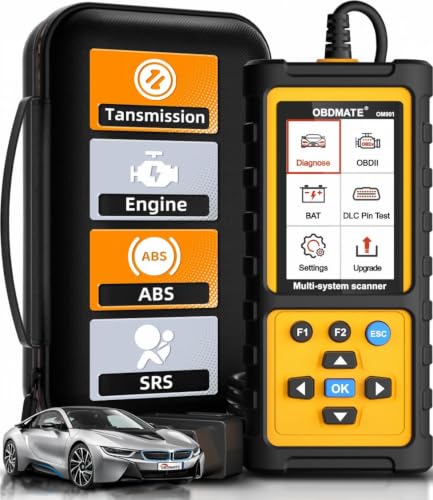
- 【Reset ABS/SRS/Transmission/Engine Lights】 More than an check engine code reader, OBDMATE OM901 obd2 scanner performs comprehensive diagnostics for the 4 most-used systems (ABS/SRS/Engine/Transmission). It quickly clears fault codes, turns off warning lights, read data stream and auto VIN.
- 【3.5" Handheld Scanner with 4 System Diagnose】 3.5" Super large TFT screen equipped displays an intuitive menu and clear readings of various sensors from ABS, SRS, ECM and TCM systems. It arrived with a silicone protective case and hard-shell carrying case, ensuring long-lived durability and drop resistance. The car diagnostic tool is plug-to-play designed, plug it and get diagnosis started without any batteries or updates required.
- 【One-Click I/M Readines&Full OBD2 Functions】 Press F1 to get an intuitive corloured form about whether various emissions-related systems on the vehicle are operating properly. Help you get smog-check ready quickly. OM901 car scanner supports all essential OBD2 functions you need: read & clear codes, view freeze frame, read I/M readiness, retrieve VIN, live data stream (with graphing display), O2 sensor test, onboard monitoring mode, and EVAP leak test.
- 【Battery Voltage Check&DLC Pin Test】 It allows you to monitor battery health by testing current battery voltage. Plus, this obd2 diagnostic tool features DLC 16-PIN test to check current voltage of every pin.
- 【Automotive Scanner Diagnostic Kit】 The package comes with 1 car scanner, 1 USB-type c cable, 1 hard storage bag and 1 user manual(en). Free to update without any hidden fees. 5 languanges available in setting including English, French, Italian, German and Espanish. Valuable and Portable, making it a great tool kit for car owners, DIY enthusiasts, and professional mechanics.
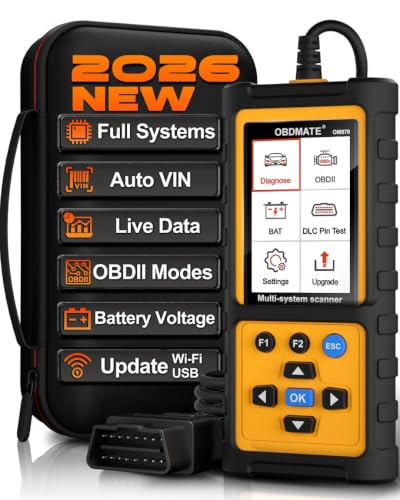
- 【Full Systems Automotive Diagnostic】 More than checking engine, ABS and SRS, OBDMATE OM970 obd2 scanner performs comprehensive diagnostics on all electric modules. It quickly scans and clears fault codes, turns off warning lights, reads live data, and features Auto-VIN technology.
- 【Live Datastream&4-in-1 Graph】 Easily view live sensor data such as RPM, fuel trims, ATF temperature, wheel speed sensor, battery voltage and so on. OM970 scan tool also supports 4-in-1 trend graphing. Spend just 3 minutes to check – and you'll know exactly what's going wrong, helping you avoid hundreds in dealership diagnostic fees.
- 【One-Click I/M Readiness&Full OBD2 Functions】 Press F1 to get an intuitive corloured form about whether your vehicle's emissions-related systems are operating properly. Help you get smog-check ready quickly. OM970 obd2 diagnostic tool supports all essential OBD2 functions you need. Plus, it features battery voltage test and DLC 16-PIN test.
- 【Straightforward Menus with Easy Navigation】 All functions are easy to understand without obscure decriptions. 3.5" Large screen delivers clear readings while keeping one-hand operation. The car diagnostic tool comes with a silicone protective case and a hard-shell carrying case, ensuring long-lived durability and drop resistance.
- 【Budget-Friendly, No Subscriptions, Free Software Updates】 Plug and play: no bluetooth pairing, monthly fees, Wi-Fi connection, or any other troublesome initial settings. OM970 obd2 scanner works out of the box with the latest software. Lifetime free upgrade.
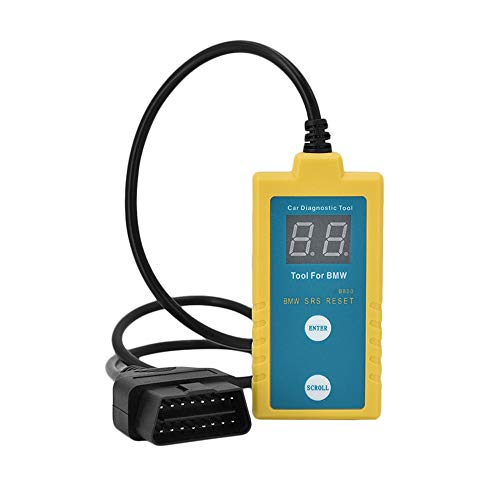
- ✔️【Professional SRS Reset for 1994-2003 BMW】 Designed specifically for classic BMW models (1994-2003). This B800 scanner reads & clears SRS airbag fault codes, turns off the warning light, and saves you a costly dealer visit. Confirmed compatible with: E36, E46 (EXCEPT 2001 330i), E34, E38, E39, Z3, and X5 (E53). NOT compatible with any BMW built before 1994 or after 2003.
- ✔️【Important: Two Different Connection Ports – Read Before Use】 To avoid “not working” issues, please note: For 1994–2000 BMWs (most E36, E34, Z3, early E39), the SRS diagnostic port is a round 20-pin connector under the hood. You MUST use the included 16-pin to 20-pin adapter cable. For 2000–2003 models (late E46, E39, X5), use the standard OBD-II port inside the cabin. Incorrect connection is the #1 reason for “incompatibility” reports.
- ✔️【Read & Clear Fault Codes in Minutes】 Quickly diagnose why your SRS light is on. The scanner accurately reads fault codes from airbag and seatbelt pretensioner systems. With one button press, clear the codes and reset the SRS warning light in seconds. No expensive dealer tools needed.
- ✔️【User-Friendly for DIYers – No Mechanic Required】 Easy operation with an intuitive button layout: ‘Enter’ to confirm, ‘Scroll’ to navigate. The clear LCD screen shows results instantly. Includes a step-by-step manual (revised for clarity) to guide you through the entire reset process.
- ✔️【Reliable Support with 1-Year Warranty】 We stand behind the quality of our B800 scanner. It comes with a 1-Year Hassle-Free Warranty. If you have any questions or need support, please contact us with your Order ID, and our dedicated team will assist you promptly.
This product presentation was made with AAWP plugin.