NUMBER: 08-016-15 REV. A
GROUP: Electrical
DATE: June 23, 2015
THIS BULLETIN SUPERSEDES SERVICE BULLETIN 08-016-15 DATED FEBRUARY 26, 2015, WHICH SHOULD BE REMOVED FROM YOUR FILES. ALL REVISIONS ARE HIGHLIGHTED WITH **ASTERISKS** AND INCLUDES ADDITIONAL MODEL YEARS, SYMPTOM/CONDITION AND UPDATED ANTENNA FOR WD, WK VEHICLES.
SUBJECT:
Poor Radio Reception
OVERVIEW:
This bulletin involves replacing the satellite antenna if needed.
MODELS:
| 2013-2014 | (DS) | Ram 1500 Pickup (U.S. Vehicle Only) |
| 2013-2014 | (DJ) | Ram 2500 Pickup (U.S. Vehicle Only) |
| 2013-2014 | (D2) | Ram 3500 Pickup (U.S. Vehicle Only) |
| 2013-2014 | (DD) | Ram 3500 Cab Chassis (U.S. Vehicle Only) |
| 2013-2014 | (DP) | Ram 4500/5500 Cab Chassis (U.S. Vehicle Only) |
| 2014-2015 | (WD) | Dodge Durango (U.S. Vehicle Only) |
| 2014-2015 | (WK) | Jeep Grand Cherokee (U.S. Vehicle Only) |
| 2014-2015 | (KL) | Jeep Cherokee (U.S. Vehicle Only) |
NOTE: This bulletin applies to vehicles equipped with Connected Vehicle (sales code RS7) and Sirius XM Satellite Radio (sales code RSD).
- DS vehicles built on or before October 31, 2013 (MDH 1031XX).
- DJ/DD/DP/D2 vehicles built on or before October 17, 2013 (MDH 1017XX).
- KL vehicles built on or before February 01, 2015 (MDH 0201XX).
- **WD/WK vehicles built on or before March 02, 2015 (MDH 0301XX).**
NOTE: This condition happens to U.S. vehicles ONLY. The U.S. vehicles are equipped with a specific cellular provider and radio combination that induces this condition.
SYMPTOM/CONDITION:
A customer may experience, SXM (Sirius/XM) radio has intermittent muting. This occurs in areas where XM signal is degraded and cell signal is very weak. The condition happens when the optional vehicle internet connection through the cell network is in use with the internal vehicle Wi-Fi.
This Symptom/Condition Only Applies to 2014-2015 **WD, WK** or KL Vehicles.
A customer may experience a popping noise when listening to AM stations.**
DIAGNOSIS:
Using a Scan Tool (wiTECH) with the appropriate Diagnostic Procedures available to verify if any Diagnostic Trouble Codes (DTCs) are set. If Audio DTCs are present record them on the repair order and repair as necessary before proceeding further with this bulletin.
If the customer describes the symptom/condition listed above, perform the Repair Procedure.
PARTS REQUIRED:
| Qty. | Part No. | Description |
|---|---|---|
| 1 (AR) | 05064648AC | Antenna, Rear Mounted, Black |
| 1 (AR) | 05091278AB | Antenna, Front Mounted, Black |
| 1 (AR) | 05064642AE | Antenna, Whip Base, |
| 1 (AR) | **05091352AD** | Grained Black Antenna |
| 1 (AR) | **1YG06AXRAE** | Antenna, Black (sales code AXR) |
| 1 (AR) | **1YG06GW7AE** | Antenna, White (sales code GW7) |
| 1 (AR) | **1YG06JRMAE** | Antenna, Redline 2 (sales code JRM) |
| 1 (AR) | **1YG06JRPAE** | Antenna, Cherry Red (sales code JRP) |
| 1 (AR) | **1YG06JSCAE** | Antenna, Silver (sales code JSC) |
| 1 (AR) | **1YG06KARAE** | Antenna, Steel Metallic (sales code KAR) |
| 1 (AR) | **1YG06KBUAE** | Antenna, Blue (sales code KBU) |
| 1 (AR) | **1YG06KEPAE** | Antenna, Auburn Pearl (sales code KEP) |
| 1 (AR) | **1YG06KFSAE** | Antenna, Cashmere (sales code KFS) |
| 1 (AR) | **1YG06KGZAE** | Antenna, Forest Green (sales code KGZ) |
| 1 (AR) | **1YG06LAUAE** | Antenna, Granite Metallic (sales code AUA) |
REPAIR PROCEDURE:
- Replace the antenna. Follow the procedures in TechConnect, 08 – Electrical/8A Audio/Video/Entertainment/Connectivity/ANTENNA, Satellite, Audio/Removal and Installation.
NOTE: When replacing an antenna that has a screw on mast, the mast does not need to be replaced, see (Fig. 1)
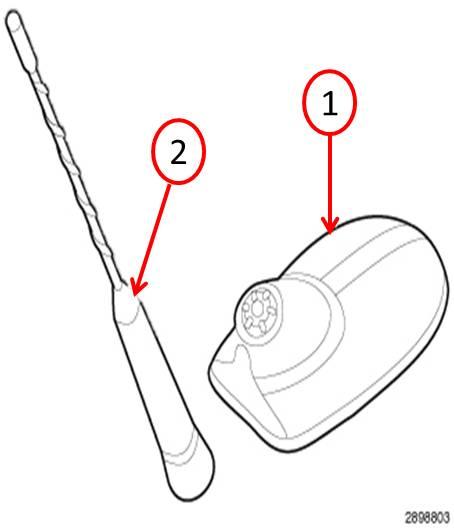
Fig. 1 Antenna Mast and Base
1 – Base
2 – Mast
POLICY:
Reimbursable within the provisions of the warranty.
TIME ALLOWANCE:
| Labor Operation No: | Description | Skill Category | Amount |
|---|---|---|---|
| 08-20-04-93 | Antenna, Satellite Radio Replace. DS/DD/DJ/D2/DD/DP (2- Skilled) | 6 – Electrical and Body Systems | 1.3 Hrs. |
| **08-20-04-95** | Antenna, Satellite Radio Replace. WD/WK (2- Skilled) | 6 – Electrical and Body Systems | 0.5 Hrs |
| 08-20-04-95 | Antenna, Satellite Radio Replace. KL (2- Skilled) | 6 – Electrical and Body Systems | 0.7 Hrs |
FAILURE CODE:
| ZZ | Service Action |

- 5” GPS navigator with driver alerts and travel data.External memory storage: This USB mass storage device is compatible with Windows XP or newer and Mac OS X 10.4 or later..Control Method:Touch.Special Feature:Touchscreen.
- Easy-to-use 5” GPS navigator includes detailed map updates of the U.S. and Canada
- Simple on-screen menus and bright, easy-to-see maps
- Garmin Traffic is ready to use right out of the box — without use of a smartphone
- Road trip-ready with The HISTORY Channel database of notable historic sites, a U.S. national parks directory, TripAdvisor traveler ratings and millions of Foursquare points of interest (POIs)

- Foursquare - Search millions of additional new and popular restaurants, shops and more with Foursquare
- Garmin Real Directions - Garmin Real Directions guides like a friend using landmarks and traffic lights
- Direct Access - Simplifies navigating to select complex destinations, like malls and airports
- Backup Camera Compatible - Take the worry out of reversing with the BC 30 Wireless Backup Camera (purchased separately)3
- Free lifetime Map updates

- Vehicle dash mount for use on any stable surface
- Securely holds your GPS in vehicle.Keep your device in easy sight with this portable friction mount, and then remove it from your vehicle when you arrive at your destination
- Does not slide or detach while vehicle is in motion
- Adjustable to position GPS in a variety of angles
- Ships in Certified Frustration-Free Packaging

This product presentation was made with AAWP plugin.