NUMBER: 08-015-16
GROUP: Electrical
DATE: February 09, 2016
SUBJECT:
Poor GPS Signal Reception
OVERVIEW:
This bulletin involves the replacement of the GPS antenna with a roof mount antenna to improve navigation performance.
MODELS:
| 2011 – 2014 | (JC) | Dodge Journey (International only) |
NOTE: This bulletin applies to vehicles built with one of the following radios:
- Uconnect Touch 8.4N CD/DVD/MP3/NAV (Sales Code RB6)
- Uconnect Touch 8.4N CD/DVD/MP3/NAV (Sales Code RB4)
- Media CTR 641N CD/DVD/MP3/NAV (China) (Sales Code RE9)
- Media CTR 641N CD/DVD/MP3/NAV (Japan) (Sales Code RE4)
SYMPTOM/CONDITION:
The customer may experience off route conditions due to weak navigation satellite signal.
DIAGNOSIS:
If the customer describes the symptom/condition listed above, perform the Repair Procedure.
PARTS REQUIRED:
| Qty. | Part No. | Description |
|---|---|---|
| 1 | 05091031AA | Dual-Function Antenna |
| 1 | 68248758AA | I/P, Overlay Wiring |
| 1 | 68068349AA | Body, Overlay Wiring |
REPAIR PROCEDURE:
- Check the radio software version. Put the radio into dealer mode by pressing the drivers Temp up and down buttons and the front defrost button all at the same time until the dealer mode screen is displayed. Press the “Navigation” button to read the Nav software version number and the “Radio Part Info” button to read the Head Unit software version number.
- For 2011 Model Year vehicles, is the Head Unit software version the 13/48/18 or newer and the Nav software version the 3.20 or newer?
- For 2012 Model Year vehicles, is the Head Unit software version the 13/48/46 or newer and the Nav software version the 4.14 or newer?
- For 2013 Model Year vehicles, is the Head Unit software version the 15/26/63 or newer and the Nav software version the 4.30 or newer?
- For 2014 Model Year vehicles, is the Head Unit software version the 15/09/D1 or newer and the Nav software version the 6.22 or newer?
NOTE: To complete the repair procedure it is necessary to get the parts shown in (Fig. 1) ordering the P/Ns 05091031AA, 68068349AA and 68248758AA. (Fig. 1) shows the routing overview of the body and under-dashboard wiring and the connector connections.
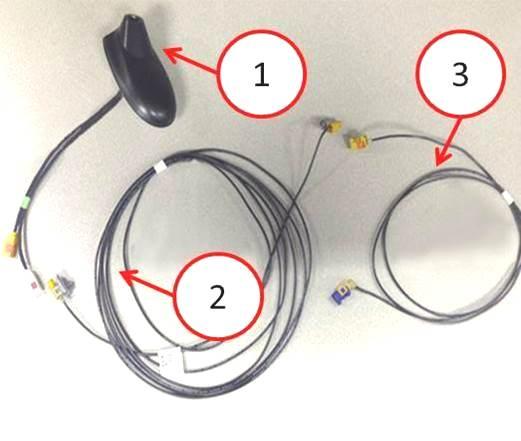
Fig. 1 Rework Kit Description
1 – Dual Function Antenna
2 – Body Wiring (from dual function antenna to coupling on A pillar)
3 – Wiring Under the Dashboard (from coupling on A pillar to radio)
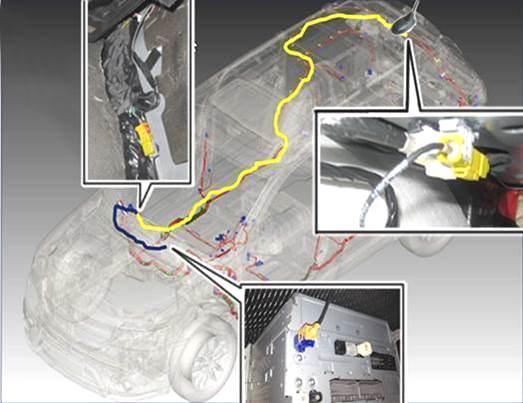
Fig. 2 Wiring Routing
- Turn the ignition key to the OFF position and disconnect the battery negative terminal.
- Remove the rear crossmember trim panel by slightly pulling the trim to release the retaining devices. Using the suitable tool, release the rear roof light and move it to one side without disconnecting it (Fig. 3).
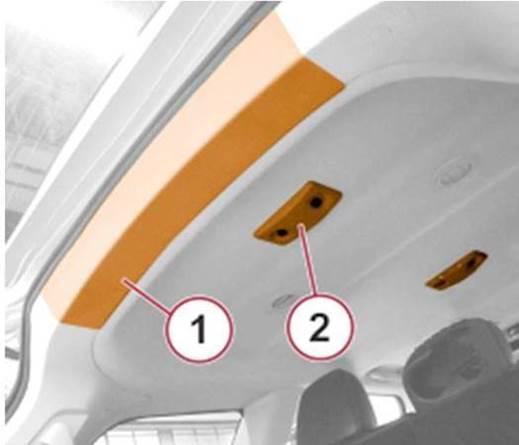
Fig. 3 Rear Crossmember Trim Panel And Rear Roof Light Location
1 – Crossmember Trim Panel
2 – Roof Light
- Remove the upper trims of right and left C pillars (Fig. 4).
- Remove the upper trims of right and left B pillars (Fig. 4).
- Lower the headliner until the lower part of the antenna can be accessed (Fig. 4).
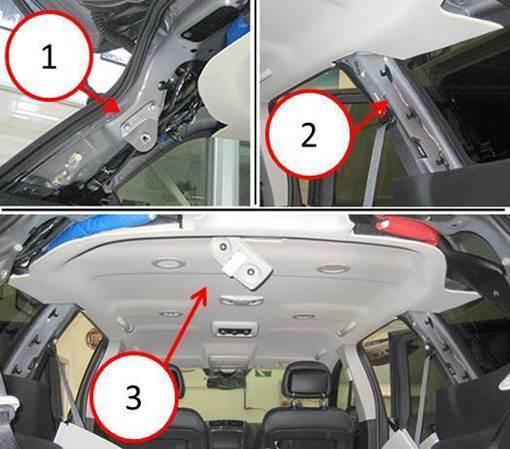
Fig. 4 Pillar Trims And Headliner Removal
1 – Trim of Left C pillar
2 – Trim of Right B pillar
3 – Headliner
- Disconnect the antenna connector (Fig. 5).
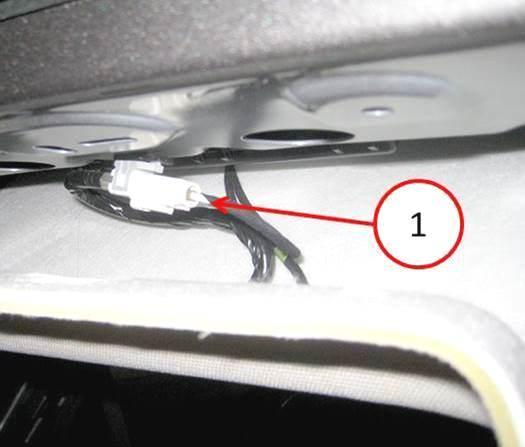
Fig. 5 Antenna Connector
1 – Connector
- Remove two nuts and lower the Radio Frequency (RF) module downward (Fig. 6).
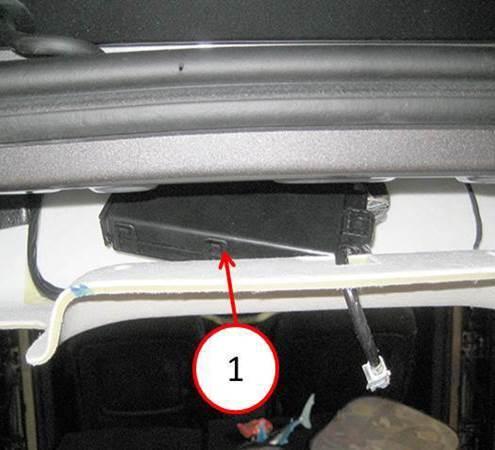
Fig. 6 RF Module
1 – Module
- Slightly press on the back of the trim and remove the nut and the retainer from the old antenna. Working from inside the vehicle, press one of the retaining tabs on the antenna using a flat-bladed tool. Press one side of the antenna connector through the roof, then press the other side of the connector and remove the antenna (Fig. 7).
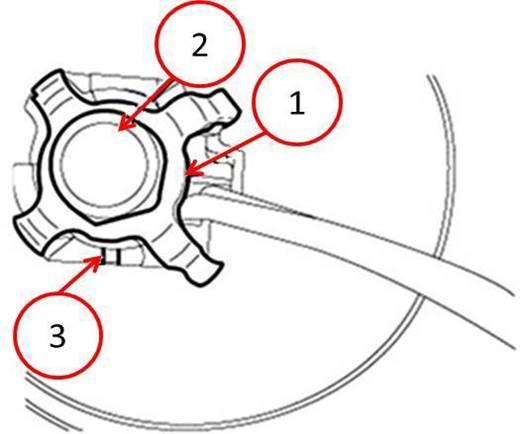
Fig. 7 Antenna Retainer
1 – Retainer
2 – Nut
3 – Retaining Tab
- Carefully clean the surface of the roof in the area where the new antenna is to be placed.
- Install the dual function antenna P/N 05091031AA, with two electrical connectors through the hole on the roof. Press antenna into position until the retainer snaps-fit (Fig. 8).
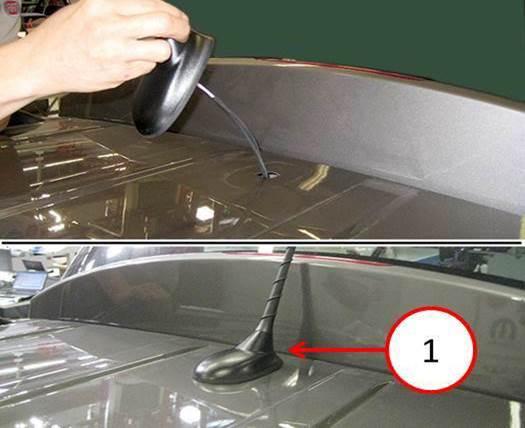
Fig. 8 New Dual Function Antenna Location
1 – Antenna
- Install the antenna retainer and nut. Tighten nut to 90 N·m (66 ft. lbs.).
- Connect the white connector from the antennae to the white connector from the radio cable (Fig. 9).
- Connect the yellow connector from the antenna to the yellow connector from the body wiring harness from the kit (Fig. 9).
- Fasten the connectors (white – white) and (yellow – yellow) into the fasteners (Fig. 9) on the roof crossmember.
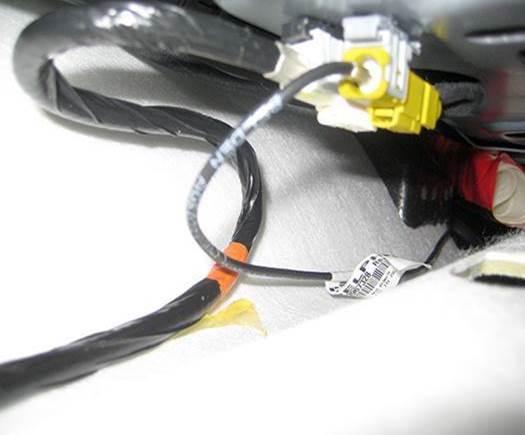
Fig. 9 Dual Function Antenna Location Connectors
- Install the (RF) module with two nuts.
- Install the body wiring to the interior side of the roof trim, working from the back side to the right B pillar and secure it with the adhesive tape (Fig. 10).
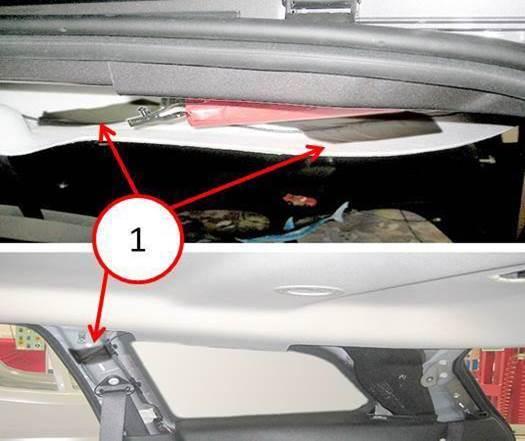
Fig. 10 Body Wiring Routing
1 – Tape Application Points
- Remove the door weather strip and lay the body wiring along the right B pillar. Secure by applying tape above and below the seat belt attaching point (Fig. 11). Continue by routing the body wiring under the B pillar lower trim (Fig. 11).
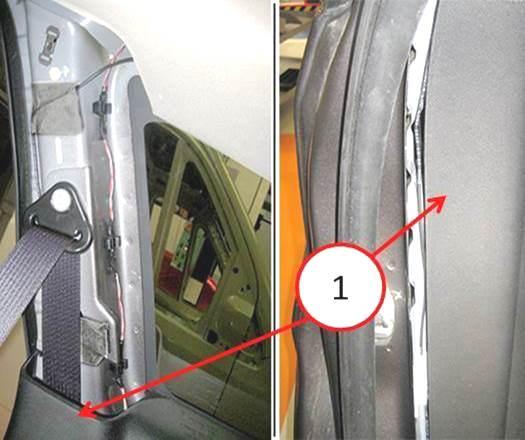
Fig. 11 Body Wiring Routing B Pillar
1 – B Pillar Lower Trim
- Remove the kickplate from the right rear door compartment.
- Remove the kickplate from the right front door compartment.
- Remove the kickplate coupling for the front door.
- Install the body wiring along the right lower side of the vehicle until reaching the passenger feet area, under the pillar lower trim and secure it to the sill with adhesive tape (Fig. 12).
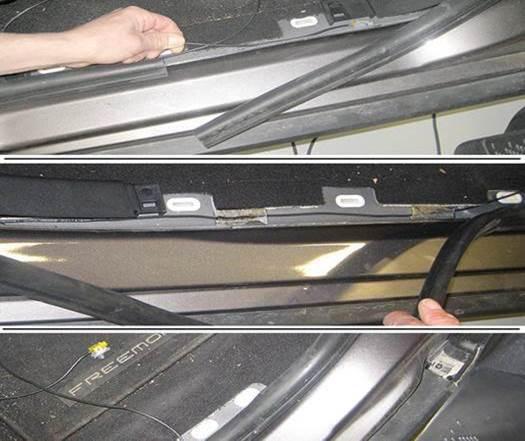
Fig. 12 Body Wiring Routing Kickplate
- Remove the Radio.
- Disconnect the GPS connector and wrap with insulating tape. Also wrap harness wires to lock in place and prevent noise (Fig. 13).
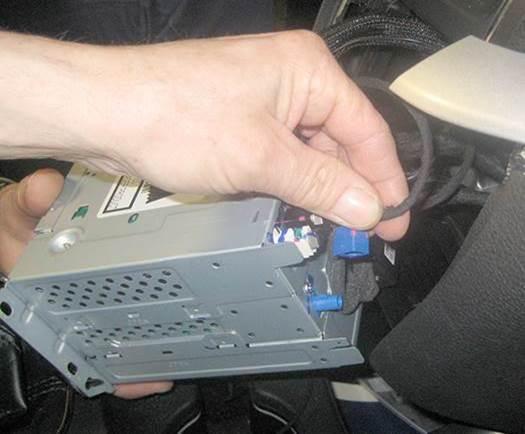
Fig. 13 GPS Connector
- Open the glove box, release it from the retainers and flip it downward as shown in (Fig. 14).
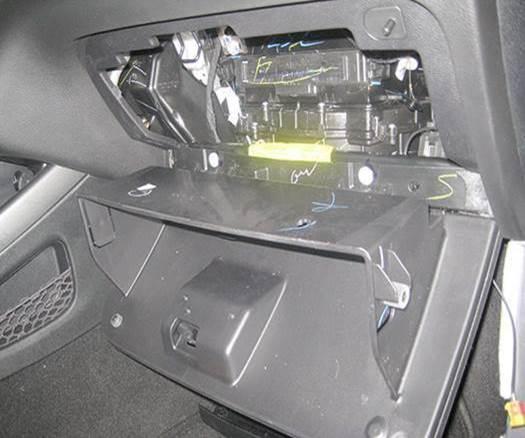
Fig. 14 Glove Box
- Using the under dashboard wiring from the kit, install the yellow/blue connector from the area behind the glove box, until it protrudes out from the radio housing as shown in (Fig. 15). Connect the yellow/blue connector to the radio.
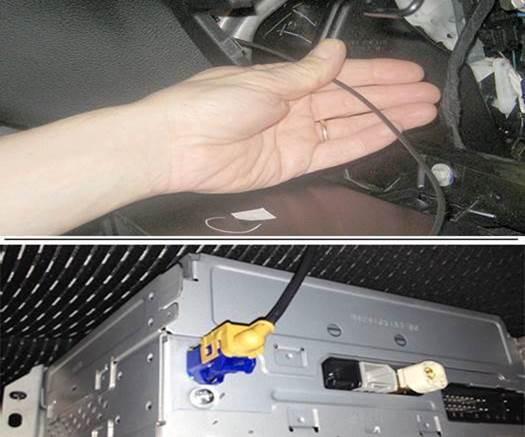
Fig. 15 GPS Connector Connection With New IP Wiring
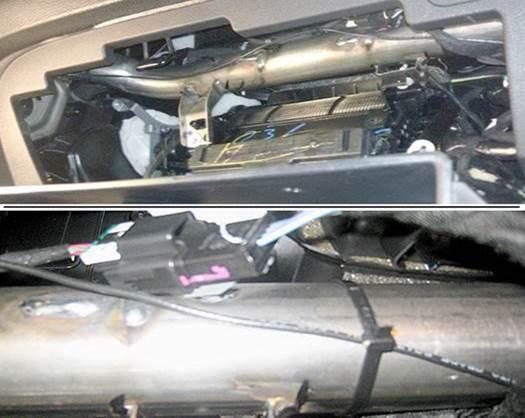
Fig. 16 IP Wiring Overlay Routing
- Route the wiring out from under the dashboard (Fig. 17) on the lower right side of the dashboard.
- Connect the yellow connector for the body wiring (coming from the back) to the yellow connector of the under dashboard wiring, coming from the radio (Fig. 17).
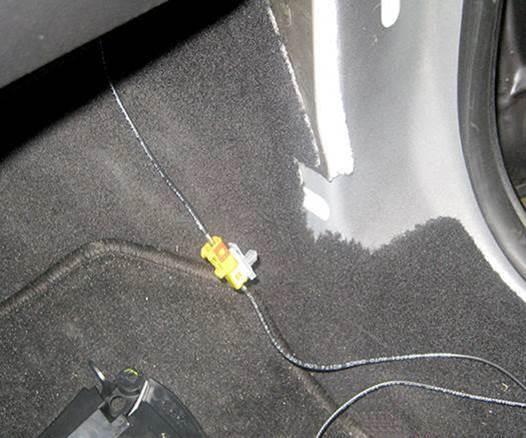
Fig. 17 Connection Between The IP And The Body Wiring
- Fasten the connector coupling to the A pillar and secure the wiring under the dashboard and the body wiring with adhesive tape (Fig. 18).
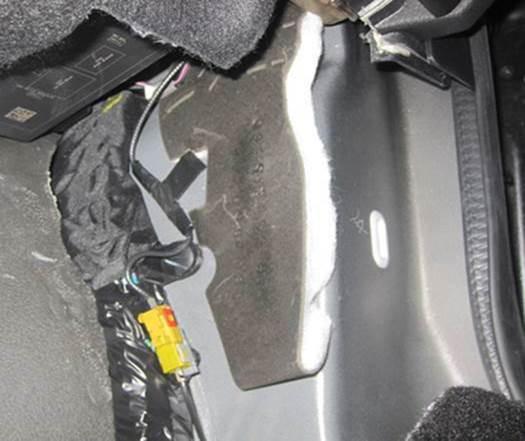
Fig. 18 Connector Coupling Location
- Place any remaining wiring under carpet as shown in (Fig. 19).
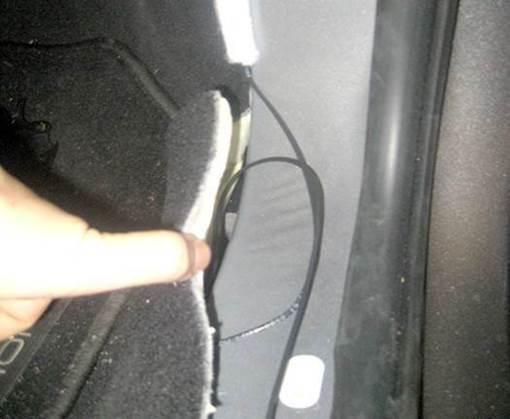
Fig. 19 IP Wiring Rounting Carpet
- Install any previously disassembled or removed components (glove box, radio, kickplates and mouldings, etc.).
- Move the vehicle outdoors to a place free from high obstacles to check radio operation. From the home page of the ‘Navigation Menu’, touch the upper left upper corner signal strength icon (Fig. 20).
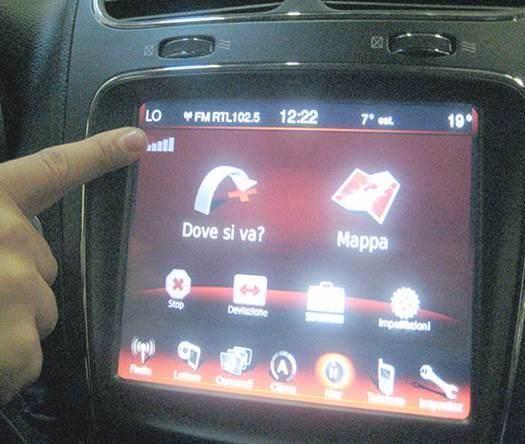
Fig. 20 GPS Information Access
- Check the number of receiving satellites and the intensity of the signal from each satellite (indicated through bars) verifying a good GPS signal is shown in (Fig. 21).
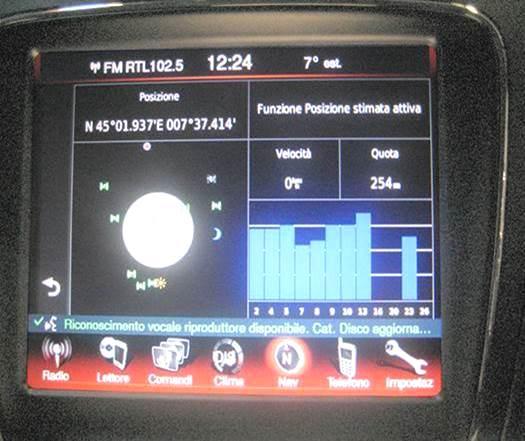
Fig. 21 GPS Menu
POLICY:
Reimbursable within the provisions of the warranty.
TIME ALLOWANCE:
| Labor Operation No: | Description | Skill Category | Amount |
|---|---|---|---|
| 08-20-04-94 | Install Dual Function Antenna and Overlay Harness (2- Skilled) | 6 – ELECTRICAL AND BODY SYSTEMS | 1.6 Hrs. |
FAILURE CODE:
| ZZ | Service Action |
NUMBER: 08-032-15
GROUP: Electrical
DATE: March 31, 2015
Uconnect Updates - Chrysler Dodge Ram Jeep Fiat
http://chrysler.oemdtc.com/344/uconnect-updates-chrysler-dodge-ram-jeep-fiat

- USB-C 2-in-1 storage OTG: The Lexar JumpDrive Dual Drive D40E features USB Type-A and Type-C connectors in a slim, portable form factor for easy device compatibility
- Transfer speeds up to 100MB/s: Based on internal testing, performance may vary depending upon the host device, interface, and usage conditions. 1MB=1,000,000 bytes
- Plug and Play: Widely compatible with USB Type-C smartphones, tablets, laptops, Macs, and traditional Type-A devices, no software installation required. The 360° swivel design allows for easy switching between connectors without the hassle of losing a cap
- Durable & Compact: The Lexar D40E USB memory stick features a metal enclosure, withstands temperatures from 0° to 50° C (32°F to 122°F), and is lightweight at 26g with dimensions of 70.4 x 16.9 x 11.7mm
- Security & Warranty: Securely protects files using an advanced security software solution with 256-bit AES encryption. Backed by a Lexar 3-year limited warranty
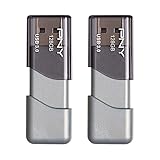
- The durable, light-weight design of the Turbo Attaché 3 USB 3.0 Flash Drive is the essential mobile storage solution
- Perfect for transferring large files such as movies, videos, photos, music & documents
- Transfer speeds up to 10 times faster than standard USB 2.0 flash drives
- Convenient sliding collar, and cap-less design protects your content when not in use
- Compatible with most PC and Mac laptop and desktop computers with USB 3.0 ports


- GOOD VALUE PACKAGE - 1 Pack 32GB Memory Stick USB 2.0 Flash Drives with great cost performance and high quality.
- BIG CAPACITY - The available capacity: 29.10GB-29.8GB, You can save the data of movies, music, photos, designs, programs, manuals, handouts in a high speed.Good performance in digital data storing, transferring and sharing with families, friends, workmates, clients and machines.
- EASY TO USE & PLUG AND WORK - Support windows 7 / 8 / 10 / Vista / XP / 2000 / ME / NT Linux and Mac OS, Compatible with USB2.0 and below.
- TWISTTURN DESIGN & EASY CARRY - The metal clip rotates 360° round the ABS plastic body which with rubber oil skin feeling finish. The capless design can avoid lossing of cap, and providing efficient protection to the USB port.
- WARRANTY & SUPPORT - SIMMAX logo is laser printed on the USB connector surface, our products are of good quality and we promise that any problem about the product within one year since you buy.

- High-speed USB 3.0 performance of up to 150MB/s(1) [(1) Write to drive up to 15x faster than standard USB 2.0 drives (4MB/s); varies by drive capacity. Up to 150MB/s read speed. USB 3.0 port required. Based on internal testing; performance may be lower depending on host device, usage conditions, and other factors; 1MB=1,000,000 bytes]
- Transfer a full-length movie in less than 30 seconds(2) [(2) Based on 1.2GB MPEG-4 video transfer with USB 3.0 host device. Results may vary based on host device, file attributes and other factors]
- Transfer to drive up to 15 times faster than standard USB 2.0 drives(1)
- Sleek, durable metal casing
- Easy-to-use password protection for your private files(3) [(3)Password protection uses 128-bit AES encryption and is supported by Windows 7, Windows 8, Windows 10, and Mac OS X v10.9 plus; Software download required for Mac, visit the SanDisk SecureAccess support page]

- Easily store and access 2TB to content on the go with the Seagate Portable Drive, a USB external hard drive
- Designed to work with Windows or Mac computers, this external hard drive makes backup a snap just drag and drop
- To get set up, connect the portable hard drive to a computer for automatic recognition no software required
- This USB drive provides plug and play simplicity with the included 18 inch USB 3.0 cable
- The available storage capacity may vary.
This product presentation was made with AAWP plugin.