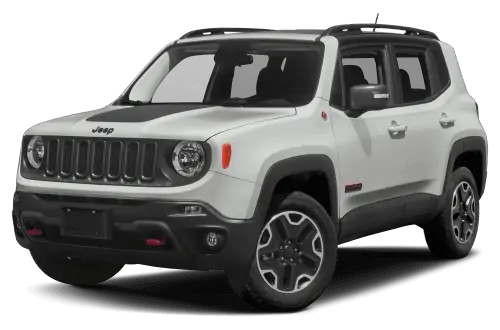
NUMBER: 08-026-15 REV. A
GROUP: Electrical
DATE: April 03, 2015
THIS BULLETIN SUPERSEDES SERVICE BULLETIN 08-026-15, DATED MARCH 21, 2015, WHICH SHOULD BE REMOVED FROM YOUR FILES. ALL REVISIONS ARE HIGHLIGHTED WITH **ASTERISKS** AND INCLUDES UPDATING TO AN RRT STATUS.
**THIS SERVICE BULLETIN IS ALSO BEING RELEASED AS RAPID RESPONSE TRANSMITTAL (RRT) 15-031. ALL APPLICABLE SOLD AND UN-SOLD RRT VIN’s HAVE BEEN LOADED. TO VERIFY THAT THIS RRT SERVICE ACTION IS APPLICABLE TO THE VEHICLE, USE VIP OR PERFORM A VIN SEARCH IN TECHCONNECT. ALL REPAIRS ARE REIMBURSABLE WITHIN THE PROVISIONS OF WARRANTY.**
SUBJECT:
Incorrect Language Displayed On The Cluster And Radio
OVERVIEW:
This bulletin involves changing the vehicle language settings to English.
MODELS:
| 2015 | (BU) | Jeep Renegade |
NOTE: This bulletin applies to vehicles built on or before March 03, 2015 (MDH 0303XX) equipped with one of the following radios:
- Uconnect 3.0 AM/FM (sales code RA1).
- Uconnect 5.0 AM/FM/BT (sales code RA2).
- Uconnect 8.4AN AM/FM/BT/ACCESS/NAV (sales code RA4).
SYMPTOM/CONDITION:
The customer and/or dealer may want to change the language displayed in the radio and cluster to English.
DIAGNOSIS:
**If a customer’s VIN is listed in VIP or your RRT VIN list, perform the repair. For all other customers that describe the symptom/condition listed above, perform the Repair Procedure.**
REPAIR PROCEDURE:
- Using the vehicle sales codes which radio does the vehicle have, RA1, RA2 Or RA4?
RA1 Radio Language Setup Procedure
NOTE: The word on the cluster display may be hard to understand, since they may be in a foreign language. Chose the selection that will be in the same location on the cluster’s displayed as shown in the images below.
- Using the buttons on the steering wheel, scroll to menu 8 in the Electronic Vehicle Information Center (EVIC).
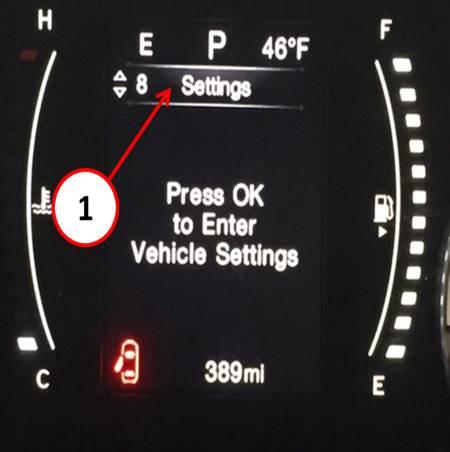
Fig. 1 Select Menu 8
1 – Correct Selection
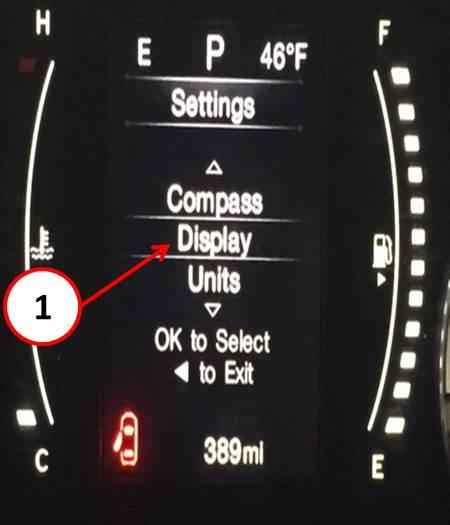
Fig. 2 Select Display
1 – Correct Selection
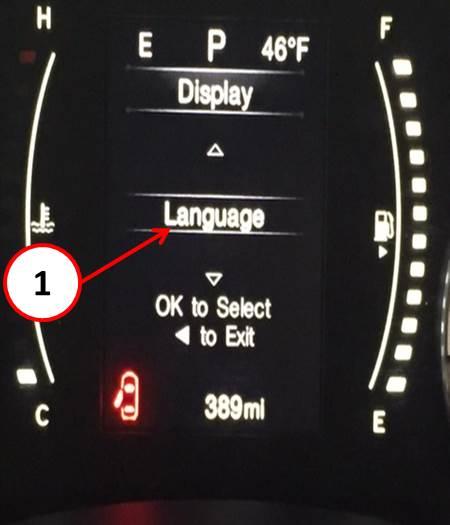
Fig. 3 Select Language
1 – Correct Selection
- First select French or Spanish, before selecting English.
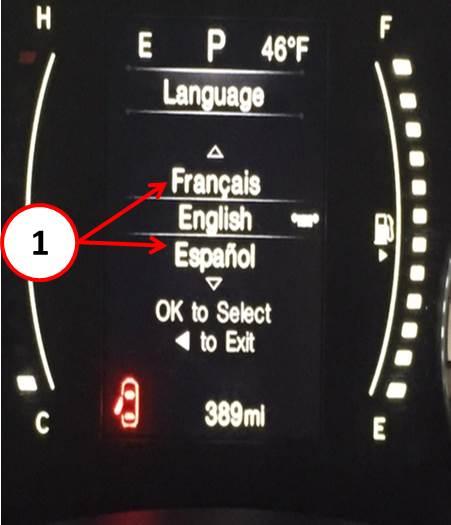
Fig. 4 Select Either French or Spanish
1 – Either Selection Will Be Correct
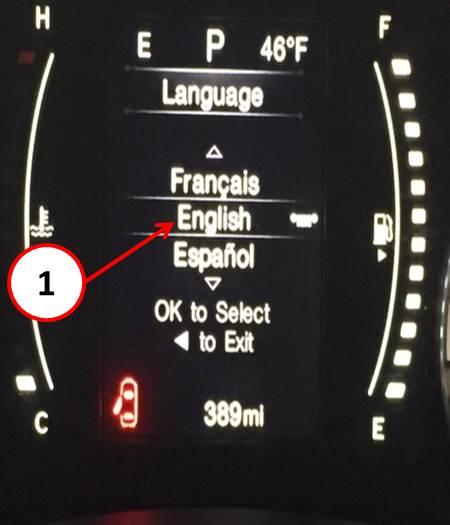
Fig. 5 Select English
1 – Correct Selection
- This Bulletin has been completed.
RA2 Radio Language Setup Procedure
NOTE: The word on the radio display may be hard to understand, since they may be in a foreign language. Chose the selection that will be in the same location on the radio’s displayed as shown in the images below.
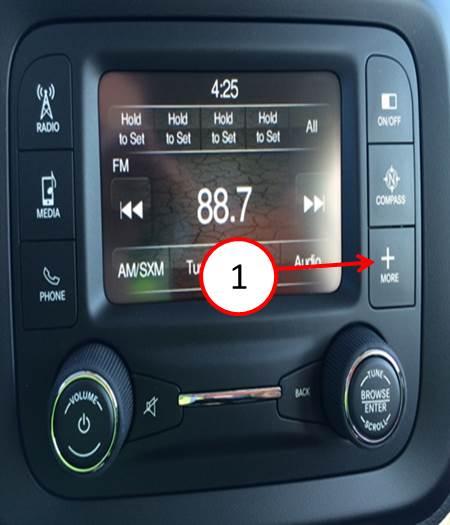
Fig. 6 Press Hard Key More
1 – Correct Selection
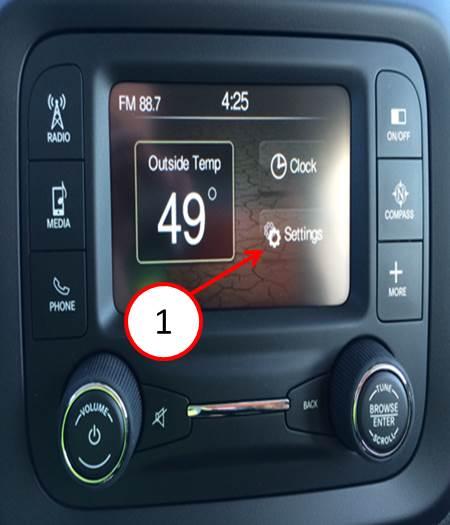
Fig. 7 Select Settings
1 – Correct Selection
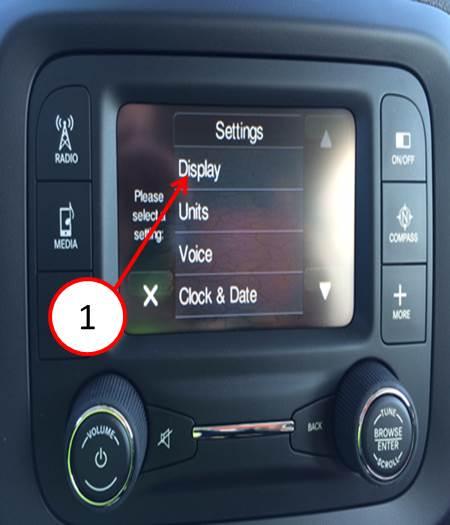
Fig. 8 Select Display
1 – Correct Selection
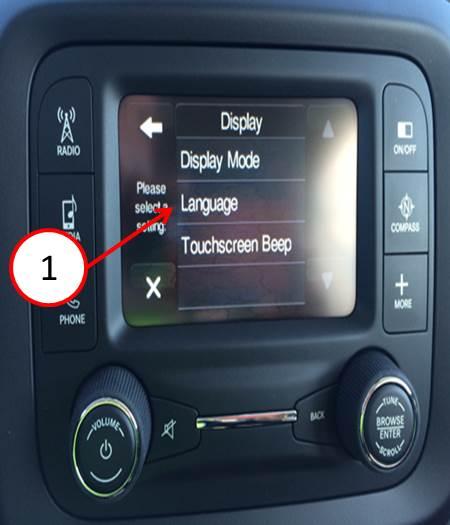
Fig. 9 Select Language
1 – Correct Selection
- First select French or Spanish, before selecting English.
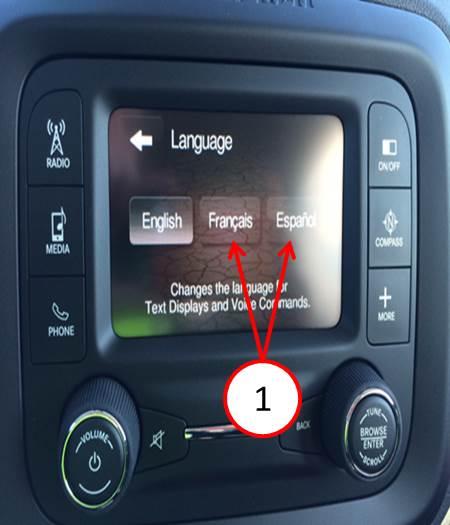
Fig. 10 Select Either French or Spanish
1 – Either Selection Will Be Correct
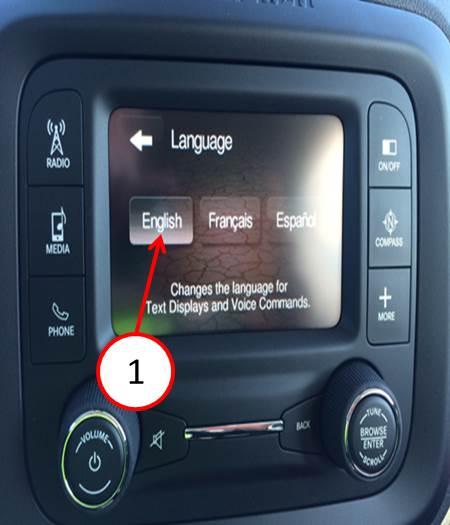
Fig. 11 Select English
1 – Correct Selection
- This Bulletin has been completed.
RA4 Radio Language Setup Procedure
NOTE: The word on the radio display may be hard to understand, since they may be in a foreign language. Chose the selection that will be in the same location on the radio’s displayed as shown in the images below.
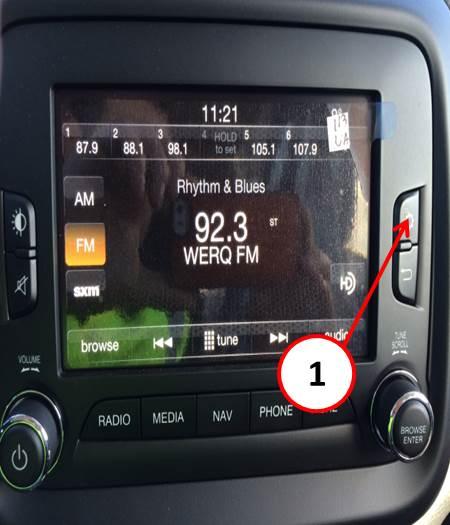
Fig. 12 Press Hard Key Settings
1 – Press Hard Key
- 16.123
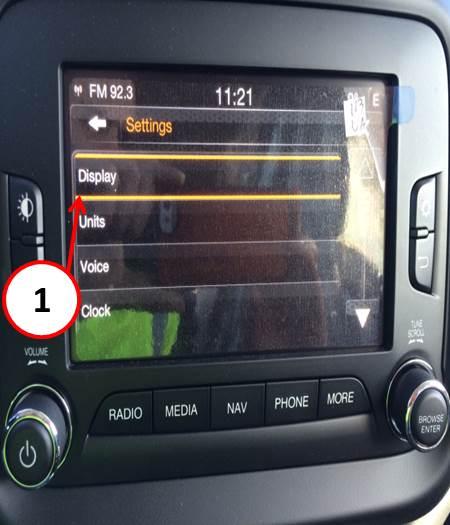
Fig. 13 Select Display
1 – Correct Selection
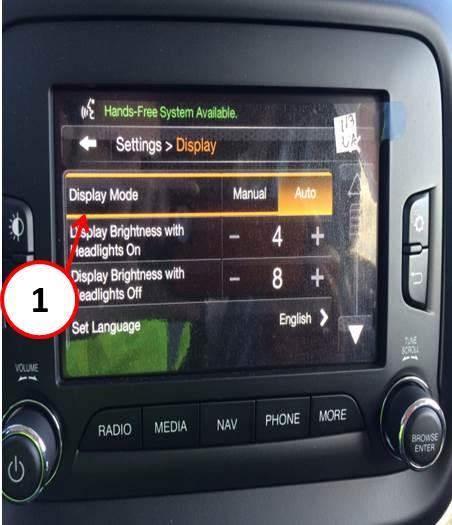
Fig. 14 Select Display Mode
1 – Correct Selection
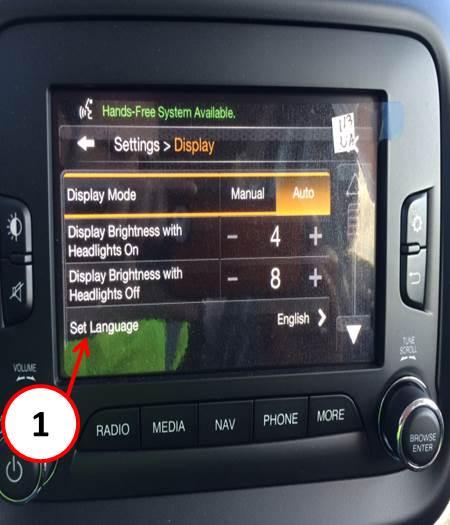
Fig. 15 Select Set Language
1 – Correct Selection
- First select French or Spanish, before selecting English.
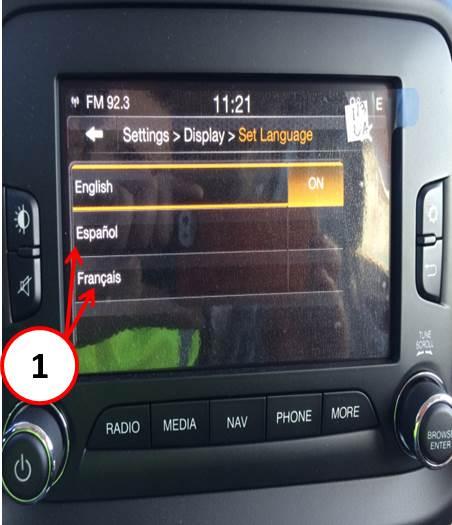
Fig. 16 Select Either French or Spanish
1 – Either Selection Will Be Correct
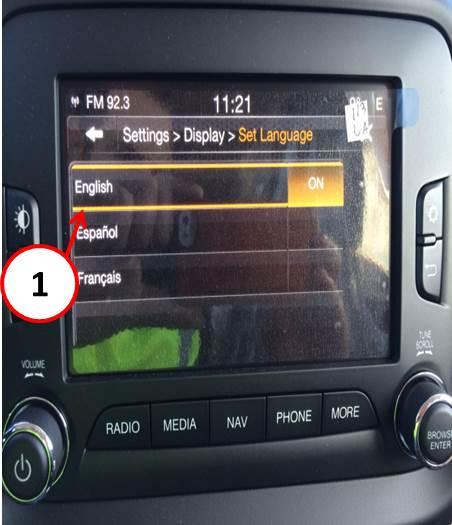
Fig. 17 Select English
1 – Correct Selection
- This bulletin has been completed.
POLICY:
Reimbursable within the provisions of the warranty.
TIME ALLOWANCE:
| Labor Operation No: | Description | Skill Category | Amount |
| 18-45-07-94 | Change Language Settings To English (0 – Introduction) | 6 – Electrical and Body Systems | 0.2Hrs. |
FAILURE CODE:
| ZZ | Service Action |
NUMBER: 08-026-15
GROUP: Electrical
DATE: March 21, 2015
https://www.nhtsa.gov/recalls?nhtsaId=10144849
https://static.nhtsa.gov/odi/tsbs/2015/MC-10144849-9999.pdf
Uconnect Updates - Chrysler Dodge Ram Jeep Fiat
http://chrysler.oemdtc.com/344/uconnect-updates-chrysler-dodge-ram-jeep-fiat

- USB-C 2-in-1 storage OTG: The Lexar JumpDrive Dual Drive D40E features USB Type-A and Type-C connectors in a slim, portable form factor for easy device compatibility
- Transfer speeds up to 100MB/s: Based on internal testing, performance may vary depending upon the host device, interface, and usage conditions. 1MB=1,000,000 bytes
- Plug and Play: Widely compatible with USB Type-C smartphones, tablets, laptops, Macs, and traditional Type-A devices, no software installation required. The 360° swivel design allows for easy switching between connectors without the hassle of losing a cap
- Durable & Compact: The Lexar D40E USB memory stick features a metal enclosure, withstands temperatures from 0° to 50° C (32°F to 122°F), and is lightweight at 26g with dimensions of 70.4 x 16.9 x 11.7mm
- Security & Warranty: Securely protects files using an advanced security software solution with 256-bit AES encryption. Backed by a Lexar 3-year limited warranty
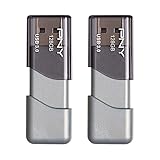
- The durable, light-weight design of the Turbo Attaché 3 USB 3.0 Flash Drive is the essential mobile storage solution
- Perfect for transferring large files such as movies, videos, photos, music & documents
- Transfer speeds up to 10 times faster than standard USB 2.0 flash drives
- Convenient sliding collar, and cap-less design protects your content when not in use
- Compatible with most PC and Mac laptop and desktop computers with USB 3.0 ports


- GOOD VALUE PACKAGE - 1 Pack 32GB Memory Stick USB 2.0 Flash Drives with great cost performance and high quality.
- BIG CAPACITY - The available capacity: 29.10GB-29.8GB, You can save the data of movies, music, photos, designs, programs, manuals, handouts in a high speed.Good performance in digital data storing, transferring and sharing with families, friends, workmates, clients and machines.
- EASY TO USE & PLUG AND WORK - Support windows 7 / 8 / 10 / Vista / XP / 2000 / ME / NT Linux and Mac OS, Compatible with USB2.0 and below.
- TWISTTURN DESIGN & EASY CARRY - The metal clip rotates 360° round the ABS plastic body which with rubber oil skin feeling finish. The capless design can avoid lossing of cap, and providing efficient protection to the USB port.
- WARRANTY & SUPPORT - SIMMAX logo is laser printed on the USB connector surface, our products are of good quality and we promise that any problem about the product within one year since you buy.

- High-speed USB 3.0 performance of up to 150MB/s(1) [(1) Write to drive up to 15x faster than standard USB 2.0 drives (4MB/s); varies by drive capacity. Up to 150MB/s read speed. USB 3.0 port required. Based on internal testing; performance may be lower depending on host device, usage conditions, and other factors; 1MB=1,000,000 bytes]
- Transfer a full-length movie in less than 30 seconds(2) [(2) Based on 1.2GB MPEG-4 video transfer with USB 3.0 host device. Results may vary based on host device, file attributes and other factors]
- Transfer to drive up to 15 times faster than standard USB 2.0 drives(1)
- Sleek, durable metal casing
- Easy-to-use password protection for your private files(3) [(3)Password protection uses 128-bit AES encryption and is supported by Windows 7, Windows 8, Windows 10, and Mac OS X v10.9 plus; Software download required for Mac, visit the SanDisk SecureAccess support page]

- Easily store and access 2TB to content on the go with the Seagate Portable Drive, a USB external hard drive
- Designed to work with Windows or Mac computers, this external hard drive makes backup a snap just drag and drop
- To get set up, connect the portable hard drive to a computer for automatic recognition no software required
- This USB drive provides plug and play simplicity with the included 18 inch USB 3.0 cable
- The available storage capacity may vary.
This product presentation was made with AAWP plugin.