NHTSA Campaign Number: 14V643
Manufacturer Chrysler Group LLC
Components SEAT BELTS, AIR BAGS
Potential Number of Units Affected 126,532
Air Bags/Seat Belt Pretensioners may be Disabled
If the frontal air bags, seat belt pretensioners, and side air bags are disabled, there is an increased risk of injury to the vehicle occupants in the event of a vehicle crash that necessitates use of the passive restraint system.
Summary
Chrysler Group LLC (Chrysler) is recalling certain model year 2014 Dodge Durango vehicles manufactured June 2, 2013, to June 28, 2014, and 2014 Jeep Grand Cherokee vehicles manufactured October 30, 2012, to April 30, 2014.
Due to a fault within the Occupant Restraint Control (OCR) module, the frontal air bags, seat belt pretensioners, and side air bags may be disabled.
The malfunction indicator light (MIL) should illuminate to initially warn drivers of a failure.
Remedy
Chrysler will notify owners, and dealers will replace the ORC module, free of charge.
The recall began on April 27, 2015.
Owners may contact Chrysler customer service at 1-800-853-1403.
Chrysler’s number for this recall is P67.
Notes
Owners may also contact the National Highway Traffic Safety Administration Vehicle Safety Hotline at 1-888-327-4236 (TTY 1-800-424-9153), or go to www.safercar.gov.
Check if your Vehicle has a Recall
April 2015
Dealer Service Instructions for:
Safety Recall P67 / NHTSA 14V-643
Occupant Restraint Control Module
Models
NOTE: This recall applies only to the above vehicles built through June 28, 2014 (MDH 062813).
| IMPORTANT: Some of the involved vehicles may be in dealer new vehicle inventory. Federal law requires you to complete this recall service on these vehicles before retail delivery. Dealers should also consider this requirement to apply to used vehicle inventory and should perform this recall on vehicles in for service. Involved vehicles can be determined by using the VIP inquiry process. |
Subject
The Occupant Restraint Control (ORC) module on about 125,500 of the above vehicles may develop an internal fault. A coating on the ORC module printed circuit boards may have been improperly applied during the manufacturing process. If the coating was applied incorrectly, lead salts may form and cause a resistive short across the ORC module printed circuit board(s). Atmospheric humidity may increase the potential for this condition. This could cause the airbag warning lamp to illuminate and potentially disable the passive restraint system. This could cause an increased risk of injury during certain crash conditions.
Repair
The ORC module must be replaced on all involved vehicles.
Parts Information
| Part Number | Description |
|---|---|
| CBP1P673AA
No products found. | Module, ORC (WK models with sales code YAB) |
| CBP1P674AA
No products found. | Module, ORC (WK models without sales code YAB) |
| CBP1P675AA
No products found. | Module, ORC (all WD models) |
Each dealer to whom vehicles in the recall were assigned will receive enough ORC modules to service about 20% of those vehicles.
Special Tools
The following special tools are required to perform this repair:
| wiTECH VCI Pod Kit |
| Laptop Computer |
| wiTECH Software |
Service Procedure
- Open the hood and locate the Power Distribution Center (PDC).
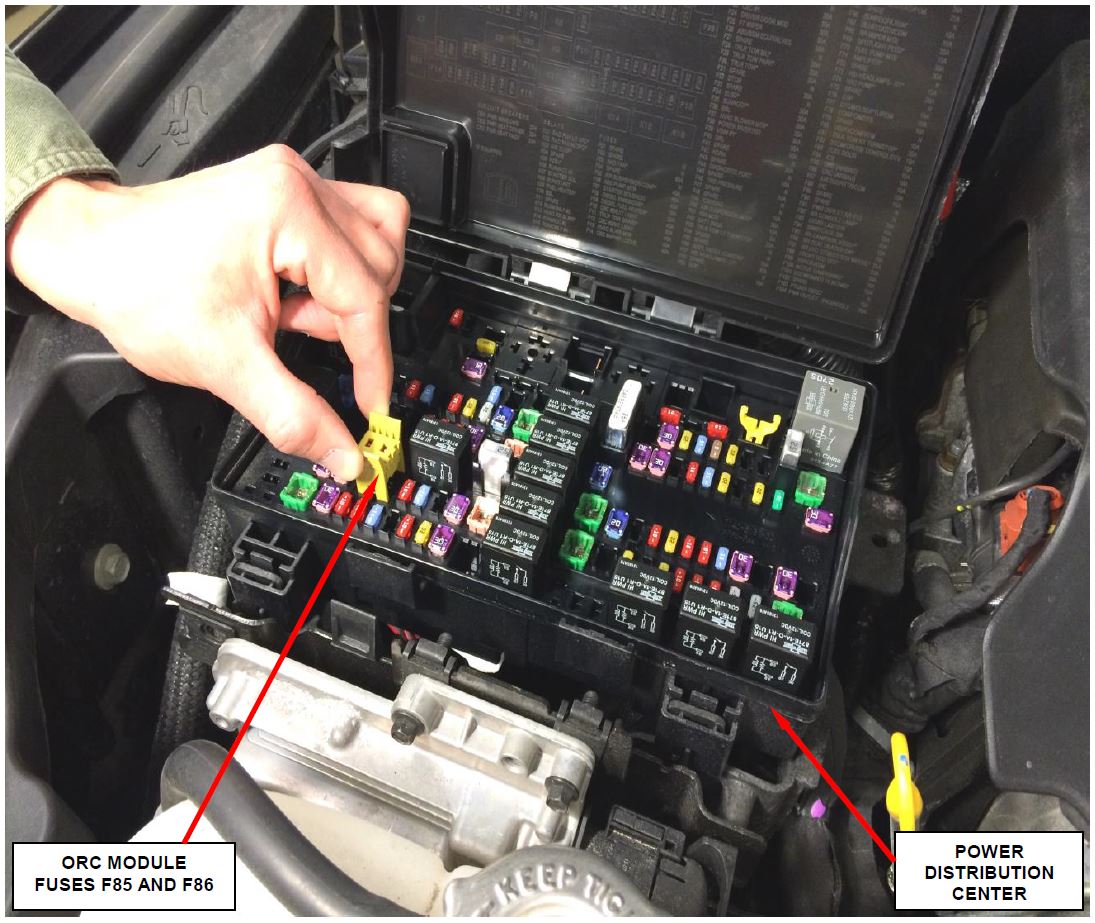
- Open the PDC cover and pull the ORC module fuses (fuse numbers F85 and F86) (Figure 1).
NOTE: Fuse locations are listed on the inside of the PDC cover (Figure 1).
- Use the following procedure to partially remove the center console:
a. For WK models only, remove and save the gear shift handle top cover (Figure 2).
b. For WK models only, remove and save the gear shift handle retaining screw located under the top cover (Figure 2).
c. For WK models only, remove and save the gear shift handle knob (Figure 2).
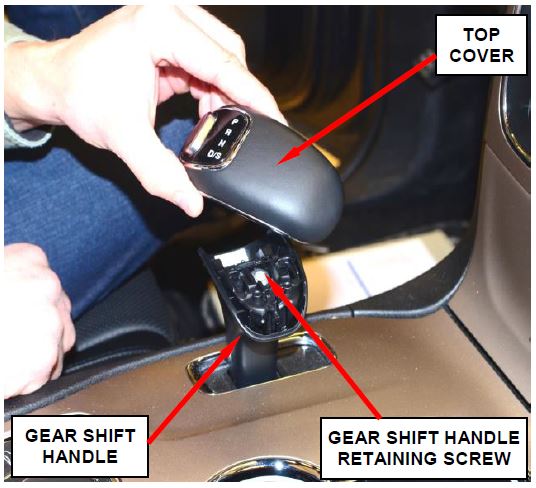
Figure 2 – Gear Shift
d. Remove and save the center console top panel.
e. Remove and save the center console right and left side panels (Figure 3).
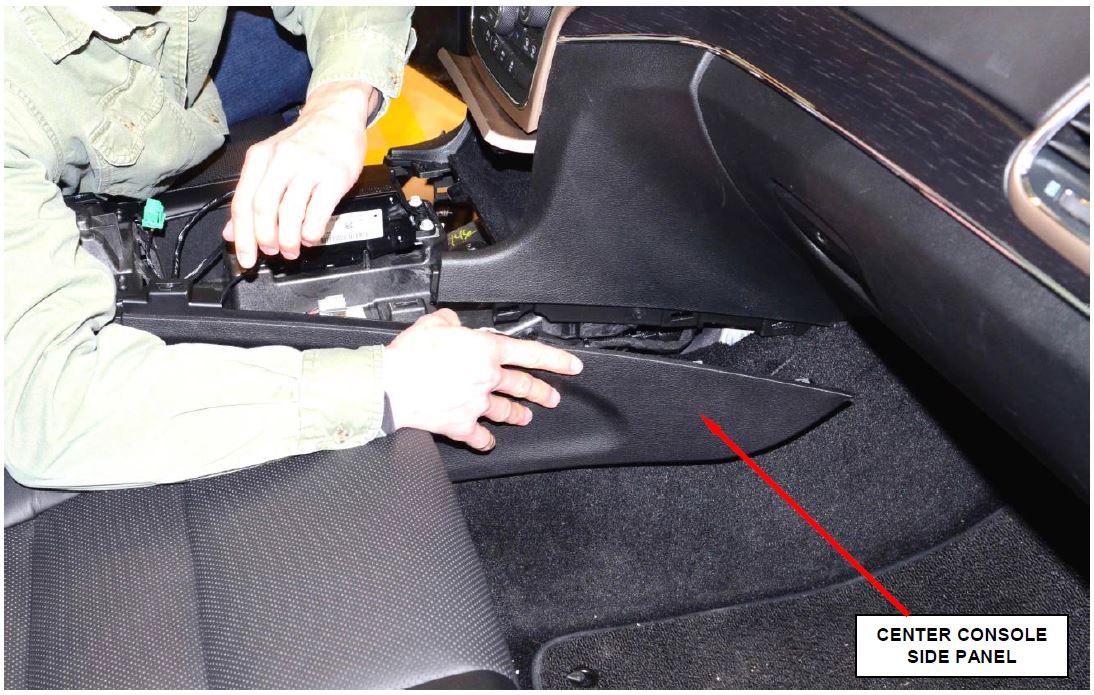
Figure 3 – Console Side Panels (right side shown)
f. Remove and save the four console mounting screws located behind the side panels (two per side).
g. Disconnect the grey electrical connector (Figure 4).
h. Move both front seats to the full forward position.
i. Remove and save the center console rear retaining bolt plastic covers (Figure 5).
j. Remove and save the center console rear retaining bolts (Figure 5).
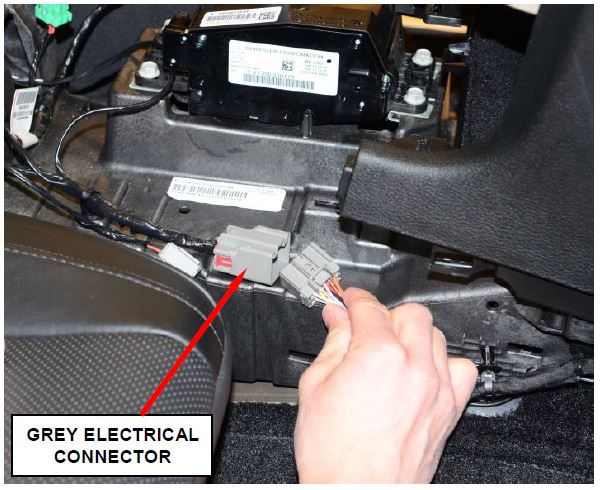
Figure 4 – Grey Electrical Connector
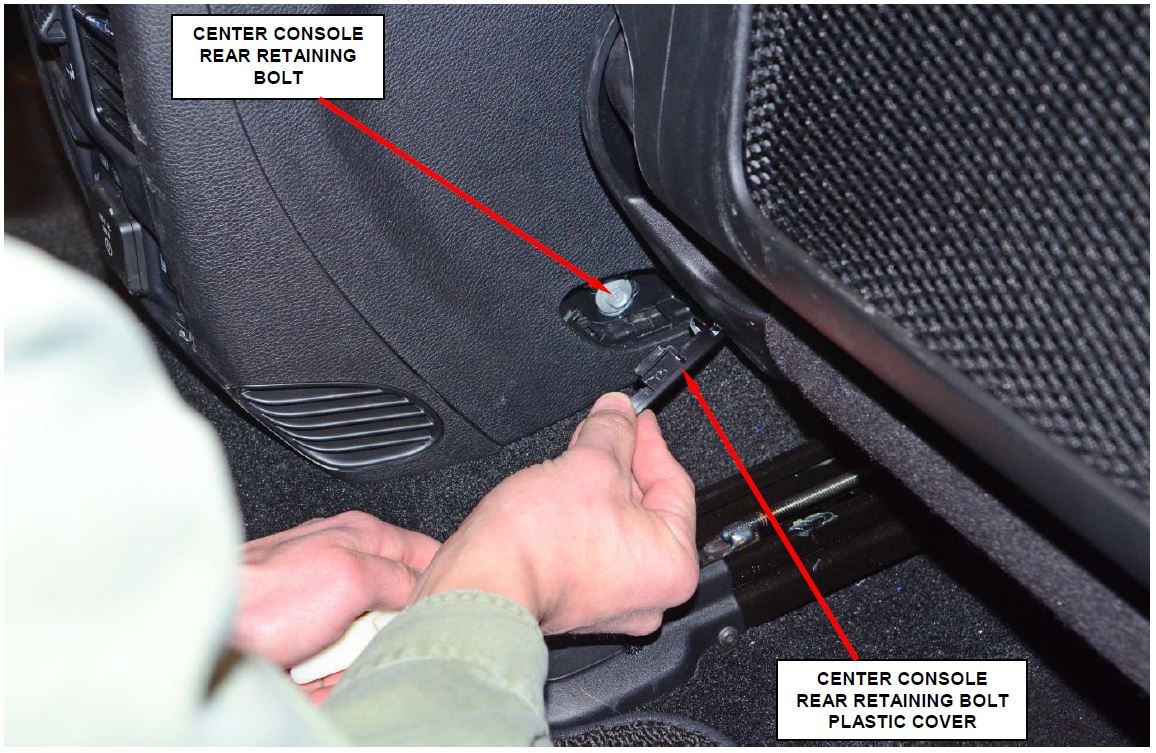
Figure 5 – Center Console Rear Retaining Bolts (right side shown)
k. Disconnect the center console large flat electrical connector located under the passenger front seat (Figure 6).
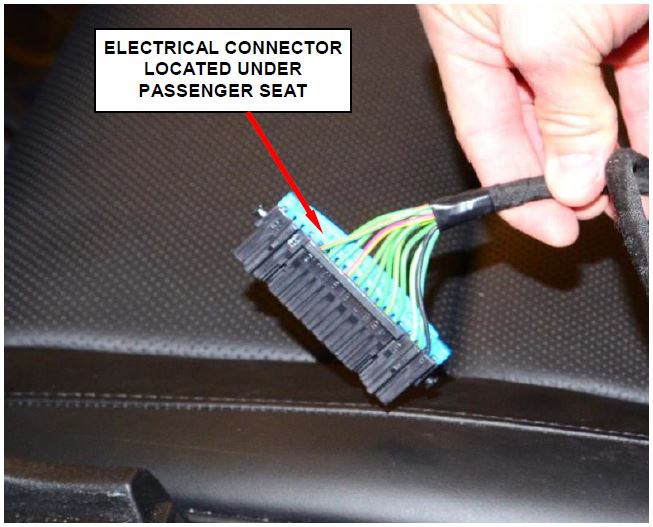
Figure 6 – Electrical Connector
l. Carefully lift the back of the center console up and install a prop rod or equivalent (Figure 7).
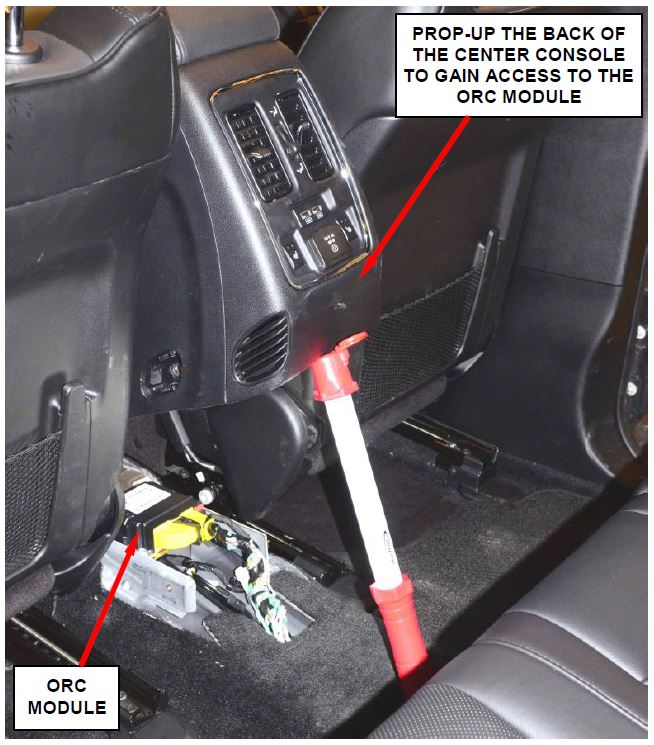
Figure 7 – Prop Up Back of Console
WARNING: To avoid serious or fatal injury on vehicles equipped with side curtain airbags, disable the Supplemental Restraint System (SRS) before attempting any Occupant Restraint Controller (ORC) module service. The ORC module may contain a rollover sensor, which enables the system to deploy the side SRS components in the event of a vehicle rollover event. If an ORC module containing a rollover sensor is accidentally rolled during service while still connected to battery power, the side SRS components will deploy. Disconnect and isolate the battery negative (ground) cable, then wait two minutes for the system capacitor to discharge before performing further service. This is the only sure way to disable the SRS. Failure to take the proper precautions could result in accidental airbag deployment.
WARNING: To avoid serious or fatal injury, never strike or drop the ORC module, as it can damage the impact sensor or affect its calibration. The ORC module contains the impact sensor, which enables the system to deploy the Supplemental Restraint System (SRS) components. If an ORC module is accidentally dropped during service, the module must be scrapped and replaced with a new unit. Failure to observe this warning could result in accidental, incomplete, or improper SRS component deployment.
- Disconnect and isolate the negative cable from the battery (Figure 8). Wait two minutes for the system capacitor to discharge before further service.
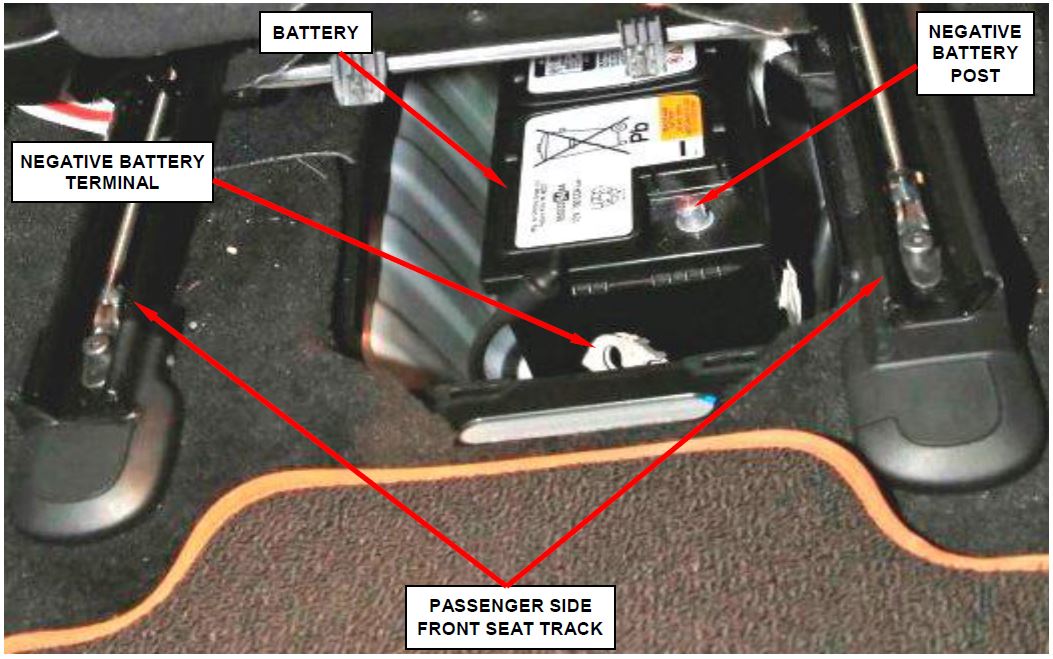
Figure 8 – Disconnect Negative Battery Cable
- Disconnect the instrument panel and body wire harness electrical connectors from the ORC module.
NOTE: To disconnect the wire harness electrical connectors from the ORC module, depress the release tab and lift the lever arm to the fully open position on each electrical connector (Figure 9).
NOTE: Disconnecting the smaller electrical connector first will allow easier access for disconnecting the large electrical connector.
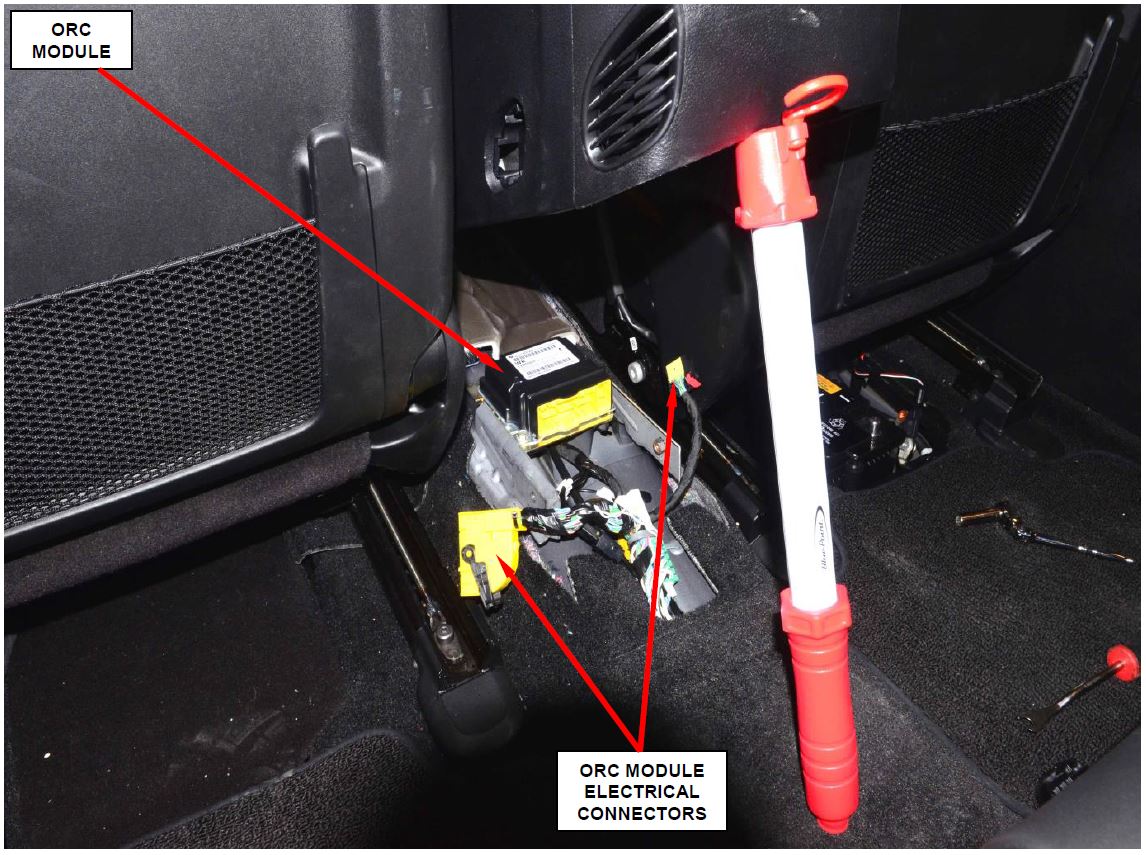
Figure 9 – ORC Module Yellow Electrical Connectors
- Remove and save the two bolts and one nut that secure the ORC module to the vehicle.
- Remove and discard the original ORC module from the vehicle (Figure 10).
CAUTION: Do not remove the metal plate located under the ORC module (Figure 10).
- Carefully position the new ORC module onto the weld stud at the right front corner of the ORC module.
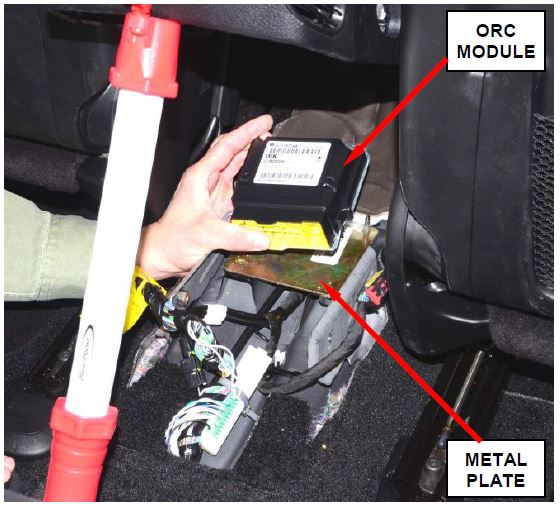
Figure 10 – ORC Module
NOTE: When the ORC is correctly positioned, the orientation arrow on the ORC label will be pointed forward in the vehicle.
- Loosely install the nut that secures the ORC module to the vehicle.
- Align the mounting holes on the left side of the ORC module.
- Install the two bolts that secure the ORC module. Tighten the bolts to 62 in. lbs. (7 N·m).
- Tighten the nut that secures the ORC module to 62 in. lbs. (7 N·m).
- Connect the electrical connectors to the ORC module connector receptacles.
CAUTION: Be certain that the latches on both ORC module electrical connectors are fully engaged.
- Lower the center console into position.
- Use the following procedure to install the center console:
a. Connect the center console large flat electrical connector located under the passenger front seat (Figure 6).
b. Install the center console rear retaining bolts (Figure 5).
c. Install the center console rear retaining bolt plastic covers (Figure 5).
d. Connect the negative battery cable.
e. Move both front seats to the full rearward position.
f. Connect the grey electrical connector on the center console (Figure 4).
g. Install the four console mounting screws located behind the side panels (two per side).
h. Install the center console right and left side panels (Figure 3).
i. Install the center console top panel.
j. For WK models only, install the gear shift handle knob (Figure 2).
k. For WK models only, install the gear shift handle retaining screw located under the top cover (Figure 2).
l. For WK models only, install the gear shift handle top cover (Figure 2).
- Connect the wiTECH scan tool and start a session.
- Cycle the ignition key to the “ON” position.
- With the vehicle unoccupied, install the ORC module fuses (fuse F85 and F86) (Figure 1).
- Wait two minutes.
- Erase all Diagnostic Trouble Codes (DTC’s).
- Use the following procedure to reset the ORC module:
a. From the “Vehicle View” screen, select the “ORC” icon.
b. Select the “ Functions” tab.
c. Select “Initialize ORC” from the list.
d. Follow the wiTECH screen prompts to complete the initialization process.
e. Once the initialization process is complete, wait one minute and then clear all DTC’s.
f. Return to the “Vehicle View” screen.
g. From the “Vehicle View” screen, select the “ABS” icon.
h. Select the “ Functions” tab.
i. Select “ABS Initialization” from the list.
j. Follow the wiTECH screen prompts to complete the initialization process.
k. Once the initialization process is complete, clear all DTC’s.
- Remove the wiTECH scan tool from the vehicle.
- Return the vehicle to the customer.
Completion Reporting and Reimbursement
Claims for vehicles that have been serviced must be submitted on the DealerCONNECT Claim Entry Screen located on the Service tab. Claims submitted will be used by Chrysler to record recall service completions and provide dealer payments.
Use the following labor operation number and time allowance:
| Labor Operation Number | Time Allowance | |
|---|---|---|
| Replace ORC module | 08-P6-71-82 | 0.8 hours |
Add the cost of the recall parts package plus applicable dealer allowance to your claim.
NOTE: See the Warranty Administration Manual, Recall Claim Processing Section, for complete recall claim processing instructions.
Dealer Notification
To view this notification on DealerCONNECT, select “Global Recall System” on the Service tab, then click on the description of this notification.
Owner Notification and Service Scheduling
All involved vehicle owners known to Chrysler are being notified of the service requirement by first class mail. They are requested to schedule appointments for this service with their dealers. A generic copy of the owner letter is attached.
Enclosed with each owner letter is an Owner Notification postcard to allow owners to update our records if applicable.
Vehicle Lists, Global Recall System, VIP and Dealer Follow Up
All involved vehicles have been entered into the DealerCONNECT Global Recall System (GRS) and Vehicle Information Plus (VIP) for dealer inquiry as needed.
GRS provides involved dealers with an updated VIN list of their incomplete vehicles. The owner’s name, address and phone number are listed if known. Completed vehicles are removed from GRS within several days of repair claim submission.
To use this system, click on the “Service” tab and then click on “Global Recall System.” Your dealer’s VIN list for each recall displayed can be sorted by: those vehicles that were unsold at recall launch, those with a phone number, city, zip code, or VIN sequence.
Dealers must perform this repair on all unsold vehicles before retail delivery. Dealers should also use the VIN list to follow up with all owners to schedule appointments for this repair.
Recall VIN lists may contain confidential, restricted owner name and address information that was obtained from the Department of Motor Vehicles of various states. Use of this information is permitted for this recall only and is strictly prohibited from all other use.
Additional Information
If you have any questions or need assistance in completing this action, please contact your Service and Parts District Manager.
Customer Services / Field Operations
Chrysler Group LLC
OCCUPANT RESTRAINT CONTROL MODULE
IMPORTANT SAFETY RECALL
P67 / NHTSA 14V-643
This notice applies to your vehicle (VIN: xxxxxxxxxxxxxxxxx).
This notice is sent to you in accordance with the requirements of the National Traffic and Motor Vehicle Safety Act.
Dear: (Name)
Chrysler has decided that a defect, which relates to motor vehicle safety, exists in certain 2014 model year Dodge Durango and Jeep® Grand Cherokee vehicles.
| The problem is… | The Occupant Restraint Control (ORC) module in your vehicle may develop an internal fault. A coating on the ORC module printed circuit boards may have been improperly applied during the manufacturing process. If the coating was applied incorrectly, lead salts may form and cause a resistive short across the ORC module printed circuit board(s). Atmospheric humidity may increase the potential for this condition. This could cause the airbag warning lamp to illuminate and potentially disable the passive restraint system. This could cause an increased risk of injury during certain crash conditions. |
| What your dealer will do… | Chrysler will repair your vehicle free of charge (parts and labor). To do this, your dealer will replace the ORC module assembly. The work will take about one hour to complete. However, additional time may be necessary depending on service schedules. |
| What you must do to ensure your safety… | Simply contact your Chrysler, Jeep, Dodge or RAM dealer right away to schedule a service appointment. Ask the dealer to hold the part for your vehicle or to order it before your appointment. Please bring this letter with you to your dealer. |
| If you need help… | If you have questions or concerns which your dealer is unable to resolve, please contact the Chrysler Group Recall Assistance Center at 1-800-853-1403. |
Please help us update our records by filling out the attached prepaid postcard if any of the conditions listed on the card apply to you or your vehicle. If you have further questions go to recalls.mopar.com.
If you have already experienced this specific condition and have paid to have it repaired, you may mail your original receipts and proof of payment to the following address for reimbursement consideration: FCA US Customer Assistance, P.O. Box 21-8004, Auburn Hills, MI 48321-8007, Attention: Recall Reimbursement. Once we receive and validate the required documents, reimbursement will be sent to you within 60 days. If you’ve had previous repairs and/or reimbursement you may still need to have the recall repair performed on your vehicle.
If your dealer fails or is unable to remedy this defect without charge and within a reasonable time, you may submit a written complaint to the Administrator, National Highway Traffic Safety Administration, 1200 New Jersey Ave., S.E., Washington, DC 20590, or call the toll-free Vehicle Safety Hotline at 1-888-327-4236 (TTY 1-800-424-9153), or go to https://www.safercar.gov.
We’re sorry for any inconvenience, but we are sincerely concerned about your safety. Thank you for your attention to this important matter.
Customer Services / Field Operations
FCA US LLC
Note to lessors receiving this recall: Federal regulation requires that you forward this recall notice to the lessee within 10 days.
Reprogramming
Chrysler J2534 Application Overview
Flash Availability - J2534/Pass Thru Device
Vehicle to Diagnostic Tool Reference Chart
Chrysler Recommended J2534 Devices
For Chrysler recommended J2534 device, see below table.
| J2534 Device | Firmware Version |
| CTC Vehicle Box * | 1.9 |
| UCAN 2 | 1.0 |
| Blue Streak -2534 Global Programmer | 2.10 |
| Actia I+ME Passthru | 2.07 |
* Chrysler recommends the CTC Vehicle Box Device for Chrysler SCI ECU reprogramming. SCI reprogramming is used on most PCMs and TCMs prior to the introduction of CAN bus vehicles which began in 2004 (Durango).
Click on the link below to:
Download J2534 Application
(Install the wiTECH 2.0 J2534 Application on your computer)
Download the Setup Utility
(Configure your microPod/MDP device)
Launch wiTECH 2.0
(Once subscription and users are assigned to a tool please follow this link to access wiTECH)
https://www.mopartsp.com/support

- J2534 Pass-Thru Programmer: TOPDON RLink J2534 is an advanced diagnostic and reprogramming tool that support all J2534 protocols, as well as D-PDU, CAN-FD and DoIP, ensuring compatibility with a wide range of modern vehicles. It offers extensive versatility with support for over 18 major automotive brands, including Chrysler, Ford, GM, Nissan, Toyota, Honda, Subaru, Land Rover/Jaguar, Volvo, Wuling, Volkswagen/Audi, Mercedes-Benz, and BMW. NOTE: Not compatible with Ford IDS diagnostic software
- All-in-One OEM Diagnostics: This J2534 ECU programming tool elevates your automotive repair capabilities to new heights by delivering complete OEM diagnosis. Boasting comprehensive full-system diagnostics, intuitive repair guides, advanced ECU programming and coding, common reset services, a vast library of repair information and more, this all-in-one solution empowers technicians to effortlessly tackle complex vehicle issues with ease. *Not compatible with 24V vehicles
- Proven Performance You Can Trust: Backed by over 10000 real vehicle tests and benefit from a wealth of practical experience, this OEM reprogramming tool guarantees stable and exceptional performance. Supported by TOPDON's dedicated technical experts with in-depth knowledge of both auto repair and J2534 Pass-Thru programming, the RLink J2534 provides prompt and professional assistance, ensuring a smooth setup and reliable compatibility
- Integrated Excellence, Always Up-to-Date: Featuring the exclusive RLink Platform to provide a streamlined experience with one-click driver installation and management, ensuring flawless integration with your OE software, maintaining the original performance quality. The built-in operation guide makes mastering OE software quick and easy, so you can get started right away. Plus, with lifetime free updates, your diagnostics will stay current with the latest drivers and innovations
- Efficiency Meets Versatility: Engineered to support three CAN channels simultaneously - CAN FD and CAN-CC included, giving you the edge in fast troubleshooting. To perfectly synchronized with the OE software, please diagnose with active subscriptions and make sure your computer system is running a compatible 64-bit Windows version (7, 8, 10 or later) to fully leverage the power of RLink J2534. *We don't provide extra OE software

- Advanced VCI Box, Industry-leading J2534 Pass-Thru Technology: This J2534 Pass-Thru Programmer is designed espically for technicians, independent shop owners, and DIY enthusiasts, enables fast, reliable computer-based programming. It supports all J2534 protocols—including the latest DoIP and CAN FD—ensuring full compatibility with both legacy and next-generation vehicles.
- High-Speed OEM-Level Diagnostics & Programming: Unlock true OEM functionality with comprehensive system diagnostics, guided troubleshooting, coding, adaptations, resets, and programming—all designed to slash repair time. This all-in-one tool eliminates the need for multiple OEM devices, boosting efficiency and cutting costs. Equipped with High-Speed USB, it delivers 10x more data per second than competing solutions
- Coverage for 17 Car Brands & Ultra Reliability: Works seamlessly for Chrysler, for Ford(Forscan), for GM, for Nissan, for Toyota, for Honda, for Subaru(SSM4), for Land Rover/Jaguar, for Volvo, for Wuling, for Volkswagen, for Mercedes-Benz, and for BMW. Backed by over 10000 real vehicle tests and benefit from a wealth of practical experience, this OEM reprogramming tool guarantees stable and exceptional performance
- User-Friendly RLink Platform & Expert Support: TOPDON’s proprietary driver management platform offers a clean interface and lifetime free updates. Access a rich library of real-world case studies to stay ahead of the curve. Backed by a support team with 10+ years of J2534 and automotive repair experience, we provide one-on-one assistance to resolve any technical issue.
- 6.6 ft USB-C Cable & Portable Storage Case: The RLink J2534 diagnostic tool features a 6.6ft USB 2.0 Cable and a 1.2 ft OBDII Extension Cable, allows to connection your computer easily outside the vehicle. The included handled carry case offers easy portability, storage, and hanging options—keeping your gear clean and ready to go, anywhere.

- Dual WiFi & 10.1" Touchscreen: Provides a stable, high-speed wireless link 3x faster than bluetooth, and a responsive, professional interface. Topdon ONE obd2 scanner diagnostic tool ensures smooth, non-lagging diagnostic scan, boosting mechanic efficiency
- J2534 Pass-Thru Support: The included ONE VCI supports the J2534 standard, allowing it to function as a pass-thru device when paired with OEM diagnostic software.Through TOPDON’s RLink platform, technicians can perform dealer-level coding, expanding in-house capabilities without investing in multiple factory automotive scan tools
- OE Topology Mapping: Visualize the vehicle’s ECU network exactly as it’s built.Zoom, pan, and highlight specific modules to pinpoint component issues with precision.Topology mapping displays real-time communication between modules
- 50+ Service Functions: Covers high-demand services like ADAS calibration, DPF regen, TPMS reset, ABS bleed, and throttle adaptation.Expands your service menu, allows you to charge premium rates, and turns away zero jobs due to lack of tooling. Vehicle-specific functionality may vary
- Advaned ECU Coding: 10 of the most serviced brands in North America, including full ECU coding and flash hidden support for BMW, VW, Au-di, Benz, Porsche, Toyota, Ni ssan and more. Enables module replacement, feature customization, and personal settings with automatic backup or restore.Lets your shop safely offer high-margin customization services, attracting more customers and boosting profit

- [J2534 Pass-Thru Programmer] - TOPDON RLink J2534 is engineered for professional technicians, delivering OEM diagnostic and reprogramming capabilities. It supports all J2534 protocols, CAN-FD, DoIP, D-PDU. Compatible with 17 vehicle brands—such as Chrysler, Ford, GM, KIA, Hyundai, Nissan, Toyota, Honda, Subaru, Mitsubishi, MAZDA, Land Rover/Jaguar, Volvo, Volkswagen/Audi, Mercedes-Benz, and BMW. RLink J2534 can help reduce the cost of purchasing equipment from different brands.
- [All-in-One OEM Reprogramming and Diagnostics] - When seamlessly integrated with OEM diagnostic software, this dongle enables you to perform a wide range of functions, including ECU programming and coding, DTC reading and clearing, active tests, component matching, adaptations, rewriting, guided troubleshooting, and more. This all-in-one tool eliminates the need for multiple OEM devices, significantly boosting work efficiency.
- [Tested, Trusted, and Proven for Accuracy] - TOPDON RLink J2534 is renowned for its reliability, having successfully completed over 10,000 real-vehicle tests. The wealth of data and hands-on experience behind it ensures consistent performance and accurate results. You can trust this tool to deliver optimal performance.
- [One-Click Installation, Continuous Updates] - The exclusive TOPDON RLink platform streamlines installation with a one-click driver setup, allowing you to quickly access OEM software for diagnostic and reprogramming tasks. With lifetime free updates, your RLink J2534 stays current without any additional cost, ensuring reliable performance for the long term. *We don't provide extra OE software.
- [Works with Windows Compatibility and OEM Software Subscription] - The RLink J2534 supports three CAN channels - including CAN FD and CAN-CC, providing advantages in the process of rapid troubleshooting. Compatible with Windows 7, 8 and 10 (64-bit) and higher versions of the system. For full functionality, an active OEM software subscription is required for each supported vehicle brand. Please note that the dongle does not include OEM software, which must be purchased separately to access brand-specific diagnostic and reprogramming features.

- 【J2534 Pass-Thru Device】 This budget-friendly J2534 pass-thru device delivers OEM diagnostics and reprogramming capabilities for dealerships, repair shops and automotive DIY enthuisasts, enables you diagnose, program and repair the vehicles more efficiently and precisely. Supporting J2534, D-PDU, CAN-FD and DoIP, this J2534 passthru tool ensures wide vehicle coverage. It's compatible with OE software application, ensuring seamless integration and original performance quality
- 【All-in-One Diagnostic Tool】 Simplify your workflow and tackle the complex diagnostics and repairs with confidence! This J2534 passthrough tool provides full system diagnosis, bi-directional control, maintenance reset services, ECU programming and ECU coding to run advanced diagnostics and programming. Equipped with the specialized platform, this J2534 pass-thru tool is fully compatible with OE software that helps technicians confidently handle complicated vehicle repair issues
- 【J2534 Diagnostic Tool】 The Tabscan J2534 pass-thru device is built with a dedicated platform, making it ideal for both professional and personal use. Simply download the driver for your ford vehicle within the platform—ensuring only one driver is installed at a time. Then connect the device to your vehicle’s OBD2 port and link it to your computer using the included USB A to USB C cable. Finally launch your OE software, select Tabscan J2534 VCI as interface, and begin diagnose and program
- 【Universal Compatibility】 Tabscan J2534 reprogramming tool is designed to be compatible with Ford vehicles for advanced diagnostics and programming. It supports J2534 protocols, along with D-PDU, CAN-FD and DoIP, ensuring seamless connectivity with older or modern vehicles. This J2534 diagnostic tool only works with computer running on windows 7/10/11. Vehicle compatibility varies by model or year, please confirm with us before purchase. Note: It's not compatible with 24V vehicles
- 【Professional Technical Support】 Tabscan J2534 pass-thru device provides a stable and seamless connection between your vehicle and computer for diagnostics, programming, and coding. But that's not all—we go beyond hardware. Our dedicated technical support team brings deep expertise in automotive diagnostics and programming. Whether you need help with setup, troubleshooting or latest diagnostic resources and upgrades, we provide fast, professional and reliable support every step of the way
- ALL OF THE J2534 PROTOCOLS - This single unit has all of the protocols you need for your OEM J2534 reprogramming and diagnostics including the latest in DoIP and CanFD
- J2534 TECHNICAL SUPPORT - FREE for the life of the tool. Staffed by technicians who understand vehicle repair and J2534 Pass‑thru
- TOOLBOX WITH OEM APPLICATION DESCRIPTIONS - educational video tutorials and real-time news – Giving you the confidence and up-to-date knowledge to get the job done
- J2534 v05.00 API - The newest version of J2534 to give you the latest in pass-thru technology
- FUTURE PROOF WITH 4 CAN CHANNELS - Going beyond the 3 required by select Chrysler/FCA models, CarDAQ-Plus 3 also provides a 4th to meet the needs of future OEM applications
This product presentation was made with AAWP plugin.