NUMBER: 08-098-15
GROUP: Electrical
DATE: October 15, 2015
THIS BULLETIN SUPERSEDES TECHNICAL SERVICE BULLETIN 08-085-14 REV. A, DATED NOVEMBER 14, 2014, WHICH SHOULD BE REMOVED FROM YOUR FILES.
ALL REVISIONS ARE HIGHLIGHTED WITH **ASTERISKS** AND INCLUDES, ADDING 2015 AND 2016 MODEL YEARS, REMOVE THE BUILT ON OR BEFORE DATE, REPAIR INFORMATION CHANGES REGARDING UPDATING MODULES WITHOUT REMOTE USB PORT AND A NEW LOP.
SUBJECT:
Hands Free Feature Inoperative
OVERVIEW:
This bulletin involves updating the Convergence Telematics Module (CTM) software.
NOTE: Convergence Telematics Module (CTM) was also known as the Hands Free Module (HFM).
MODELS:
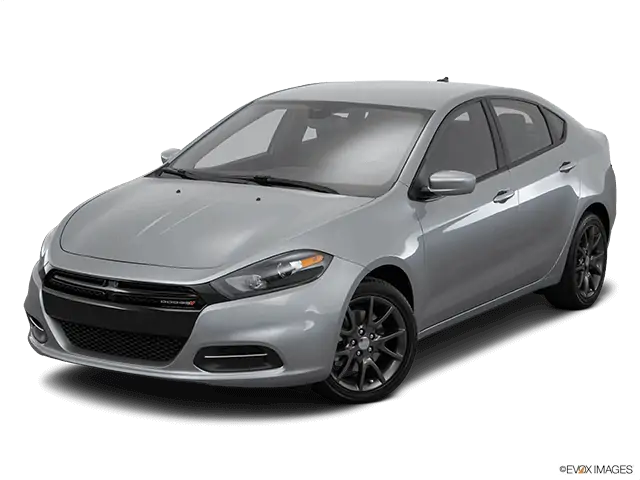
| **2013 – 2016** | (PF) | **Dodge** Dart |
NOTE: **This bulletin applies to vehicles equipped with UConnect 200 AM/FM/CD/MP3 Radio (sales code RAE) and UConnect Voice Command W/Bluetooth (sales code RSP or RSQ).**
SYMPTOM/CONDITION:
The customer may notice that the hands free feature (Bluetooth) does not work. On further inspection one or more of the following DTCs may be found:
- U11F6-00 Lost Communication With Convergence Telematics Module.
- U11F6-87 Lost Communication With Convergence Telematics Module – Missing Message.
DIAGNOSIS:
Using a Scan Tool (wiTECH) along with the appropriate Diagnostic Procedures available in TechCONNECT, verify no DTCs are set. If DTCs are present, other than those listed above, record them on the repair order and repair as necessary before proceeding further with this bulletin.
If the customer describes the symptom/condition or if the technician finds the DTC, perform the Repair Procedure.
PARTS REQUIRED:
| Qty. | Part No. | Description |
|---|---|---|
| **1 (AR) | 05091908AD | Hands Free Module |
| 1 (AR) | 05091911AD | Hands Free Module** |
| 1(AR) | 68086985AB
No products found. | USB Cable use on vehicles without remote USB port |
NOTE: Most Dealers will already have this USB cable. It was used on other Hand Free Module updates.
REPAIR PROCEDURE:
- Check to see if the CTM is communicating.
- Turn on the vehicle and press the phone button on the steering wheel.
- Quickly turn the radio volume control knob to 20 (or about 3/4 of max) and leave it there.
- Did the audio system play any of the following prompts: Uconnect Ready… beep, Ready… beep, or just an audible beep?
- Yes >>> Proceed to Step #10.
- No >>> Proceed to Step #5.
- Disconnect the battery for one minute.
- Reconnect the battery and see if the CTM is now communicating on the buss.
- Turn on the vehicle and press the phone button on the steering wheel.
- Make sure the radio volume is still set at 20 (or about 3/4 of max) and leave it there.
- Did the audio system play any of the following prompts: Uconnect Ready… beep, Ready… beep, or just an audible beep?
- Yes >>> Proceed to Step #10.
- No >>> This bulletin does not apply. Normal diagnostics for a non responses CTM should be performed.
- After hearing the beep, say “Setup- Software Update”.
- The CTM software version will now be displayed on the radio display screen.
- What software version is being display on the radio screen?
- **B:01.06.26 or higher >>> Proceed to Step #13.
- B:01.06.14, B:01.06.23 or B:01.06.24** >>> Use the USB flash drive that contains 1 flash file. Proceed to Step #14.
- B:01.05.09 >>> Use the USB flash drive that contains 3 flash files. Proceed to Step #14.
- The CTM already has the latest software and this bulletin doesn’t apply.
- Has the USB flash drive been created with the correct software update files?
- Yes >>> Proceed to Step #18.
- No >>> Proceed to Step #15.
- Go to DealerCONNECT>Service>UCONNECT Information & Utilities> UconnectDealer software downloads to download the files.
- If a security message appears “Do you want to view only the webpage content that was delivered securely?” See (Fig. 1). Press No to continue.
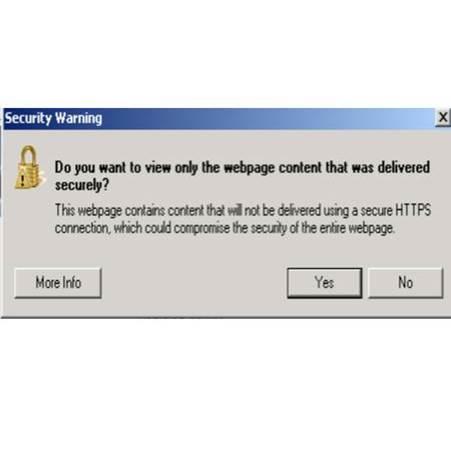
Fig. 1 Pop-up Security Message
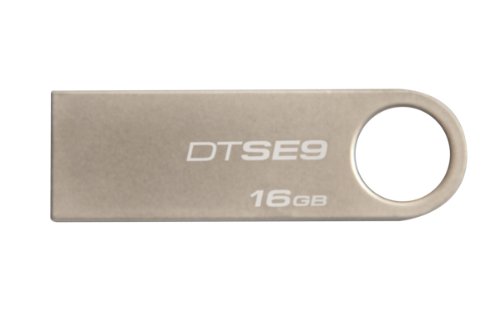
NOTE: A Blank USB flash drive must be used to download the software. Only one software update can be used on one USB flash drive. One USB flash drive
NOTE: If the dealer cannot download the software, make sure you have proper security access. If not have the Service Manager or Shop Foreman download the software update.
- To download the software files to a USB flash drive, follow the on screen instructionsand perform the following.
- Acquire a blank USB flash drive with at least 4 gb of space.
- Download the software update file to your local pc’s desktop.
- Be sure to extract the file before copying it to the blank USB flash drive.
- A blank USB flash drive will be needed for each CTM update, additional update scan not be on the same USB stick.
- Once the file is saved to the USB flash drive, it is recommended to physically labelthe USB flash drive with the bulletin number and if it’s an early or late built vehicle.
- **Does this vehicle have a remote USB port (sales code RSX)?
- Yes >>> Proceed to Step #21.
- No >>> Proceed to Step #19.
- Gain access to the CTM, refer to TechConnect > Electrical/8E – Electronic Control Modules/MODULE, Convergence Telematics/Removal, CTM location see (Fig. 2).
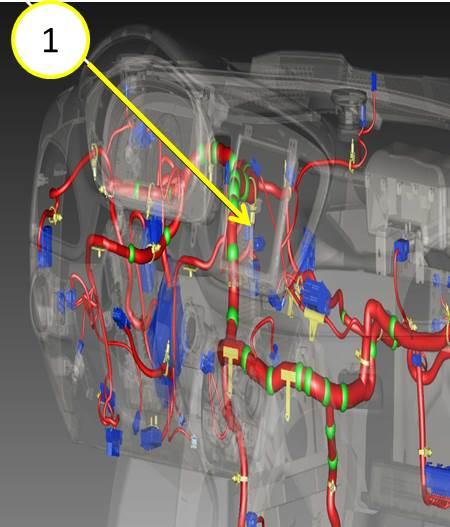
Fig. 2 CTM Location Under The Dash
1 – CTM location
- Plug in USB cable (68086985AB) into the open port of the CTM. (Fig. 3).
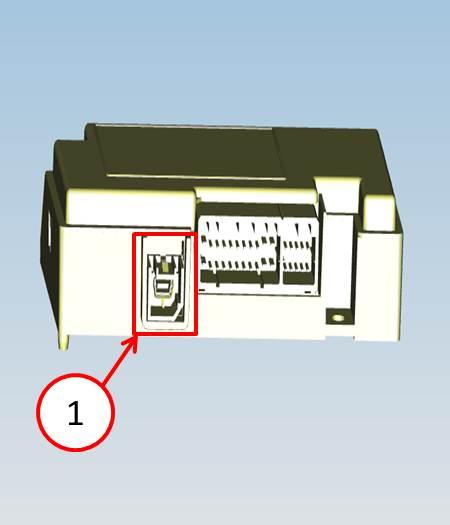
Fig. 3 Location Of USB Update Cable Port On CTM
1 – Plug USB cable (68086985AB) in this open port.
- With the engine running insert the correct USB flash drive into the USB port.
- Press the phone button on the steering wheel and after a beep is heard say, “SetupSoftware Update”.
- The audio system will state “Starting Software Update. Please Wait…” This will befollowed up with intermittent beeps.
CAUTION: **Do not interrupt the vehicles power, cycle the ignition or remove the USB flash drive.**
NOTE: If a USB flash drive with 3 (early built) update files on it is used, the update will take around **33 minutes**. If the USB flash drive with only 1 file (late built) on it is used then the update should take **3 minutes**.
NOTE: Vehicle built on or before October 21, 2012 are considered early built vehicle.
- After the update has been completed, the audio beeps will stop and the radio displaywill show a normal radio display.
CAUTION: When updating an early built vehicle, the radio display screen will show a normal display between each update file. Do not proceed to the next step until all 3 files have been downloaded.
CAUTION: Do NOT remove the USB flash dive at this point, proceed to the next step.
- Press the phone button on the steering wheel.
- Did the audio system play any of the following prompts: Uconnect Ready… beep, Ready… beep, or just an audible beep?
- Yes >>> **Press the phone button on the steering wheel to end session** and remove the USB flash drive from the USB port and proceed to Step #29.
- No >>> Proceed to Step #27.
- Wait 2 minutes and press the phone button again.
- Did the audio system play any of the following prompts: Uconnect Ready… beep, Ready… beep, or just an audible beep?
- Yes >>> **Press the phone button on the steering wheel to end session and** remove the USB flash drive from the USB port and proceed to Step #29.
- No >>> Remove the USB flash drive and perform normal diagnostics, the module may need to be replaced.
- Verify that the CTM has been updated.
- Press the phone button on the steering wheel.
- After hearing a beep, say “Setup – Software Update”.
- Is software version **B:01.06.26** being display on the radio screen?
- Yes >>> This service bulletin has been completed, proceed to Step #34.
- No >>> Proceed to Step #33.
- Is this the 2nd attempt to update the HFM?
- Yes >>> Make sure the correct software is being used and try to download the file from the website again on to a new USB flash drive.
- No >>> Flash the CTM again proceed to Step #18.
- If USB update cable 68086985AB was used to update the module remove the cableand reassemble the vehicle. Use TechConnect > Electrical/8E – Electronic Control Modules/MODULE, Convergence Telematics/Installation.
POLICY:
Reimbursable within the provisions of the warranty.
TIME ALLOWANCE:
NOTE: Vehicle built on or before October 21, 2012 are considered early built vehicle.
| Labor Operation No: | Description | Skill Category | Amount |
|---|---|---|---|
| **18-20-34-9D | Module, Convergence Telematics (CTM) – Inspect Software Level (0 – Introduction) | 6 – Electrical and Body Systems | 0.2 Hrs. |
| 18-20-34-9E | Module, Convergence Telematics (CTM) – Inspect and Reprogram (Early Build) (0 – Introduction) | 6 – Electrical and Body Systems | 0.8 Hrs. |
| 18-20-34-9F | Module, Convergence Telematics (CTM) – Inspect and Reprogram (Late Build) (0 – Introduction) | 6 – Electrical and Body Systems | 0.2 Hrs. |
| 18-20-34-9G | Module, Convergence Telematics (CTM) – Create USB Jump Drive From CD or Uconnect Website (One Time Only, Each Model Year) (0 – Introduction) | 6 – Electrical and Body Systems | 0.2 Hrs. |
| (Related To Performing Update) 18-20-34-51 | Module, Convergence Telematics (CTM) – Without Remote USB Port (0 – Introduction) | 6 – Electrical and Body Systems | 0.3 Hrs.** |
NOTE: If a USB flash drive with 3 (early built) update files on it is used, the update will take around **42 minutes**. If the USB flash drive with only 1 file (late built) on it is used then the update should take **9 minutes**.
FAILURE CODE:
**The dealer must choose which failure code to use. If the customer came in with an issue and the dealer found updated software to correct that issue, use failure code CC, for all other use failure code RF.
- If the customer’s concern matches the SYMPTOM/CONDITION identified in the Service Bulletin, failure code CC is to be used.
- If an available flash is completed while addressing a different customer concern, failure code RF is to be used.
| CC | Customer Concern |
|---|---|
| RF | Routine Flash** |
Uconnect Updates - Chrysler Dodge Ram Jeep Fiat
http://chrysler.oemdtc.com/344/uconnect-updates-chrysler-dodge-ram-jeep-fiat

- USB-C 2-in-1 storage OTG: The Lexar JumpDrive Dual Drive D40E features USB Type-A and Type-C connectors in a slim, portable form factor for easy device compatibility
- Transfer speeds up to 100MB/s: Based on internal testing, performance may vary depending upon the host device, interface, and usage conditions. 1MB=1,000,000 bytes
- Plug and Play: Widely compatible with USB Type-C smartphones, tablets, laptops, Macs, and traditional Type-A devices, no software installation required. The 360° swivel design allows for easy switching between connectors without the hassle of losing a cap
- Durable & Compact: The Lexar D40E USB memory stick features a metal enclosure, withstands temperatures from 0° to 50° C (32°F to 122°F), and is lightweight at 26g with dimensions of 70.4 x 16.9 x 11.7mm
- Security & Warranty: Securely protects files using an advanced security software solution with 256-bit AES encryption. Backed by a Lexar 3-year limited warranty
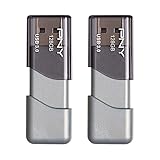
- The durable, light-weight design of the Turbo Attaché 3 USB 3.0 Flash Drive is the essential mobile storage solution
- Perfect for transferring large files such as movies, videos, photos, music & documents
- Transfer speeds up to 10 times faster than standard USB 2.0 flash drives
- Convenient sliding collar, and cap-less design protects your content when not in use
- Compatible with most PC and Mac laptop and desktop computers with USB 3.0 ports


- GOOD VALUE PACKAGE - 1 Pack 32GB Memory Stick USB 2.0 Flash Drives with great cost performance and high quality.
- BIG CAPACITY - The available capacity: 29.10GB-29.8GB, You can save the data of movies, music, photos, designs, programs, manuals, handouts in a high speed.Good performance in digital data storing, transferring and sharing with families, friends, workmates, clients and machines.
- EASY TO USE & PLUG AND WORK - Support windows 7 / 8 / 10 / Vista / XP / 2000 / ME / NT Linux and Mac OS, Compatible with USB2.0 and below.
- TWISTTURN DESIGN & EASY CARRY - The metal clip rotates 360° round the ABS plastic body which with rubber oil skin feeling finish. The capless design can avoid lossing of cap, and providing efficient protection to the USB port.
- WARRANTY & SUPPORT - SIMMAX logo is laser printed on the USB connector surface, our products are of good quality and we promise that any problem about the product within one year since you buy.

- High-speed USB 3.0 performance of up to 150MB/s(1) [(1) Write to drive up to 15x faster than standard USB 2.0 drives (4MB/s); varies by drive capacity. Up to 150MB/s read speed. USB 3.0 port required. Based on internal testing; performance may be lower depending on host device, usage conditions, and other factors; 1MB=1,000,000 bytes]
- Transfer a full-length movie in less than 30 seconds(2) [(2) Based on 1.2GB MPEG-4 video transfer with USB 3.0 host device. Results may vary based on host device, file attributes and other factors]
- Transfer to drive up to 15 times faster than standard USB 2.0 drives(1)
- Sleek, durable metal casing
- Easy-to-use password protection for your private files(3) [(3)Password protection uses 128-bit AES encryption and is supported by Windows 7, Windows 8, Windows 10, and Mac OS X v10.9 plus; Software download required for Mac, visit the SanDisk SecureAccess support page]

- Easily store and access 2TB to content on the go with the Seagate Portable Drive, a USB external hard drive
- Designed to work with Windows or Mac computers, this external hard drive makes backup a snap just drag and drop
- To get set up, connect the portable hard drive to a computer for automatic recognition no software required
- This USB drive provides plug and play simplicity with the included 18 inch USB 3.0 cable
- The available storage capacity may vary.
This product presentation was made with AAWP plugin.