NUMBER: 08-103-15
GROUP: Electrical
DATE: October 30, 2015
THIS BULLETIN SUPERSEDES TECHNICAL SERVICE BULLETIN 08-021-14 REV. C, DATED OCTOBER 30, 2014, WHICH SHOULD BE REMOVED FROM YOUR FILES. ALL REVISIONS ARE HIGHLIGHTED WITH **ASTERISKS** AND INCLUDE ADDITIONAL SYMPTOM, SOFTWARE AND LOP.
THIS SERVICE BULLETIN IS ALSO BEING RELEASED AS RAPID RESPONSE TRANSMITTAL (RRT) 14-089. ALL APPLICABLE SOLD AND UN-SOLD RRT VIN’s HAVE BEEN LOADED. TO VERIFY THAT THIS RRT SERVICE ACTION IS APPLICABLE TO THE VEHICLE, USE VIP OR PERFORM A VIN SEARCH IN TECHCONNECT. ALL REPAIRS ARE REIMBURSABLE WITHIN THE PROVISIONS OF WARRANTY.
SUBJECT:
RG3 RG4 RJ3 RJ4 Radio Enhancements
OVERVIEW:
This bulletin involves inspecting and updating the radio software, if required.
MODELS:
| 2014 | (WK) | Jeep Grand Cherokee |
| 2014 | (WD) | Dodge Durango |
| 2013-2014 | (ZD) | Dodge Viper |
| 2014 | (KL) | Jeep Cherokee |
| 2013-2014 | (DS) | Ram 1500 pickup |
| 2013-2014 | (DJ) | Ram 2500 pickup |
| 2013-2014 | (D2) | Ram 3500 pickup |
| 2013-2014 | (DX) | Ram Truck – Mexico |
NOTE: This bulletin applies to vehicles equipped with one of the following radios.
- Uconnect 8.4 AM/FM/DAB/BT/VOICE (sales code RG3).
- Uconnect 8.4AN AM/FM/DAB/BT/NAV/VOICE (sales code RG4).
- Uconnect 8.4 AM/FM/BT (sales code RJ3).
- Uconnect 8.4N AM/FM/BT/NAV (sales code RJ4).
SYMPTOM/CONDITION:
- **Duplicate song titles may be displayed in USB mode.
- Last track is displayed but next track is being played.
- SD, USB or BTSA modes may become non-functional for a given ignition cycle.
- Track names may be displayed twice in USB or SD media modes.
- Voice Recognition command “Set Temperature” may not respond in Fahrenheit. United Kingdom (UK) Vehicle only.**
- DAB (Digital Audio Broadcast) is inoperative.
- Wrong routing for addresses with a longitude between 0 and -1 degrees.
- Speed Camera UK & Spain complaining that the speed camera feature was not available with the latest MY14 software.
- DAB preset list on the top of the screen doesn’t change while scrolling with steering controls.
- Rear view camera jitter.
- Tuner reception software enhancements.
- HVAC temperature control enhancements.
- SRT soft button missing for radios when vehicle is equipped with SRT feature (EMEA /LATAM markets only).
- Battery drain due to the radio and cluster back-lighting staying on.
- Postal Code smart speller logic enhancements (EMEA markets only).
- AM/FM steering wheel mode switch button not working (LATAM markets only).
- Navigation Lockout Disable while vehicle is in motion (EMEA markets only).
- Removed network status indicators for SRT/APPS.
- Voice Recognition (VR) says ‘cancel’ when starting (App) applications.
- iPod would not resume playing after a VR session or phone call.
- Removed the cell signal indicators in the SRT and Apps button on non-US vehicles.
- rear camera may show a black screen for 3 seconds upon going to reverse.
- Navigation would not start or would lose position.
- Removal of parental control under Apps menu.
- Turn by Turn navigation in the cluster set to ON by default.
- Transfer button does not pick-up and transfer incoming call.
- Some Russian letters are caps when they should be lower-case.
- Touch screen locks up in navigation, when Russian is selected.
- Address search availably when the vehicle is moving (EMEA markets only).
- VR messages in Spanish talks to fast.
- Recognition enhancement for Russian VR.
- Hands free audio too low for non-amp vehicle (KL).
- Intermittently “Registration expired” pop-up appears on display screen.
- Arabic language for navigation only, not the keyboard (RJ3 RJ4 radio only).
- Incorrect time to destination, when ignition is cycled.
- Volume adjustment for navigation prompts, for phone call.
- Incorrect rear to center fade displayed at start up.
- Translation enhancements for French German and Spanish.
- Right arrow doesn’t work for advancing through preset.
- Map zoom level reduced.
- Park sense audio tone stuck on.
- While in rear media the browser knob is disabled.
- Varies POI not available for navigation.
- Postal code search not working in some markets.
- Horn sounds when locked is missing in the settings menu.
- Mute button out of sync with mute in the hands free phone.
- Enhancements my for hands free phone locking up.
- Enhancements to quick search.
- Backup camera active guide lines are missing.
- Sound horn when locking, missing.
- Erratic Interior ambient lamp menu being displayed.
- Remove auto entry/exit from menu.
- Remove hill start assist from menu, when not available.
- Russian keyboard enhancements.
- Polish text update.
- Black screen intermittently displayed.
- VR teleprompter translations.
- Splash screen not showing after remote unlock.
- Translation enhancement for Spanish, German, French and Russian.
- Russian letters are in caps when they should be in lower case.
- Nav locks up when Russian is selected.
- VR Spanish language talks to fast when giving instructions.
- Arabic language added to some features (RJ3 RJ4 radios only).
- VR enhancements for Russian.
- Route guiding enhancements. HVAC display enhancements.
DIAGNOSIS:
Using a Scan Tool (wiTECH) with the appropriate Diagnostic Procedures available in TechCONNECT, verify all audio systems are functioning as designed. If DTCs or symptom conditions, other than the ones listed above are present, record the issues on the repair order and repair as necessary before proceeding further with this bulletin.
If a customer’s VIN is listed in VIP or your RRT VIN list, perform the repair. For all other customers that describe the symptom/condition, perform the Repair Procedure.
REPAIR PROCEDURE:
NOTE: Note: Software updates are now available for download to USB flash drive on the Uconnect web site and should be used instead of ordering a disc.
- Has the USB flash drive been created?
- Yes >>> Proceed to Step #4.
- No >>> Proceed to Step #2.
- Go to DealerCONNECT>Service>UCONNECT Information & Utilities> Uconnect Dealer software downloads to down load the files.
- If a security message appears “Do you want to view only the web page content that was delivered securely?” press ”NO” to continue, see ( 1).
NOTE: The Site is optimized for Microsoft Internet Explored 8 or 10. Use these software version if you encounter a problem downing load the Software.
NOTE: A Blank USB flash drive must be used to down load the software. Only one software update can be used on one USB flash drive.
NOTE:
- Acquire a blank USB flash drive with at least 4 GB of space.
- Download the software update file to your local pc’s desktop.
- Be sure to extract the file before copying it to the blank USB flash drive.
- A blank USB flash drive will be needed one for each radio update, both updates can not be on the same USB flash drive.
- Once the file is saved to the USB flash drive, it is recommended that the USB flash drive be physically labeled with the bulletin number and radio sales code.
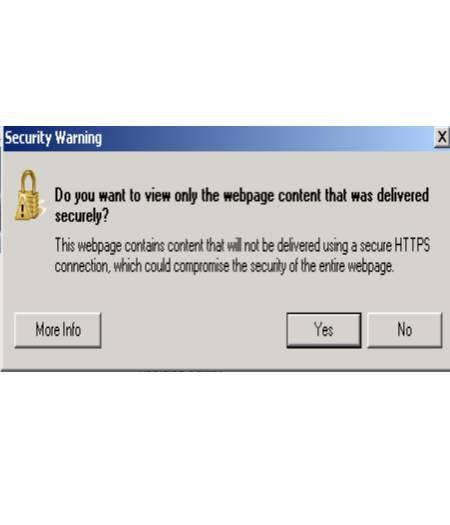
Fig. 1 Pop-up Security Message
If this Pop-up appears, select “NO” to continue.
- With the engine running and radio powered on, insert the correct USB flash drive with new software into USB hub.
- The next screen display will have the old and new software levels. The radio will be updated to **15.26.1 **.
- **Is the radio software at or above 15.26.1?
- Yes >>> Proceed to Step #7.
- No >>> Proceed to Step #8.
- Does the vehicle have an active RRT 14-089?
- Yes >>> Radio already has latest software. Use the Check Software Only LOP(18-60-02-DR) to close the active RRT.
- No >>> This bulletins doesn’t apply. Normal diagnostic should be performed.**
- Press the soft key “Yes” to start the update.
NOTE: If the software update process is interrupted, aborted or failed, the process should be restarted.
NOTE: Do not cycle the ignition or touch the radio during the update process.
- The update may take 20 minutes, no other actions will be needed.
- After the update is done, the screen will display the software levels again.
- Press “No” and turn off the vehicle. Unplug the USB flash drive. Open and close thedrivers door and let the Bus go to sleep.
NOTE: Make sure to leave ignition off, do not press the brake, and do not reopen any doors, so the modules will go to sleep.
- Cycle the ignition one more time, turn the ignition on, then back off. Open and closethe drivers door and let the Bus go to sleep. This will complete the radio update. The bulletin has been completed.
NOTE: To get the SRT soft key to appear on the screen, it may take up to 3 or 4 key cycles.
POLICY:
Reimbursable within the provisions of the warranty.
TIME ALLOWANCE:
| Labor Operation No: | Description | Skill Category | Amount |
|---|---|---|---|
| **18-60-02-HR | Radio, Check Software Level and, Perform Software Update (0 – Introduction) | 6 – Electrical and Body Systems | 0.5
Hrs.** |
| 18-60-02-DR | Radio, Check Software Level Only (0 – Introduction) | 6 – Electrical and Body Systems | 0.2 Hrs |
| **18-60-02-HS** | Radio, Software – Create USB flash drive, From Uconnnect Website (One Time Only) (0 – Introduction) | 6 – Electrical and Body Systems | 0.2 Hrs |
NOTE: The “One Time Only” LOP is used one time per dealer when down loading the software onto a USB flash drive. The dealer can only use the down load LOP, one time for each of the radios.
NOTE: The expected completion time for the flash download portion of this procedure is approximately 20 minutes. Actual flash download times may be affected by vehicle connection and network capabilities.
FAILURE CODE:
The dealer must choose which failure code to use. If the customer came in with an issue and the dealer found updated software to correct that issue, use failure code CC, for all other use failure code RF.
- If the customer’s concern matches the SYMPTOM/CONDITION identified in the Service Bulletin, than failure code CC is to be used.
- If an available flash is completed while addressing a different customer concern, failure code RF is to be used.
| CC | Customer Concern |
| RF | Routine Flash |
Reprogramming
Chrysler J2534 Application Overview
Flash Availability - J2534/Pass Thru Device
Vehicle to Diagnostic Tool Reference Chart
Chrysler Recommended J2534 Devices
For Chrysler recommended J2534 device, see below table.
| J2534 Device | Firmware Version |
| CTC Vehicle Box * | 1.9 |
| UCAN 2 | 1.0 |
| Blue Streak -2534 Global Programmer | 2.10 |
| Actia I+ME Passthru | 2.07 |
* Chrysler recommends the CTC Vehicle Box Device for Chrysler SCI ECU reprogramming. SCI reprogramming is used on most PCMs and TCMs prior to the introduction of CAN bus vehicles which began in 2004 (Durango).
Click on the link below to:
Download J2534 Application
(Install the wiTECH 2.0 J2534 Application on your computer)
Download the Setup Utility
(Configure your microPod/MDP device)
Launch wiTECH 2.0
(Once subscription and users are assigned to a tool please follow this link to access wiTECH)
https://www.mopartsp.com/support

- J2534 Pass-Thru Programmer: TOPDON RLink J2534 is an advanced diagnostic and reprogramming tool that support all J2534 protocols, as well as D-PDU, CAN-FD and DoIP, ensuring compatibility with a wide range of modern vehicles. It offers extensive versatility with support for over 18 major automotive brands, including Chrysler, Ford, GM, Nissan, Toyota, Honda, Subaru, Land Rover/Jaguar, Volvo, Wuling, Volkswagen/Audi, Mercedes-Benz, and BMW. NOTE: Not compatible with Ford IDS diagnostic software
- All-in-One OEM Diagnostics: This J2534 ECU programming tool elevates your automotive repair capabilities to new heights by delivering complete OEM diagnosis. Boasting comprehensive full-system diagnostics, intuitive repair guides, advanced ECU programming and coding, common reset services, a vast library of repair information and more, this all-in-one solution empowers technicians to effortlessly tackle complex vehicle issues with ease. *Not compatible with 24V vehicles
- Proven Performance You Can Trust: Backed by over 10000 real vehicle tests and benefit from a wealth of practical experience, this OEM reprogramming tool guarantees stable and exceptional performance. Supported by TOPDON's dedicated technical experts with in-depth knowledge of both auto repair and J2534 Pass-Thru programming, the RLink J2534 provides prompt and professional assistance, ensuring a smooth setup and reliable compatibility
- Integrated Excellence, Always Up-to-Date: Featuring the exclusive RLink Platform to provide a streamlined experience with one-click driver installation and management, ensuring flawless integration with your OE software, maintaining the original performance quality. The built-in operation guide makes mastering OE software quick and easy, so you can get started right away. Plus, with lifetime free updates, your diagnostics will stay current with the latest drivers and innovations
- Efficiency Meets Versatility: Engineered to support three CAN channels simultaneously - CAN FD and CAN-CC included, giving you the edge in fast troubleshooting. To perfectly synchronized with the OE software, please diagnose with active subscriptions and make sure your computer system is running a compatible 64-bit Windows version (7, 8, 10 or later) to fully leverage the power of RLink J2534. *We don't provide extra OE software

- Advanced VCI Box, Industry-leading J2534 Pass-Thru Technology: This J2534 Pass-Thru Programmer is designed espically for technicians, independent shop owners, and DIY enthusiasts, enables fast, reliable computer-based programming. It supports all J2534 protocols—including the latest DoIP and CAN FD—ensuring full compatibility with both legacy and next-generation vehicles.
- High-Speed OEM-Level Diagnostics & Programming: Unlock true OEM functionality with comprehensive system diagnostics, guided troubleshooting, coding, adaptations, resets, and programming—all designed to slash repair time. This all-in-one tool eliminates the need for multiple OEM devices, boosting efficiency and cutting costs. Equipped with High-Speed USB, it delivers 10x more data per second than competing solutions
- Coverage for 17 Car Brands & Ultra Reliability: Works seamlessly for Chrysler, for Ford(Forscan), for GM, for Nissan, for Toyota, for Honda, for Subaru(SSM4), for Land Rover/Jaguar, for Volvo, for Wuling, for Volkswagen, for Mercedes-Benz, and for BMW. Backed by over 10000 real vehicle tests and benefit from a wealth of practical experience, this OEM reprogramming tool guarantees stable and exceptional performance
- User-Friendly RLink Platform & Expert Support: TOPDON’s proprietary driver management platform offers a clean interface and lifetime free updates. Access a rich library of real-world case studies to stay ahead of the curve. Backed by a support team with 10+ years of J2534 and automotive repair experience, we provide one-on-one assistance to resolve any technical issue.
- 6.6 ft USB-C Cable & Portable Storage Case: The RLink J2534 diagnostic tool features a 6.6ft USB 2.0 Cable and a 1.2 ft OBDII Extension Cable, allows to connection your computer easily outside the vehicle. The included handled carry case offers easy portability, storage, and hanging options—keeping your gear clean and ready to go, anywhere.

- Dual WiFi & 10.1" Touchscreen: Provides a stable, high-speed wireless link 3x faster than bluetooth, and a responsive, professional interface. Topdon ONE obd2 scanner diagnostic tool ensures smooth, non-lagging diagnostic scan, boosting mechanic efficiency
- J2534 Pass-Thru Support: The included ONE VCI supports the J2534 standard, allowing it to function as a pass-thru device when paired with OEM diagnostic software.Through TOPDON’s RLink platform, technicians can perform dealer-level coding, expanding in-house capabilities without investing in multiple factory automotive scan tools
- OE Topology Mapping: Visualize the vehicle’s ECU network exactly as it’s built.Zoom, pan, and highlight specific modules to pinpoint component issues with precision.Topology mapping displays real-time communication between modules
- 50+ Service Functions: Covers high-demand services like ADAS calibration, DPF regen, TPMS reset, ABS bleed, and throttle adaptation.Expands your service menu, allows you to charge premium rates, and turns away zero jobs due to lack of tooling. Vehicle-specific functionality may vary
- Advaned ECU Coding: 10 of the most serviced brands in North America, including full ECU coding and flash hidden support for BMW, VW, Au-di, Benz, Porsche, Toyota, Ni ssan and more. Enables module replacement, feature customization, and personal settings with automatic backup or restore.Lets your shop safely offer high-margin customization services, attracting more customers and boosting profit

- [J2534 Pass-Thru Programmer] - TOPDON RLink J2534 is engineered for professional technicians, delivering OEM diagnostic and reprogramming capabilities. It supports all J2534 protocols, CAN-FD, DoIP, D-PDU. Compatible with 17 vehicle brands—such as Chrysler, Ford, GM, KIA, Hyundai, Nissan, Toyota, Honda, Subaru, Mitsubishi, MAZDA, Land Rover/Jaguar, Volvo, Volkswagen/Audi, Mercedes-Benz, and BMW. RLink J2534 can help reduce the cost of purchasing equipment from different brands.
- [All-in-One OEM Reprogramming and Diagnostics] - When seamlessly integrated with OEM diagnostic software, this dongle enables you to perform a wide range of functions, including ECU programming and coding, DTC reading and clearing, active tests, component matching, adaptations, rewriting, guided troubleshooting, and more. This all-in-one tool eliminates the need for multiple OEM devices, significantly boosting work efficiency.
- [Tested, Trusted, and Proven for Accuracy] - TOPDON RLink J2534 is renowned for its reliability, having successfully completed over 10,000 real-vehicle tests. The wealth of data and hands-on experience behind it ensures consistent performance and accurate results. You can trust this tool to deliver optimal performance.
- [One-Click Installation, Continuous Updates] - The exclusive TOPDON RLink platform streamlines installation with a one-click driver setup, allowing you to quickly access OEM software for diagnostic and reprogramming tasks. With lifetime free updates, your RLink J2534 stays current without any additional cost, ensuring reliable performance for the long term. *We don't provide extra OE software.
- [Works with Windows Compatibility and OEM Software Subscription] - The RLink J2534 supports three CAN channels - including CAN FD and CAN-CC, providing advantages in the process of rapid troubleshooting. Compatible with Windows 7, 8 and 10 (64-bit) and higher versions of the system. For full functionality, an active OEM software subscription is required for each supported vehicle brand. Please note that the dongle does not include OEM software, which must be purchased separately to access brand-specific diagnostic and reprogramming features.

- 💯【Conta.ct us for Support Directly】For any issues experienced after purchase, please reach out to: 📞autelsupply@ outlook. com🛣️. Our team will provide perfect solution for you. For tech support or [explore additional accessory], please cont.act our team: 📞autelsupply@ outlook. com🛣️.
- 🌎【Autel J2534 Pass-Thru Progra.mmer】As an OEM Pass-Thru Progra.mmer Vehicle interface for multiple makes, Autel MaxiFlash J2534 support all J2534 protocols, D-PDU, CAN-FD and DoIP protocols. 2026 newer Autel MaxiFlash J2534 VCI can works with P-C and download OEM vehicle software, seamlessly conduct OE-level diagnostic-progra.mming-c0ding. Also, Work with Elite II Pro/ Ultra Lite/ MS909/ MS909CV/ MS909EV to directly pro.gram on Merce.des-Be.nz & BM.W. Autel J2534 Progr.ammer is a multi-functional device and supports 10+ major brands, including for Hond.a, G.M, LandRo.ver, BM.W, Chrysl.er, For.d, Hyun.dai, Ki.a, Merc.edes B.enz, Toyot.a, Volksw.agen etc.
- 🌎【Enhanced Protocol: J2534/D-PDU/RP1210/CAN FD/DoIP】Autel MaxiFlash JVCI is a blueto.oth communicate device, it supports latest CAN FD DoIP CAN protocols, compliant with automotive D-PDU/ J2534/ RP1210 standards. It can perform standard PassThru J2534 functions: compatible with Toyota Techstream, Volvo VIDA, Honda HDS, Jaguar Land Rover IDS and BM.W 3G for OEM diagnostics. CAN FD protocol is mainly for GM 2019+, DoIP protocol is mainly for Volvo 2018+, for L-and Rover/for Jaguar 2017+, for BM.W F chassis and G chassis.
- 🌎【Compatible with P-C/ WIND.OWS 】The Autel J2534 VCI can be connected to a compu.ter via a data cable; once the corresponding OEM software is installed, it enables do advanced progr.amming and c0ding on your vehicles. Easy Steps: 1) Connect to P-C via a USB cable 2) download OEM vehicle software 3) Start Diagnose. Take For.d for example, you can download OEM software on mot.orcraft.erservi.ce website, such as: For.d Diagnostic Software downloads, As B.uilt Data, Updated Cali.bration information, then use different software do relevant features.
- 🌎【Work with Autel Elite II Pro/ Ultra Lite/ MS909/ MS909CV/ MS909EV】This 2026 latest Autel J2534 Pass-Thru VCI is 100% compatible with Autel Elite II Pro Ultra Lite MS909 MS909CV MS909EV to perform advanced functions from diagnose to progra.mming.

- 【J2534 Pass-Thru Device】 This budget-friendly J2534 pass-thru device delivers OEM diagnostics and reprogramming capabilities for dealerships, repair shops and automotive DIY enthuisasts, enables you diagnose, program and repair the vehicles more efficiently and precisely. Supporting J2534, D-PDU, CAN-FD and DoIP, this J2534 passthru tool ensures wide vehicle coverage. It's compatible with OE software application, ensuring seamless integration and original performance quality
- 【All-in-One Diagnostic Tool】 Simplify your workflow and tackle the complex diagnostics and repairs with confidence! This J2534 passthrough tool provides full system diagnosis, bi-directional control, maintenance reset services, ECU programming and ECU coding to run advanced diagnostics and programming. Equipped with the specialized platform, this J2534 pass-thru tool is fully compatible with OE software that helps technicians confidently handle complicated vehicle repair issues
- 【J2534 Diagnostic Tool】 The Tabscan J2534 pass-thru device is built with a dedicated platform, making it ideal for both professional and personal use. Simply download the driver for your ford vehicle within the platform—ensuring only one driver is installed at a time. Then connect the device to your vehicle’s OBD2 port and link it to your computer using the included USB A to USB C cable. Finally launch your OE software, select Tabscan J2534 VCI as interface, and begin diagnose and program
- 【Universal Compatibility】 Tabscan J2534 reprogramming tool is designed to be compatible with Ford vehicles for advanced diagnostics and programming. It supports J2534 protocols, along with D-PDU, CAN-FD and DoIP, ensuring seamless connectivity with older or modern vehicles. This J2534 diagnostic tool only works with computer running on windows 7/10/11. Vehicle compatibility varies by model or year, please confirm with us before purchase. Note: It's not compatible with 24V vehicles
- 【Professional Technical Support】 Tabscan J2534 pass-thru device provides a stable and seamless connection between your vehicle and computer for diagnostics, programming, and coding. But that's not all—we go beyond hardware. Our dedicated technical support team brings deep expertise in automotive diagnostics and programming. Whether you need help with setup, troubleshooting or latest diagnostic resources and upgrades, we provide fast, professional and reliable support every step of the way
This product presentation was made with AAWP plugin.